

Passwords are still the default login method for most apps. They are also the biggest security hole most companies have. Attackers do not need to break encryption anymore. They just need one reused password from a leaked database.
This is why passkeys vs passwords security has become a real conversation for CTOs, founders, and IT students alike. Passkeys remove the shared secret entirely. There is nothing to steal from your server because nothing sensitive is stored there in the first place.
This guide walks through exactly how to implement passkeys using the WebAuthn API. You will see the registration flow, the login flow, real code, and the mistakes that break passkey systems in production. By the end, you will understand the full WebAuthn implementation guide well enough to plan your own rollout.
Key Takeaways
- Passkeys replace shared secrets with cryptographic key pairs. The private key never leaves the user’s device, so a server breach exposes nothing usable.
- WebAuthn is the API; passkey is the credential. Every passkey uses WebAuthn, but not every WebAuthn credential syncs across devices as a passkey.
- Registration and authentication are separate ceremonies, each built around a single-use, server-generated challenge.
- Use a maintained library for verification. The cryptographic edge cases are not worth handling manually.
- Roll out in phases. Offer passkeys as an option first, default new users to them second, and only remove passwords once recovery paths are solid.
- The counter field and origin validation are your two biggest security checks. Skipping either one weakens the entire system.
Why Passwords Keep Failing Businesses
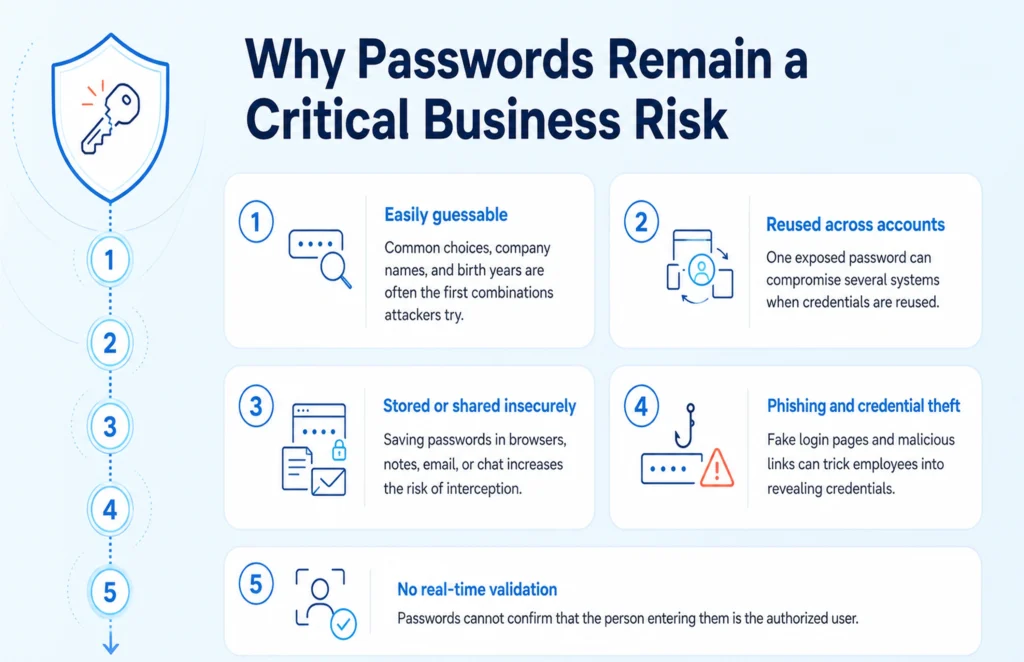
Passwords fail because they rely on a shared secret. Your server knows it. Your user knows it. Anyone who intercepts it in transit, or steals your database, knows it too.
According to the 2025 Verizon Data Breach Investigations Report, more than 80% of web application breaches trace back to stolen or weak credentials. Phishing works because a fake login page can collect a password just as easily as a real one does.
Passkeys solve this differently. Instead of a shared secret, the user’s device holds a private key that never leaves it. The server only ever sees a public key, which is useless to an attacker on its own.
What Passkeys Actually Are
A passkey is not a stronger password. It is a completely different authentication model built on public key cryptography.
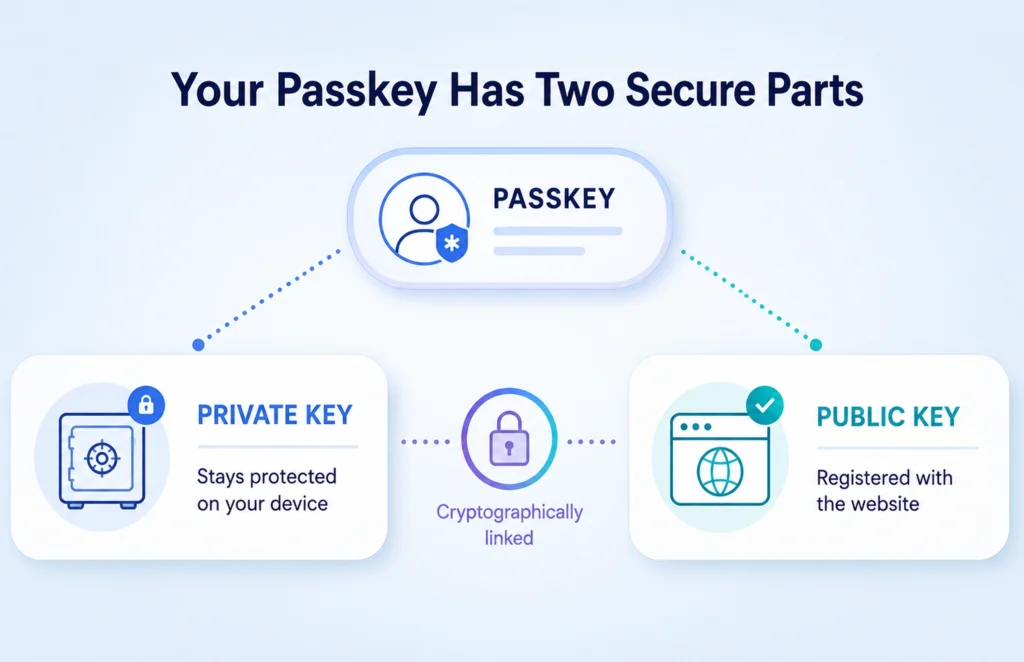
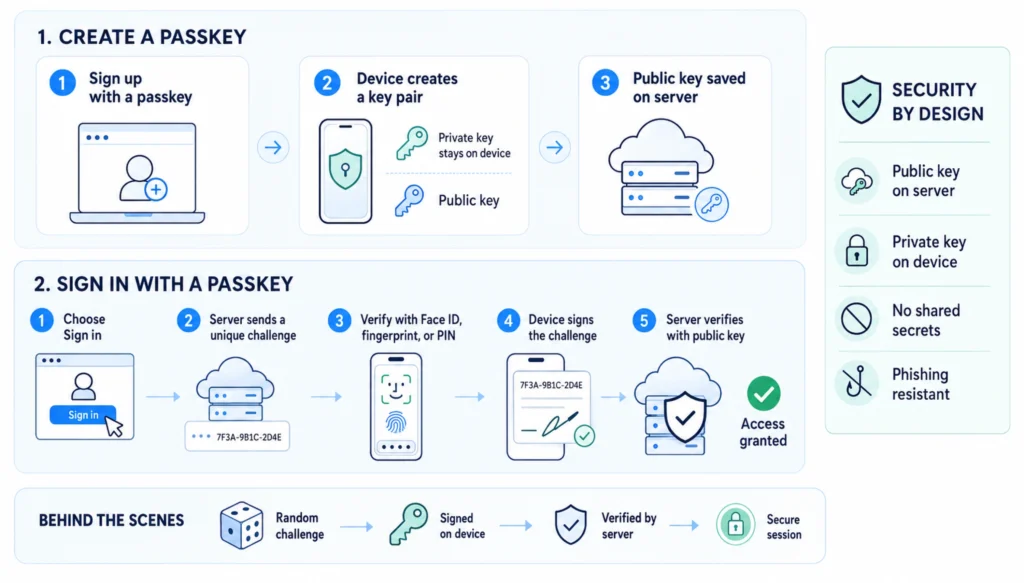
- A private key is generated and stored on the user’s device, usually inside a secure enclave or trusted platform module.
- A public key is sent to your server and linked to the user’s account.
- During login, your server sends a random challenge. The device signs it with the private key. Your server verifies that signature using the stored public key.
No secret ever crosses the network. This single design choice is what makes passkeys resistant to phishing, credential stuffing, and database breaches all at once.
Fido2 Passkey Architecture, Explained Simply
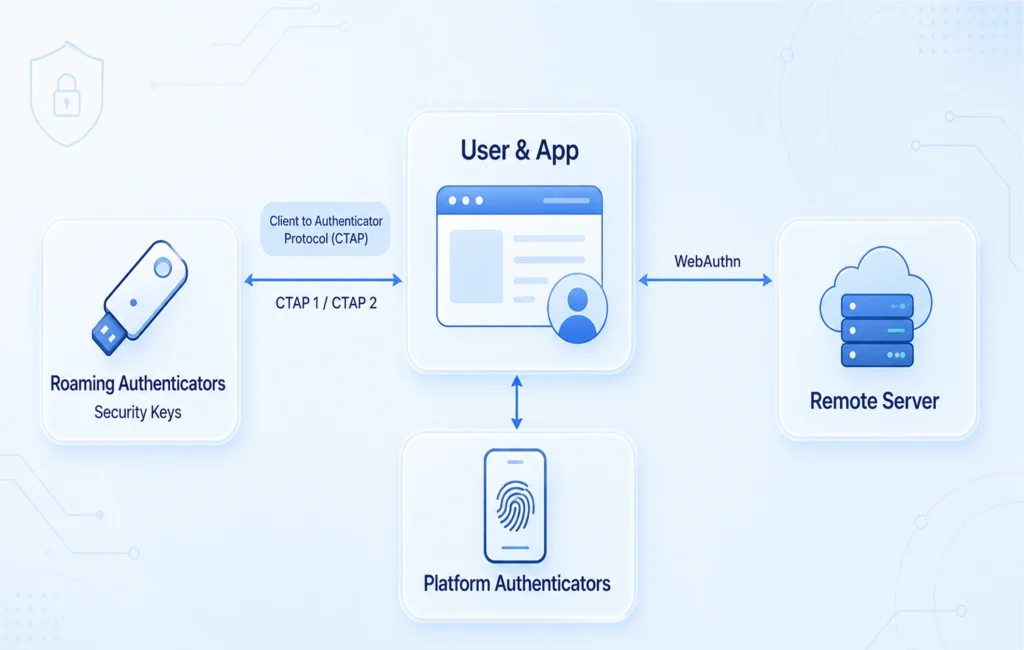
The Fido2 passkey architecture behind every passkey has two moving parts:
|
Component |
What It Does |
| WebAuthn | The browser API your code calls directly (navigator.credentials.create() and .get()) |
| CTAP | Handles communication between the browser and external authenticators, like a hardware security key |
Every passkey is a WebAuthn credential. But not every WebAuthn credential is a passkey. A hardware key like a YubiKey uses WebAuthn too, but it does not sync across devices, so it does not count as a passkey in the strict sense.
Passkeys vs Passwords: A Direct Comparison
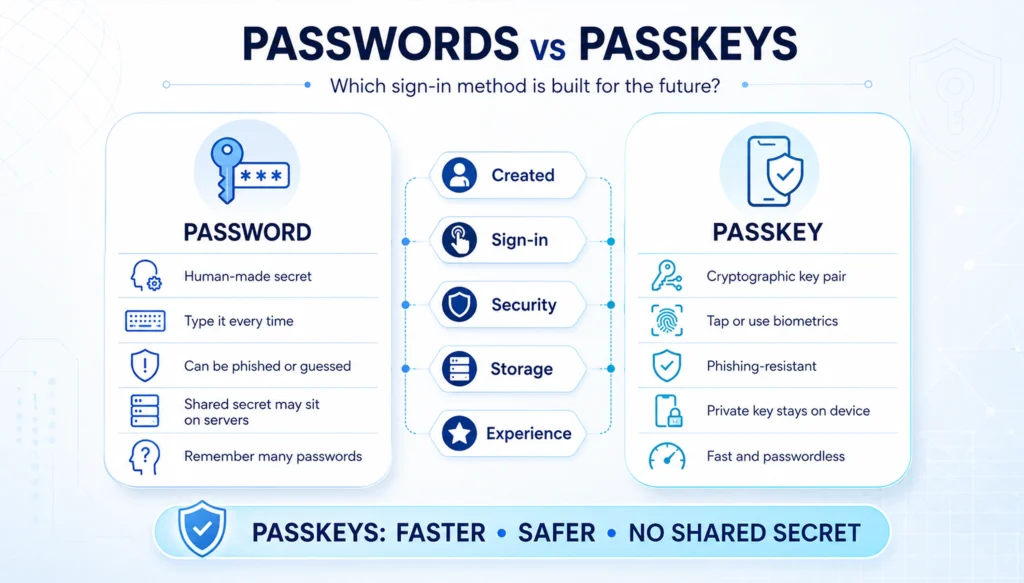
| Feature | Passwords | Passkeys |
| Storage | Hash stored on server, exposed in a breach | Public key only, useless to attackers |
| Phishing resistance | None, credentials can be typed anywhere | Domain-bound, cannot be reused on fake sites |
| User effort | Remember, type, reset | Biometric or device PIN, one tap |
| Server compute | Password hashing is CPU-heavy | Signature verification is fast and cheap |
| Support cost | Forgotten password requests are ~40% of login-related tickets | Near zero after enrollment |
Passkey vs Password Manager: They Are Not Competitors
A common point of confusion is passkey vs password manager. A password manager stores and autofills your existing passwords. A passkey replaces the password entirely with a cryptographic key pair.
In practice, most users will run both for a while. Tools like iCloud Keychain, Google Password Manager, and third-party vaults such as 1Password now store and sync passkeys the same way they store passwords, so the transition does not require abandoning your existing vault.
Understanding WebAuthn Registration and Authentication
WebAuthn registration and authentication work as two separate ceremonies. Registration creates the credential. Authentication uses it.
Registration flow:
- The browser asks your server to begin registration.
- The server returns a random, single-use challenge.
- The browser calls navigator.credentials.create(), which triggers the device’s biometric prompt.
- The device generates a key pair. The private key stays on the device.
- The public key and a credential ID are sent back to your server.
- Your server stores the public key against the user’s account.
Authentication flow:
- The browser asks your server to begin login.
- The server issues a new random challenge.
- The browser calls navigator.credentials.get().
- The device signs the challenge with the private key after a biometric check.
- Your server verifies that signature against the stored public key.
Nothing in this flow ever transmits a secret. Only proof that the user holds the private key.
Step-by-Step: How to Implement Passkeys
Rolling your own cryptographic verification from scratch is risky. Use a maintained library, such as SimpleWebAuthn for Node.js, go-webauthn for Go, or py_webauthn for Python, rather than handling attestation parsing yourself.
Step 1: Design Your Database Schema
Keep passwords and passkeys in separate tables. A user should be able to register more than one passkey for their phone and laptop, as well as a hardware key.
SQL Query:
CREATE TABLE passkey_credentials (
id VARCHAR(512) PRIMARY KEY,
user_id UUID NOT NULL REFERENCES users(id),
public_key BYTEA NOT NULL,
counter BIGINT NOT NULL DEFAULT 0,
device_type VARCHAR(50) NOT NULL,
backed_up BOOLEAN NOT NULL DEFAULT false,
transports TEXT[],
created_at TIMESTAMPTZ DEFAULT NOW()
);
The counter field matters more than it looks. Authenticators increase this number on every use. If a login arrives with a counter lower than what you have stored, treat it as a possible cloned credential and flag it.
Step 2: Build the Registration Endpoint
Your server generates the challenge and registration options, then verifies what the browser sends back.
javascript:
app.post(‘/auth/register/begin’, async (req, res) => {
const options = await generateRegistrationOptions({
rpID: ‘yourdomain.com’,
userName: user.username,
authenticatorSelection: {
residentKey: ‘required’,
userVerification: ‘preferred’,
},
});
await storeChallenge(req.session.id, options.challenge);
res.json(options);
});
residentKey: ‘required’ is the setting that actually turns the credential into a passkey rather than a plain WebAuthn key.
Step 3: Build the Authentication Endpoint
Javascript:
app.post(‘/auth/login/complete’, async (req, res) => {
const verification = await verifyAuthenticationResponse({
response: req.body,
expectedChallenge: storedChallenge,
expectedOrigin: ‘https://yourdomain.com’,
expectedRPID: ‘yourdomain.com’,
credential: storedCredential,
});
if (verification.verified) {
await updateCounter(req.body.id, verification.authenticationInfo.newCounter);
// issue session
}
});
Always validate origin with an exact match against an allowlist, never a substring check. A loose check here quietly defeats the phishing resistance you are implementing passkeys for in the first place.
Step 4: Add Conditional UI
Conditional UI lets passkeys appear directly inside the browser’s autofill dropdown, next to saved passwords, instead of forcing a separate button.
HTML:
<input type=”text” name=”username” autocomplete=”username webauthn” />
The webauthn token must be the last value in autocomplete. Call the autofill script on page load, not on a button click, or you lose the seamless effect.
Step 5: Plan for Recovery
The hardest part of going passwordless is what happens when a user loses every device. Require at least two registered passkeys before letting anyone disable their password, and keep one backup method such as recovery codes or an email magic link.
Passwordless Authentication Best Practices
A checklist worth pinning above your desk while building this:
- Never reuse a challenge. Every registration and login attempt needs a fresh, single-use, time-limited challenge, ideally expiring within five minutes.
- Validate origin strictly. Match against an exact allowlist of domains, not a substring.
- Check the signature counter. A counter that goes backward signals a possible cloned credential.
- Encourage multiple devices. One registered passkey means one lost phone locks the user out.
- Do not force it overnight. Offer passkeys alongside passwords first, make them the default for new users next, then allow password removal only once recovery is solid.
- Test with Chrome’s WebAuthn emulator before shipping, so you are not debugging biometric prompts on a live server.
Where This Fits Into Your Bigger Security Picture
Passkeys handle the login layer, but they are one piece of a much larger security posture. If your team is rebuilding a customer-facing login flow, it usually pairs well with a wider audit of your web application development architecture, since authentication touches sessions, APIs, and data access everywhere.
For companies in regulated industries, like finance or healthcare, passkey rollouts usually get planned alongside a broader look at security and governance practices, not as a standalone feature. And if your existing stack still needs a compliance review before you touch authentication at all, our security and compliance team can map out what needs fixing first.
Teams that are still deciding whether to build this in-house or bring in outside engineering support often start with a short IT consulting conversation to scope the actual effort involved, since a passkey migration touches backend, frontend, and mobile all at once.
Conclusion: Moving to Passkeys
Passkeys replace vulnerable passwords with phishing-resistant, domain-bound cryptography that eliminates shared secrets. Securing your system requires strict origin matching, signature counter tracking, and a phased rollout to prevent user lockouts. Use this guide to deploy WebAuthn correctly and build a safe, seamless authentication experience.