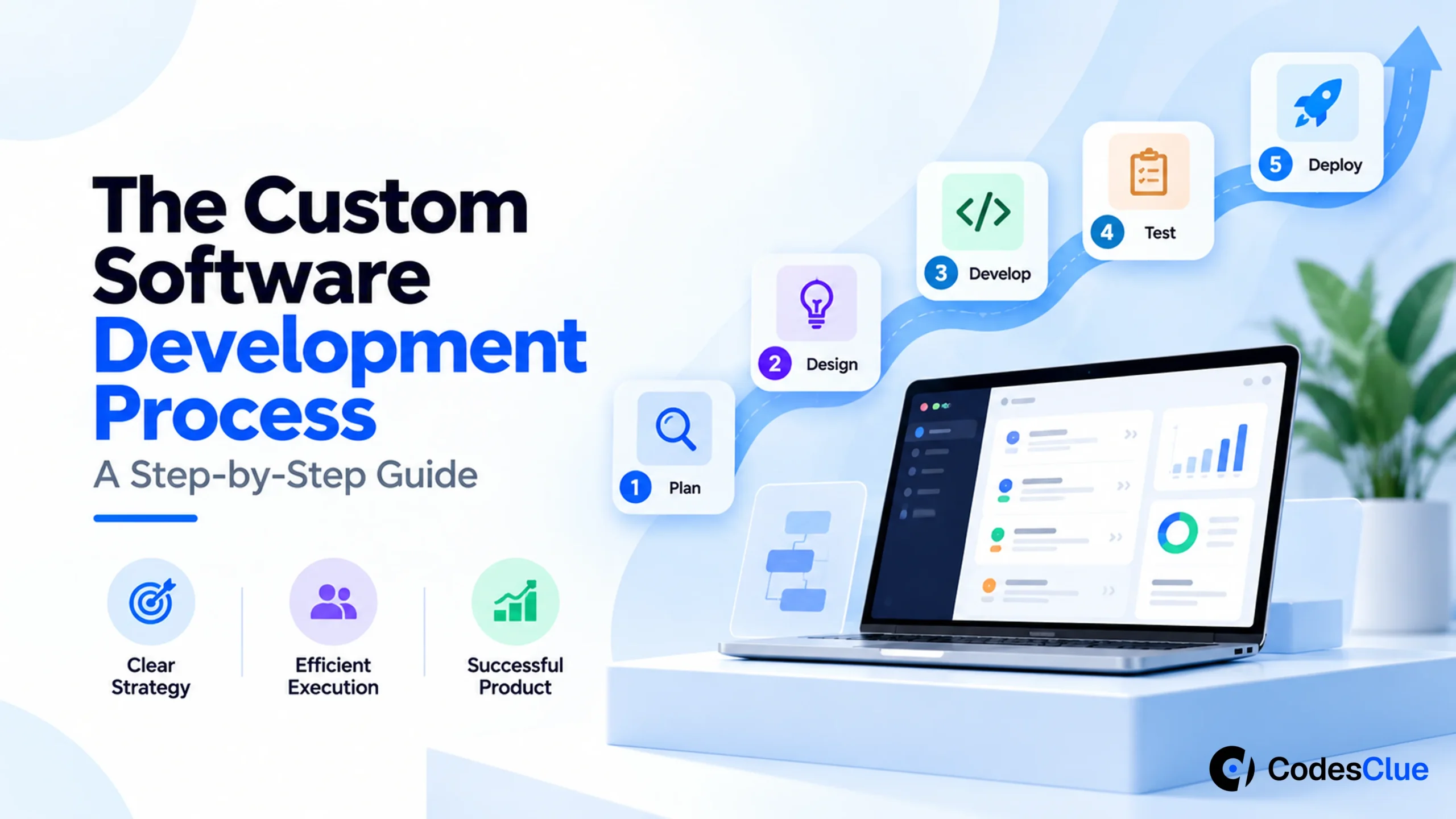
The Custom Software Development Process: A Step-by-Step Guide
Our step-by-step Custom Software Development Process walks you through every stage of the development process, So you can plan smarter, avoid costly mistakes, and ship with confidence.
Why Great Software Doesn’t Happen by Accident?
Every app that we use in our personal and professional routine passes through a well-defined process to reach its final output. Whether it is your favorite banking app or an addictive productivity tool or just a fitness app – it goes through a definite Software Development Life Cycle (SDLC) – also regarded as a blueprint where an idea is transformed into a scalable, high-performing digital product.
Year 2026 has come with more evolved and AI-augmented workflows, agile delivery models, and cloud-native architectures, which made the development timelines accelerate dramatically by 30% to 50% (opens in a new tab). We experience as well as implement this at CodesClue and thus, prepared this guide to make beginners aware about the step-by-step process of developing custom software applications.
Hence, this guide walks you through the custom software development process step-by-step, showing exactly how high-performing teams like us build reliable, scalable, and future-ready solutions.
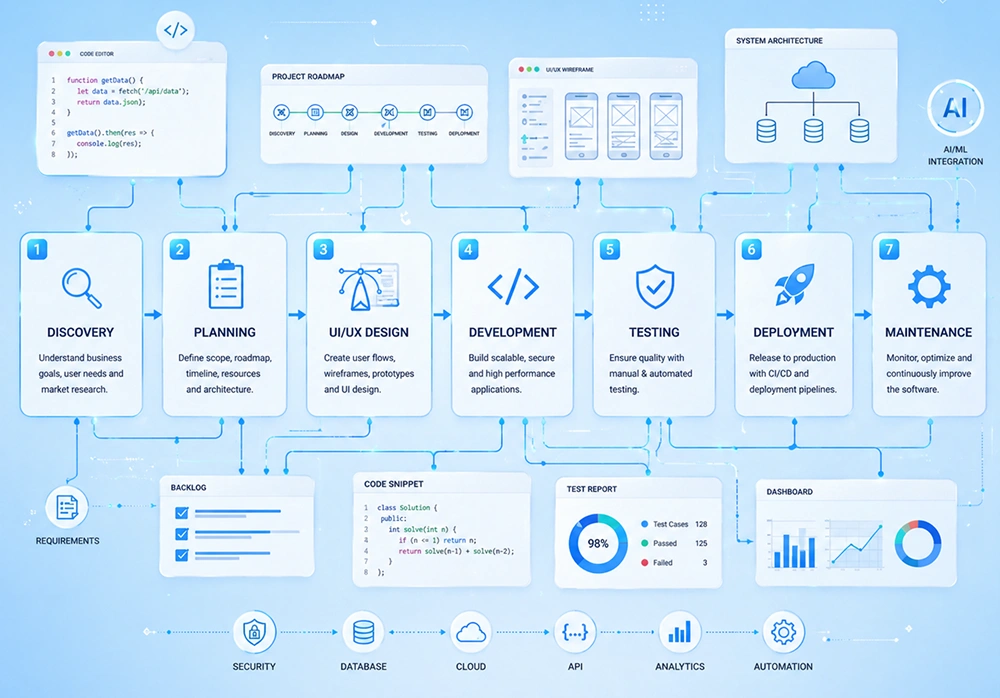
Phase 1: Product Discovery & Requirements Gathering
Phase 1 of the process brings you where idea meets reality. Here we come to discover: “What problem are we actually solving?” Even Data Insight reports that projects with strong discovery phases are 2.5x more likely to succeed.
The Product Discovery Phase is where ideas are challenged, refined, and aligned with real-world business goals. This research phase starts with conducting:
- Stakeholder Interviews to understand business objectives, expectations, and constraints.
- User Persona Development to define your ideal users – their needs, pain points, and behaviors.
- Market & Competitor Research to identify gaps and opportunities.
- Technical Feasibility Analysis to ensure your idea is not just exciting, but also buildable.
Our Key Deliverables include:
- Product Requirement Document (PRD)
- MVP (Minimum Viable Product) roadmap
- Project timeline & cost estimation
Phase 2: System Design & UI/UX Prototyping
Phase 2 is totally dedicated to system design and UI/UX prototyping. Of course, designing comes before development and it is all about visualizing the product before writing a single line of code.
Our Core Design Components include:
- Information Architecture (IA) design for structuring how content and features are organized.
- Wireframing for designing basic layouts showing functionality.
- UI/UX Prototyping to create interactive models using tools like Figma or Adobe XD.
- Visual Identity Design using colors, typography, branding elements.
The best thing about system design and UI/UX prototyping is that it reduces rework by up to 40%, improves usability and engagement early, and aligns stakeholders before development begins. Thus, you get clickable prototypes, user journey maps, and design system guidelines to present to your visitors.
Phase 3: Development (Engineering + AI Integration)
The development phase begins with the magic of code and in 2026, developing is engineering + AI collaboration than just coding. The modern development approach is surrounded by agile sprints covering 2-week cycles, continuous feedback, and iterative improvements, instead of building everything at once. The 2026’s AI-assisted coding benefits businesses with faster code generation, improved accuracy, automated debugging, and reduced human error.
Also, teams using AI-assisted workflows report 20–40% faster development cycles, significant reduction in bugs, and improved developer productivity. The agile methodology wins because of faster time-to-market, flexibility for changes, and continuous client involvement.
Phase 4: Quality Assurance (QA) & Testing
Quality assurance and testing is important because even the best code can fail without proper testing. This phase ensures your software is functional, secure, and scalable.
The Types of Testing We Implement:
- Unit Testing: Testing individual components
- Integration Testing: Ensuring modules work together
- Regression Testing: Verifying updates don’t break existing features
- Automated Testing: Speed + consistency
User Acceptance Testing (UAT) is where real users step in to validate functionality, usability, and business alignment. Modern development also integrates DevSecOps, ensuring vulnerability detection, secure coding practices, and continuous monitoring. All this matters because fixing bugs after release can cost 5x more than fixing them during development.
Phase 5: Deployment & Go-Live Strategy
Deployment and going live is more than just hitting “publish.” It’s a carefully orchestrated process to ensure stability, performance, and zero downtime. It follows production environment setup, cloud deployment (AWS, Azure, GCP), data migration, and final system validation.
Continuous Integration / Continuous Deployment or CI/CD pipelines are the backbone of modern deployment ensuring faster releases, automated workflows, and reduced human error. Some of the key considerations while deploying your software need rollback strategies (in case something breaks), load testing, and monitoring tools.
Phase 6: Post-Launch Support & Evolution
There is no stage when you can say that your software is done. Launching means you are just beginning its entry in the market. Then it goes from upgrades-to-upgrades year-by-year and this continuous improvement becomes the reason behind its real success.
These ongoing or continuous improvement activities include bug fixing, performance optimization, feature enhancement, and security updates. Post launch metrics that matter are user engagement, system performance, crash rates, and conversion metrics. Post-launch maintenance typically costs 15–25% of initial development cost annually.
Conclusion: Process Over Tools – Why the Right Partner Matters?
Everyday new technology evolves and tools are altered in developing different software products. Even the trends come and go, but one thing always remains constant and it is, ‘the structured development process’. It is the foundation of a software’s success and it succeeds only if you have chosen the right partner.
Whether a soul service provider or a custom software development agency, your development part should always possess strategic thinking, transparent workflows, scalable architecture, and long-term support.
Ready to Build Software That Actually Works?
Our team at CodesClue doesn’t just develop software products, we assure providing scalable, future-ready digital ecosystems using AI-powered development workflows, agile methodologies, security-first engineering, transparent, and milestone-driven delivery.
Get a FREE Custom Software Process Audit, Contact Us Today!
FAQs on Software Development Process
How do I know if my business actually needs custom software or just SaaS?
If your workflows are unique, scaling fast, or require deep integrations, SaaS will eventually limit you. Custom software becomes the better choice when you start adapting your business to tools, instead of tools adapting to you.
What should I prepare before starting a custom software project?
You don’t need a full technical plan, but you do need clarity on your business goals, target users, and core problems. A rough idea is enough; a good development partner will refine it during the discovery phase.
How involved do I need to be during the development process?
More than you think, but less than you fear. Expect to join sprint reviews every 1–2 weeks, give feedback, and make decisions. The best projects are collaborative, not “build and disappear.”
How do I avoid delays and budget overruns in custom software projects?
Start with a strong discovery phase, prioritize features using an MVP approach, and stick to Agile iterations. Most delays happen due to unclear requirements and last-minute changes, not technical challenges.
Can I scale or modify the software easily after launch?
Yes, if it’s built right. A scalable architecture (cloud-native + modular design) allows you to add features, handle more users, and evolve without rebuilding everything from scratch.
How is AI actually used in custom software development today?
AI is used for code generation, automated testing, smarter debugging, and even UX optimization. It doesn’t replace developers, it makes them faster, more accurate, and more efficient.