Mobile App Development Process: From Idea to App Store
A complete guide to the mobile app development process: covering ideation, UI/UX design, coding, testing, and App Store publishing.
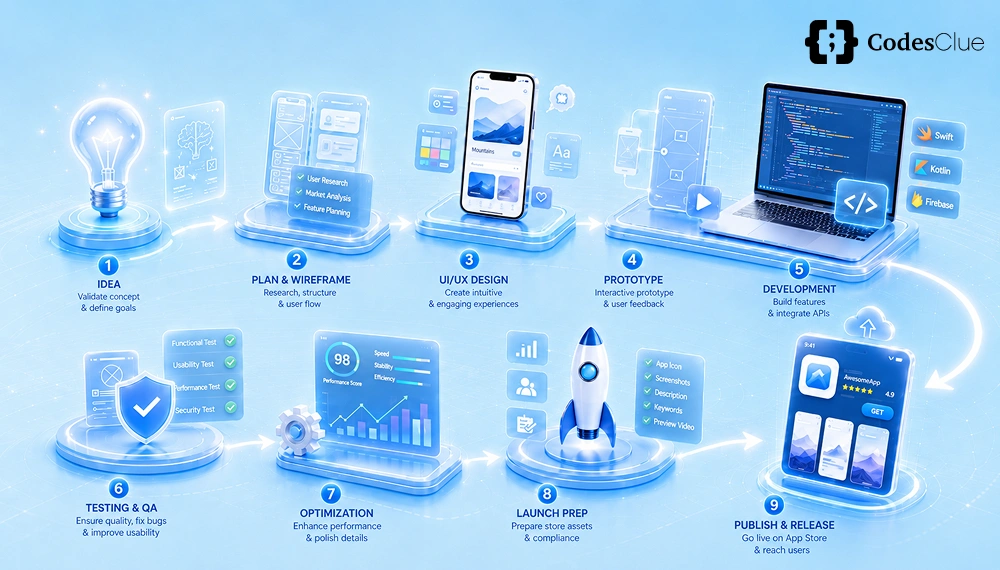
When you turn your raw app development idea into a fully functional app ready for Google Play or the App Store optimization, it comes under the mobile app development process.
As per Statista, with over 5.5 million apps available across all major stores in 2026 and global downloads exceeding 299 billion annually, the journey to developing mobile apps has become more critical than ever. Considering the fact that around 70% of the apps fail within the first year of launch due to poor planning, the importance of involving seven key stages, blending creativity, technical expertise, and data-driven decisions increases to minimize risks during the development stage.
This blog uncovers all the essentials needed to create a significant mobile application that fulfills the purpose. Also, the details about the step-by-step mobile app development process will help users save their time, effort and money from being wasted.
What Is the Mobile App Development Process?
Mobile app development process follows the agile methodology, where iterative improvements are done on the software based on user feedback. Developers use tools like Figma for design, React Native for cross-platform builds, and Firebase for backends.
Success is achieved if the process is aligned with market trends following AI integration and privacy-focused features amid rising regulations like Apple’s ATT framework.
Lets check out the step by step custom mobile app development process, backed by real-world data and best practices.
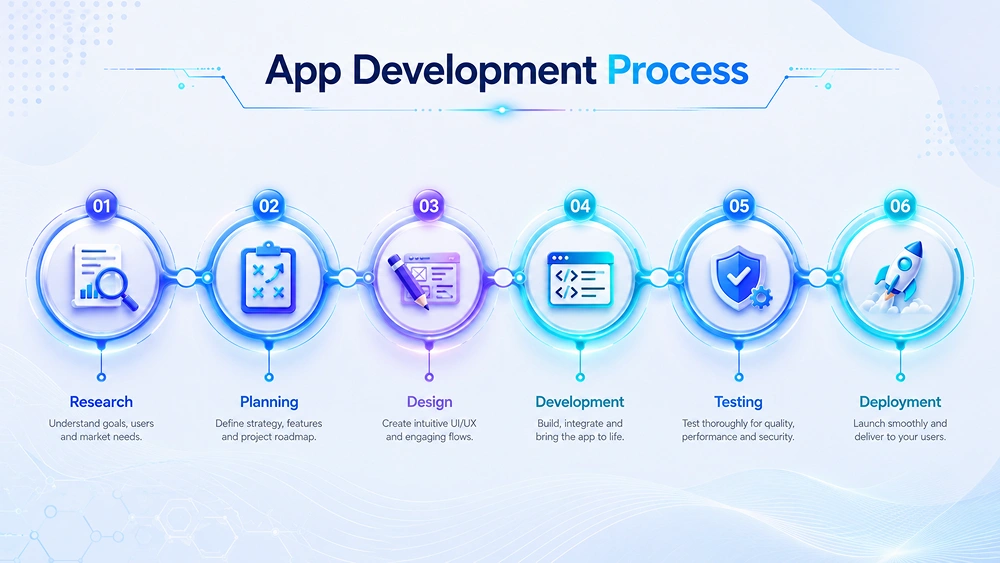
Stage 1: Discovery & Project Planning
The discovery phase establishes the app development foundation, accounting for 10-15% of total project time as per GoodFirms, 2025. Here, the goals, scope, and feasibility is decided by the team prior the development starts
Start with market research using tools like App Annie or Sensor Tower to analyze competitors. The goal should be like over 80% of successful apps solve specific pain points.
Bring forward a cross-functional team of product owners, developers, designers, and marketers. Create a Minimum Viable Product (MVP) roadmap with milestones. Use tools like Jira or Trello track progress. Budget allocation begins here, with 20-30% reserved for planning to avoid costly pivots later.
How to Validate Your App Idea?
Your app idea validation prevents the 42% failure rate from lack of market need. Try conducting surveys via Google Forms or Typeform. Target 500+ potential users and always aim for a 40% interest threshold.
- Competitor Analysis: You can use SimilarWeb to check download rankings and reviews. Example: If building a fitness app, note Peloton’s 4.8-star rating from 1M+ reviews.
- MVP Prototyping: Build a clickable prototype in Adobe XD; test with 50 beta users via UserTesting.com. Iterate if Net Promoter Score (NPS) < 50.
- Data Tools: Google Trends shows rising searches for “AI fitness coach” (up 150% YoY in 2025). Run paid Facebook Ads ($500 budget) for pre-signups that assures 10% conversion signals viability.
- SWOT Analysis: Assess Strengths (unique AI feature), Weaknesses (high dev cost), Opportunities (post-pandemic wellness boom), Threats (saturation).
Success stories like Duolingo validated via A/B tests, achieving 500M downloads. Dedicate 4-6 weeks for app idea validation for a 90% success boost.
Stage 2: UI/UX Design & Wireframing
Experts suggest that UI/UX design influences 90% of user retention. This stage focuses on intuitive interfaces. Start with wireframes in Sketch or Figma, mapping user flows – average apps have 5-10 core screens.
Create user personas and map their journeys to understand real needs. Design high-fidelity mockups with modern trends like dark mode, smooth gestures, and subtle micro-interactions. Ensure accessibility (WCAG 2.2) so everyone can use the app.
Test designs early using tools like Maze or Lookback to catch friction points and iterate 2–3 times. Streamline user flows to reduce drop-offs and improve engagement. Finally, hand off designs via Zeplin for smooth development – expect about 6–10 weeks for polished, user-friendly results.
Stage 3: Native vs Cross-Platform Development Approach
Choosing the right approach impacts speed and cost. Native development (Swift for iOS, Kotlin for Android) offers top performance but doubles effort. It is ideal for 40% of apps needing hardware access like Augmented Reality.
Cross-platform frameworks like Flutter or React Native when built once, can be deployed everywhere, cutting costs by 30-50%. Flutter powers 42% of cross-platform apps, with 2x faster development.
| Approach | Pros | Cons | Best For | Market Share (2025) |
|---|---|---|---|---|
| Native | Optimal speed, native UI | Higher cost/time | Gaming, AR/VR | 35% |
| Cross-Platform (Flutter/React Native) | Cost-effective, single codebase | Slight perf overhead | MVPs, business apps | 65% |
| Progressive Web Apps (PWA) | No store needed, instant updates | Limited device access | E-commerce | 10% |
Data shows cross-platform apps achieve 85% native performance. Select the OS based on audience: 70% Android users favor cross-platform for broader reach. This stage spans 4-8 months.
Stage 4: Backend Development & API Integration
Backend powers 80% of app functionality. Build scalable servers using Node.js, Django, or serverless options like AWS Lambda that reduces costs by 40%.
Key tasks remain: Setting databases (MongoDB for flexibility, PostgreSQL for relations), authentication (OAuth/JWT), and APIs via REST/GraphQL. Integrate third-party services: Stripe for payments (processes $1T+ annually), Firebase for real-time data.
Security is paramount because OWASP reports 94% breaches from APIs. So, implement HTTPS without fail, rate limiting, and GDPR/CCPA compliance. CI/CD pipelines with GitHub Actions automate deployments.
Example: Uber’s microservices handle 15M trips/day. Allocate 20% of the timeline (2-4 months) in backend development and API integration for robust, scalable infrastructure.
Stage 5: App Testing & Quality Assurance (QA)
QA catches 60% of bugs pre-launch, preventing 25% uninstalls from crashes. Employ manual/automated testing: unit (Jest), integration (Postman), and UI (Appium).
Types include:
- Functional: Verify features.
- Performance: Load tests via JMeter (target <2s load time).
- Security: Penetration testing with Burp Suite.
- Beta: 1,000+ users via TestFlight/Di Hidalgo.
Cross-device testing on BrowserStack covers 5,000+ configs. Aim for 95% code coverage. Tools like Crashlytics track issues. This 1-2 month phase boosts App Store ratings by 0.5 stars on average.
Stage 6: App Store Submission & Deployment
Deployment finalizes the launch. Optimize App Store Optimization by using keywords in title/description that drive 70% downloads.
How to Submit to the Apple App Store?
- Enroll in the Apple Developer Program that charges $99/year.
- Prepare for screenshots, 4K video preview, privacy policy.
- Archive in Xcode, upload via App Store Connect.
- Submit the app for review (1-2 days; 50% rejected first time for Guideline 2.1 info).
- Respond to rejections promptly. Approval will be achieved within 24-48 hours.
How to Submit to Google Play Store?
- Sign up to Google Play Console for $25 one-time.
- Upload APK/AAB, store listing with A/B tests.
- Comply with policies like no intrusive ads).
- Review will take 1-7 days. Use internal testing tracks first.
Post-submission, monitor using Analytics. You will see 65% app downloads within Week 1 only.
Stage 7: Post-Launch Support & Optimization
Launch is not the end of the development phase. 75% revenue comes after the post-launch of the app. Monitor KPIs for DAU/MAU that should bring 20% retention till Day 30 along with crash-free sessions (>99%).
Update via agile sprints. Fix bugs, add features based on reviews (respond to 100% reviews within 24 hours. ASO tweaks and paid user associations such as Facebook Ads that yields ROI = 3x average. A/B test via Firebase Remote Config. Scale with cloud bursting. Expect ongoing costs at 15-20% of the development budget.
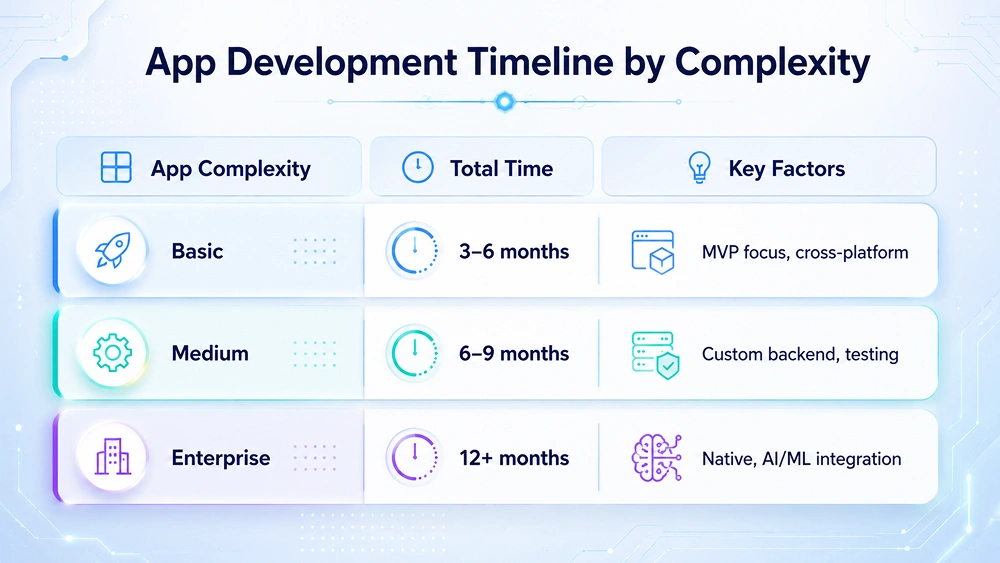
Timelines for custom mobile app development process vary from project to project. Simple apps like calculators can be developed within 3-6 months. Complex apps like any social app takes 9-18 months to build. The breakdown is given below.
| App Complexity | Total Time | Key Factors |
|---|---|---|
| Basic | 3-6 months | MVP focus, cross-platform |
| Medium | 6-9 months | Custom backend, testing |
| Enterprise | 12+ months | Native, AI/ML integration |
Remember, agile development cuts time by 25%.
Mobile App Development Cost by Phase
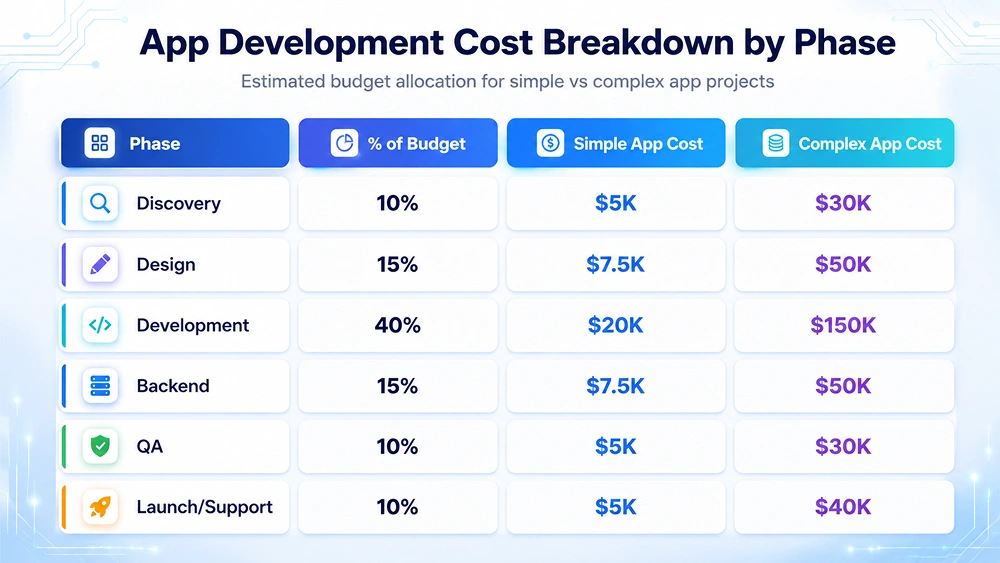
The average cost of mobile app development ranges between $50K-$500K.
US rates: $100-200/hr
India/offshore: $30-60/hr.
| Phase | % of Budget | Simple App Cost | Complex App Cost |
|---|---|---|---|
| Discovery | 10% | $5K | $30K |
| Design | 15% | $7.5K | $50K |
| Development | 40% | $20K | $150K |
| Backend | 15% | $7.5K | $50K |
| QA | 10% | $5K | $30K |
| Launch/Support | 10% | $5K | $40K |
Factors affecting development process: Team location (offshore saves 40%), features (AR adds 20%).
How CodesClue Handles the Mobile App Development Process for its Customers?
CodesClue approaches mobile app development as a strategic partnership rather than just a technical execution. Every solution is crafted with a deep understanding of business objectives, user behavior, and future scalability, ensuring the app delivers real, measurable impact.
By combining intuitive design, robust engineering, and agile adaptability, we consistently deliver applications that are not only high-performing but also engaging and future-ready.
With a strong focus on quality, security, and continuous innovation, our company ensures that every app evolves alongside your business, driving growth, enhancing user experiences, and creating long-term value in an ever-changing digital landscape.
FAQs on Mobile App Development Process
How long does it take to build a mobile app in 2026?
Most simple apps take 3–6 months, while medium apps take 6–9 months and complex apps 9–18 months. Timelines depend on features, team size, and whether you use native or cross‑platform development.
How much does mobile app development cost?
A basic app can cost around $50K, medium apps $100K–$200K, and complex or enterprise apps $250K–$500K+. Cost varies by region, team experience, and features such as AI, payments, or real‑time data.
Should I choose native or cross‑platform development?
Use native (Swift/Kotlin) for maximum performance and hardware access, such as AR or gaming. Use cross‑platform (Flutter/React Native) to save time and budget for business or MVP apps.
What is an MVP in mobile app development?
An MVP is a simple first version with only core features, used to test your idea with real users. It helps you validate demand, collect feedback, and avoid building unused features early.
How do I submit an app to the Apple App Store?
Create an Apple Developer account, prepare screenshots and metadata, archive the app in Xcode, and upload it via App Store Connect for review. Apple usually replies within 1–2 days, and approved apps go live in 24–48 hours.
How do I submit an app to the Google Play Store?
Create a Google Play Console account, upload your APK or AAB, fill in store listing details, and accept the policies. Google’s review takes about 1–7 days, and you can start with a small test release.
Why is testing important before launch?
Testing catches bugs, performance issues, and confusing flows that cause uninstall. Doing QA early and using beta tests can reduce crashes and improve user ratings after launch.