Android App Security Checklist: GDPR and Beyond
Is your Android app audit-ready? Follow this security and GDPR checklist to protect user data and pass compliance reviews with confidence.
Most Android apps don’t get hacked because of exotic zero-days. They get hacked because of basics that got skipped. A hardcoded API key. A content provider left exported. A consent banner that looks compliant but lets analytics SDKs fire before the user taps “Accept.”
If you’re building or scaling an Android app for business, a solid mobile app security checklist isn’t optional anymore. It’s the difference between an app that survives a Play Store review, a GDPR audit, and a penetration test, and one that doesn’t.
This Blog breaks down exactly what to check, why it matters, and how to build it right the first time.
Key Takeaways
- Android app security best practices start with the sandbox model, permission minimization, and encrypted local storage, not just a firewall or an SSL certificate.
- GDPR compliance for mobile apps in 2026 is judged on technical truth. Regulators test whether your SDKs actually respect consent, not whether your banner looks nice.
- A proper secure mobile app development checklist covers authentication, data storage, networking, input validation, and third-party SDK governance as five separate layers.
- Mobile app security testing tools like MobSF, Frida, and Burp Suite should run in your CI/CD pipeline, not just before launch.
- Enterprise mobile app development teams need documented DPIAs, SDK inventories, and consent logs to survive an audit, not just clean code.
Why a Mobile App Security Checklist Actually Matters
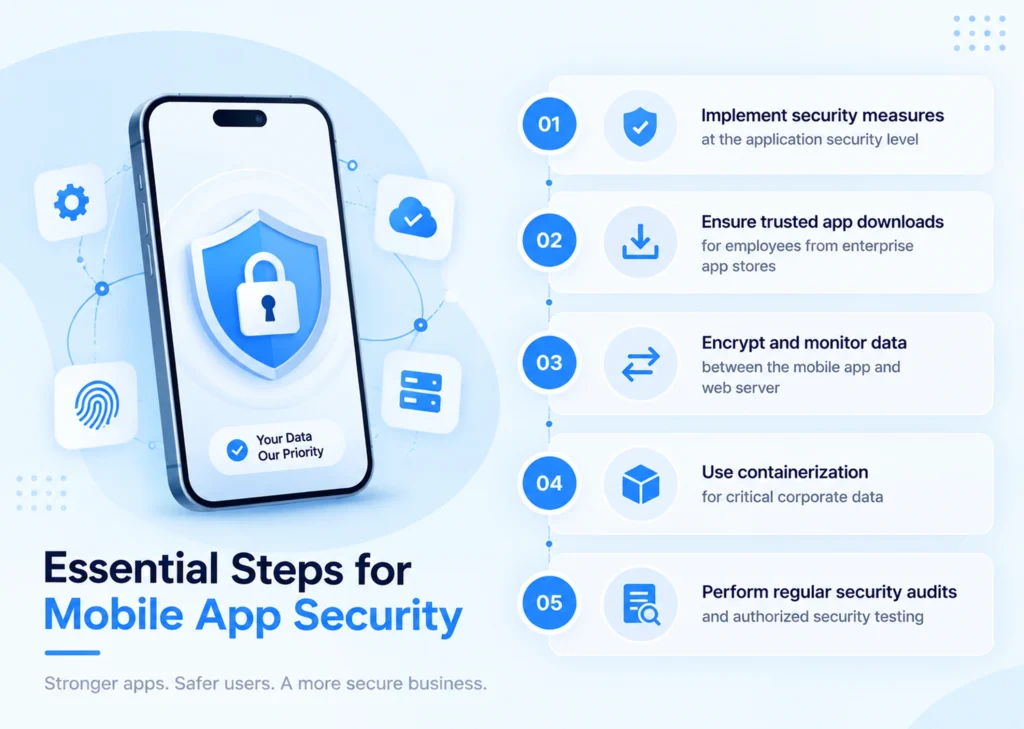
Every Android app runs inside a sandbox that isolates its data and code execution from other apps on the device. This sandbox, combined with a framework that handles cryptography, permissions, and secure interprocess communication, is designed to help you build secure apps without making difficult security decisions from scratch.
But the sandbox only protects what happens inside your app. It does nothing for the decisions your team makes, like which permissions to request, where to store user tokens, or which third-party SDK to trust with personal data. That’s where most breaches, and most mobile app data privacy failures, actually originate.
A structured mobile app security checklist forces your team to make those decisions deliberately, before an attacker or a regulator forces the conversation.
Android App Security Best Practices:
Authentication and Credential Handling
Don’t store usernames and passwords on the device. Instead, authenticate the user once using their username and password, then issue a short-lived, service-specific authorization token for subsequent requests. This single habit closes off a huge chunk of the credential-theft attack surface.
Modern Android development also gives you better tools than passwords. Google’s Credential Manager library unifies support for passkeys, passwords, and federated sign-in options like Sign-in with Google, and biometric authentication such as fingerprint or facial recognition adds another strong layer for finance, healthcare, or identity apps.
Quick authentication checklist:
- Use Credential Manager instead of building custom login flows from scratch
- Rotate access tokens frequently and keep their lifespan short
- Rate-limit login attempts to block brute-force attacks
- Add biometric authentication for sensitive transactions
How to Secure Android App Data?
How to secure Android app data really comes down to knowing where you’re storing it and who can read it from there.
| Storage Type | Default Access | Recommended Use |
|---|---|---|
| Internal Storage | Private to your app only | Tokens, session data, cached PII |
| External Storage | Globally readable and writable | Non-sensitive files only, never credentials |
| Content Providers | Configurable per app | Structured sharing, use signature protection when sharing only with your own apps |
Files created on external storage, like SD cards, are globally readable and writable, so only non-sensitive information should ever be stored there, and any data pulled from external storage should be treated as untrusted input and validated before use.
For anything genuinely sensitive, use the Android Keystore system rather than rolling your own encryption. Use existing, proven cryptographic implementations like AES and RSA instead of writing your own protocol, and rely on 256-bit AES for commercial use whenever possible.
Networking and API Security
Every network call your app makes is a potential leak point. Use HTTPS over HTTP wherever the server supports it, since mobile devices frequently connect through unsecured networks like public Wi-Fi hotspots.
Networking non-negotiables:
- Enforce HTTPS across every API call, no exceptions
- Implement certificate pinning for an added layer against man-in-the-middle attacks
- Never route sensitive IPC through localhost ports; other apps on the device can access them
- Validate every response before trusting it, especially from WebView
API Key Management
API keys get leaked more often through carelessness than through hacking. If your app’s source code includes API keys when compiled, an attacker can decompile the app and extract them, so keys should never be committed to source control and should instead use tools like the secrets-gradle-plugin.
Also generate unique keys per app, restrict them by IP or package name where possible, and rotate them on a fixed schedule. A rotation window of 90 days to 6 months, aligned with ISO 27001 guidance, is generally adequate for most apps.
GDPR Compliance for Mobile Apps: What 2026 Actually Requires
This is where most Android teams get comfortable too early. A consent popup is not the same thing as GDPR compliance, and mobile app data privacy deserves far more attention than a single settings screen.
The “Technical Truth” Problem
Regulators are increasingly testing what actually happens on the network, not just what the consent banner says, and it’s common to find that analytics SDKs fire before users interact with the consent screen, or that trackers stay active even after a user declines. If your SDK fires before consent is captured, your app is non-compliant, no matter how polished the banner looks.
Why Mobile Apps Face Extra Risk
A typical app integrates 10 to 30 third-party SDKs for analytics, advertising, and crash reporting, and the app publisher stays legally responsible as the data controller for everything those SDKs do, even when the data leaves for servers the publisher doesn’t control.
Device identifiers like IDFA on iOS and AAID on Android are persistent across sessions, unlike browser cookies users can simply delete, which makes them a much more invasive tracking mechanism when combined with location or behavioral data.
GDPR Mobile App Development Guidelines That Actually Hold Up
Following the right GDPR mobile app development guidelines from day one saves you a painful retrofit later. Valid consent has to be freely given, specific to each purpose, clearly informed, and captured through an active opt-in, meaning no pre-checked boxes and no consent implied by silence. Bundling all tracking into a single “Accept All” with no real “Reject All” option is one of the fastest ways to draw regulatory attention.
GDPR mobile development guidelines, condensed:
- Gate every third-party SDK so it can’t initialize before consent is logged
- Give users equal-weight “Accept All” and “Reject All” buttons
- Log every consent decision with a timestamp and policy version
- Keep a live inventory of every SDK and what data it touches
- Sanitize crash logs before they leave the device; stack traces often leak PII by accident
Apple’s App Tracking Transparency prompt is often mistaken for GDPR compliance, but it’s a binary platform permission, not GDPR-level granular consent, so the safer workflow is to show the GDPR consent screen first and only trigger the ATT prompt afterward if the user opts into advertising.
You can review the full GDPR framework directly on the European Commission’s GDPR portal (opens in a new tab) for the legal text behind these requirements.
Android App Penetration Testing and Security Testing Tools
A checklist only works if you test against it. Android app penetration testing should be a recurring line item on your release calendar, not a one-time pre-launch task.
| Tool | Purpose | When to Use |
|---|---|---|
| MobSF | Static and dynamic analysis, SDK inventory | Every build, via CI/CD |
| Burp Suite / OWASP ZAP | API and network traffic interception | Before release, during pen tests |
| Frida | Runtime manipulation and instrumentation | Deep security audits |
| Drozer | Android IPC and attack surface discovery | Component-level review |
| JADX | Decompiling APKs to check for hardcoded secrets | Pre-launch code review |
The industry baseline worth knowing is OWASP’s verification standard. MASVS defines two verification levels: L1 covers basic security hygiene relevant to every app, while L2 adds defense-in-depth requirements like root detection and anti-tampering, which matter most for high-value apps like banking or healthcare.
Automated scanning won’t catch everything, though. Industry estimates suggest automated tools cover roughly 60 to 70 percent of MASVS requirements, mostly around static analysis and configuration checks, while business logic flaws and authentication correctness still need manual Android app penetration testing.
Penetration testing checklist:
- Run MobSF on every build inside your CI/CD pipeline
- Schedule a full manual penetration test at least quarterly
- Re-test whenever you add a new SDK or change authentication flow
- Check AndroidManifest.xml for exported components and debug flags before every release
Enterprise Mobile App Development: Raising the Bar Further
If you’re building for enterprise clients, “secure enough for a consumer app” won’t cut it. Enterprise buyers expect documentation that proves you meet real app security compliance requirements, not just good code.
That means:
- A maintained Software Bill of Materials listing every SDK and its data behavior
- Data Processing Agreements signed with every third-party vendor
- DPIAs completed for any app doing location tracking, profiling, or biometric authentication
- A DSAR (Data Subject Access Request) workflow that can fulfil requests within 30 days
- Consent architecture that syncs across devices for the same logged-in user
Enterprise procurement teams will ask for this paperwork before they sign off, regardless of how good your code is. Build the documentation alongside the app, not after a client asks for it.
Secure Mobile App Development Checklist: The Full Summary
-
- HTTPS enforced on every network call, certificate pinning in place
- Credential Manager or passkeys used instead of stored passwords
- Sensitive data encrypted using Android Keystore, never plaintext
- API keys kept out of source control, rotated every 90 to 180 days
- Content providers set to android:exported=false unless explicitly needed
- Consent captured before any tracking SDK initializes
- SDK inventory documented and reviewed with every app update
- DPIA completed for any high-risk processing activity
- Crash logs and diagnostic data scrubbed of PII before transmission
Conclusion
Mobile app data privacy isn’t a checkbox you tick once before launch. It’s a discipline you build into every sprint, every SDK integration, and every release. The apps that hold up under a real audit are the ones where app security compliance requirements were designed in from day one, not patched on afterward.
If you’re serious about scaling into enterprise or EU markets, treat how to secure Android app data as an engineering priority, follow the right GDPR mobile app development guidelines from the first commit, and make Android app penetration testing a recurring part of your release cycle, not a one-time formality. Teams that do this consistently don’t just pass compliance reviews. They build the kind of trust that turns into long-term enterprise contracts.
FAQs
How often should we run mobile app security testing?
Run automated scans like MobSF on every build. Run a full manual penetration test quarterly, or with every release if you’re in fintech or healthcare.
Does GDPR apply if our app isn't based in the EU?
Yes, if you have EU users and your app processes their data through analytics, location, or profiling, GDPR applies regardless of where your company is headquartered.
What's the single biggest Android security mistake teams make?
Trusting third-party SDKs without auditing what data they collect. Most breaches trace back to an SDK the team never fully vetted.