API Integration for Mobile Apps: How Cloud Architecture Improves UX and ROI
Discover how cloud-based API integration helps mobile apps load faster, scale easily, and boost UX while cutting costs and improving ROI.

Mobile users leave in seconds if your app takes too long to load. Google has reported that improving mobile page speed by just 0.1 seconds can increase conversion rates by up to 8.4% for retail sites and 10.1% for travel sites. This shows how even small performance improvements can directly impact revenue.
API integration for mobile apps plays a significant role here.
API architecture and cloud architecture for mobile apps can improve performance, reliability, and measurable mobile app ROI.
Key Takeaways
- API integration directly affects mobile UX, conversion, and retention.
- Cloud architecture helps mobile apps handle traffic, geography, and failures.
- Scalable API architecture prevents performance bottlenecks as usage grows.
- Latency improves through several coordinated optimizations, not one fix.
- Connecting technical metrics with business metrics makes mobile app ROI measurable.
What Is API Integration for Mobile Apps?
Mobile API integration connects an iOS or Android application with backend systems, databases, third-party services, payment platforms, authentication providers, analytics tools, and other services through APIs.
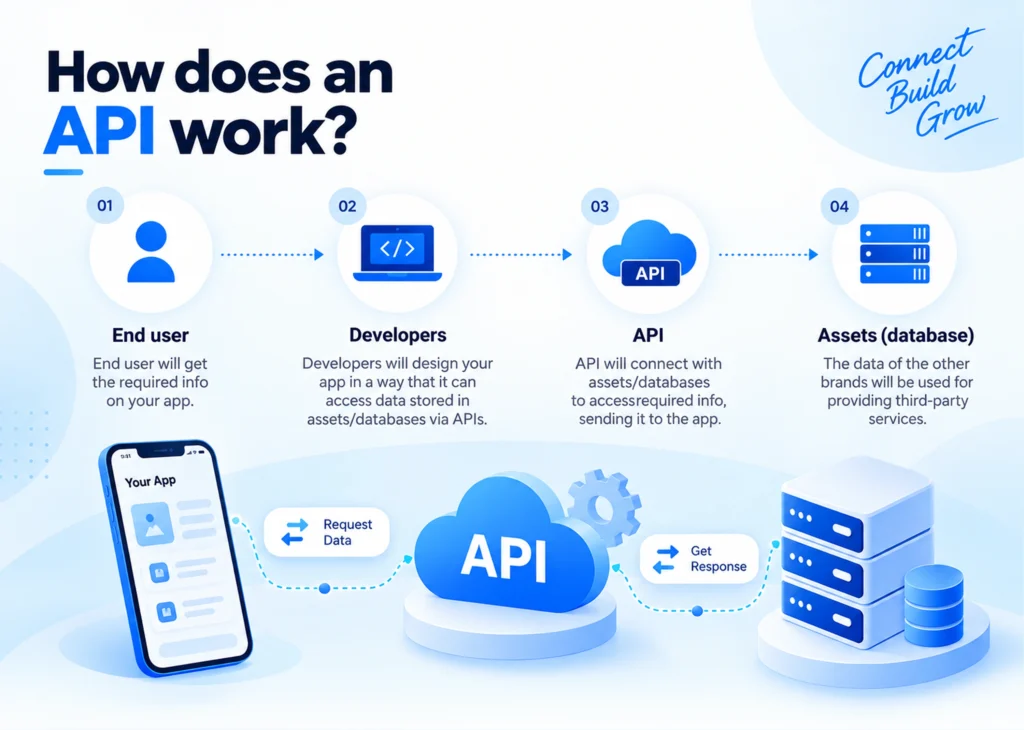
The process typically starts when the mobile app sends an API request, which passes through authentication and, where applicable, an API gateway. The request then reaches the relevant backend service, database, or third-party platform. The service processes it and sends an API response back to the app, which uses the returned data to update the mobile UI.
This flow powers features such as login, search, payments, profiles, and real-time data.
Why API Integration for Mobile Apps Is a Business Decision
Every screen in a mobile app communicates with a backend. A product page calls an inventory API. A checkout flow calls a payment gateway. A dashboard pulls data from three or four services and stitches the results together for the user. The quality of that conversation determines your app’s real speed, not the user’s phone.
Weak API integration for mobile apps creates a specific, avoidable pattern. A screen fires six sequential calls when two well-designed calls would work. The backend sends bloated data the interface never displays. A failed call retries with no backoff strategy, and the whole session stalls. None of this shows up in a design mockup. Users feel every bit of it while they stare at a spinner.
Decision-makers who treat API design as a pure engineering detail miss the point entirely. Every architecture choice here shapes revenue, retention, and how much users trust your product.
Cloud Architecture for Mobile Apps: The Foundation Behind Fast, Reliable UX
Cloud architecture for mobile apps determines how your backend behaves under real conditions like sudden traffic spikes, users spreading across continents, and the constant risk of one overloaded server taking your entire app offline.
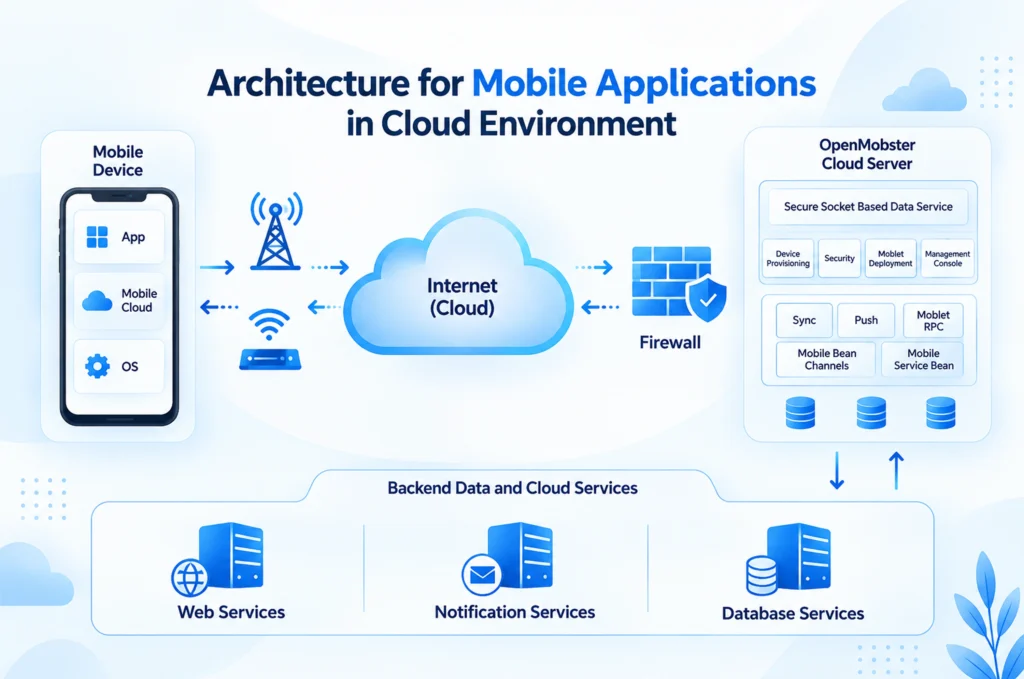
A well-designed cloud backend does three things well.
- It scales automatically during demand spikes instead of buckling under them.
- It distributes traffic geographically, so a user in Singapore doesn’t wait on a server sitting in Virginia.
- It isolates failures, so one broken service never drags the whole app down with it.
These capabilities become increasingly important as an app grows in traffic, geographic reach, and business criticality. Solid cloud architecture for mobile apps separates a product that degrades gracefully under pressure from one that crashes completely during its busiest hour, the exact moment you can least afford it.
Scalable API Architecture: Designing for Growth Without Rebuilding
Most teams delay decisions about scalable API architecture until growth forces their hand. By then, fixing the structure means touching every client app that depends on it. Planning for scale early costs less than retrofitting it under pressure later.
A few patterns consistently pay off:
- Backend-for-Frontend (BFF) Layer: Shapes API responses specifically for mobile clients instead of forcing mobile to parse the same bloated payload a web dashboard uses.
- Versioned APIs: Let you evolve your backend without breaking older app versions still sitting on users’ phones.
- Microservices Structure: Lets independent components scale and fail on their own, instead of one monolithic backend that rises and falls as a single unit.
How to Choose the Right Mobile API Architecture
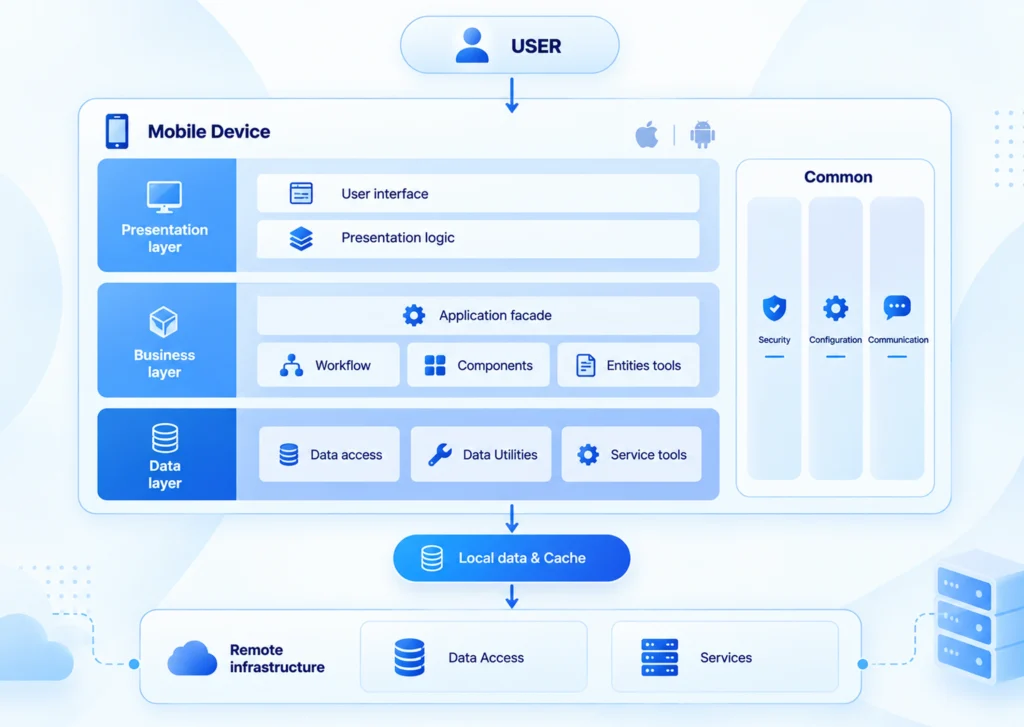
Choose the API architecture based on application complexity, traffic patterns, data requirements, and geographic reach. A simple application may not need microservices, while complex mobile experiences can benefit from a BFF layer or flexible API strategy.
A scalable architecture should allow backend capacity and services to grow without requiring major changes to existing mobile clients.
Check this small architecture decision table, for example.
| Scenario | Suitable approach |
|---|---|
| Simple application | Modular monolith + REST |
| Complex mobile data | BFF + REST/GraphQL |
| Variable traffic | Autoscaling/serverless |
| Independent business domains | Microservices |
| Global users | Regional deployment + CDN |
REST vs. GraphQL for Mobile Apps: Which Should You Choose?
REST fits predictable, resource-based mobile experiences, while GraphQL is useful when screens need precise data from multiple sources. Choose based on your API complexity, data-fetching patterns, performance requirements, and long-term maintenance needs.
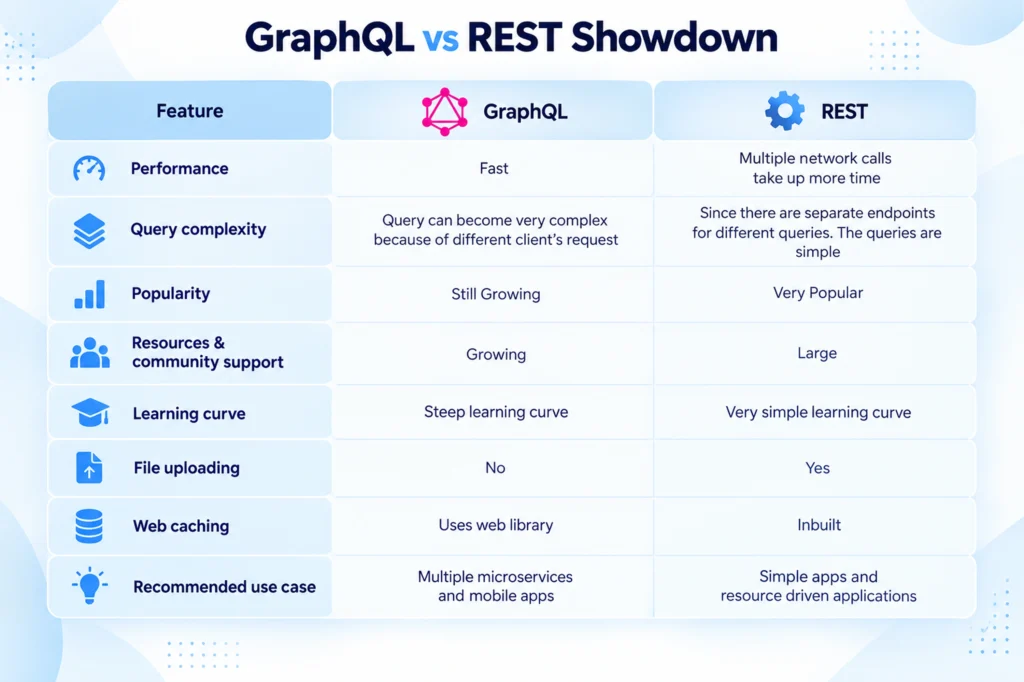
| Factor | REST | GraphQL |
|---|---|---|
| Simplicity | High | Moderate |
| Data fetching | Fixed endpoints | Client-defined |
| Over-fetching | More likely | Lower |
| Caching | Straightforward | More complex |
| Best fit | Standard CRUD | Complex/mobile-specific data |
REST remains a strong choice for straightforward, cacheable resources. GraphQL can make sense when mobile clients need flexible data aggregation or want to reduce multiple network requests. The right choice depends on data requirements, caching needs, team expertise, and backend complexity, not popularity.
How to Reduce Mobile App Latency: Tactics That Actually Work
You cannot fix mobile app latency with one change, but by stacking several smaller decisions that compound over time.
| Tactic | What It Solves | Typical Impact |
|---|---|---|
| Aggressive, correct caching | Repeated network calls for slow-changing data | Fewer redundant requests per session |
| CDN for static assets | Slow image and video delivery from origin servers | Faster load on media-heavy screens |
| Regional backend deployment | Long physical distance between user and server | Lower latency for global user bases |
| Batched, parallel API calls | Sequential requests that stack delay on delay | Faster screen load for multi-source data |
| Real timeouts with fallback states | Screens that hang indefinitely on failure | Better perceived reliability |
Latency becomes particularly important in high-intent flows such as search, checkout, payment confirmation, and authentication, where delays can interrupt the user’s task.
API Security Best Practices for Mobile Apps
Security needs to be built into the API layer because mobile applications expose APIs to untrusted networks and client environments.
- OAuth 2.0 / secure token-based authentication
- HTTPS/TLS for data in transit
- Secure token storage using Keychain/Keystore
- Rate limiting and abuse protection
- Input validation and authorization
Cloud-Native Mobile App Development: What It Actually Changes
Cloud-native mobile app development uses cloud services, automated deployment, elastic scaling, observability, and loosely coupled components to create backends that can adapt to changing demand.
The payoff shows up in three clear places:
- Auto-scaling absorbs traffic spikes, like a product launch or a holiday sale, without a manual scramble to provision new servers.
- Managed backend services for authentication, push notifications, and storage remove work that once required custom backend development from scratch.
- Pay-as-you-go pricing stops you from paying for idle server capacity most of the year just to cover a traffic peak that happens twice.
Adopting cloud-native practices early can reduce the disruption of later infrastructure modernization.
Mobile UX Optimization: Where Architecture Meets the User
Mobile UX optimization usually gets framed as a design discipline, including layout, color, hierarchy, and onboarding flow. All of that genuinely matters, but none of it survives a slow, unreliable backend. A beautifully designed checkout screen still fails its one job the moment a payment API times out under load.
Every architecture decision covered above is also a UX decision. Fast, predictable API responses let a well-designed interface finally feel as good as it looks. Users rarely separate “bad design” from “slow backend” when they abandon a session. They simply leave, and your funnel data blames the last screen they saw, not the API call that actually slowed them down.
So, the real mobile UX optimization starts with the backend, not the color palette.
Measuring Mobile App ROI: Connecting Technical Decisions to Revenue
Mobile app ROI conversations often stop at feature count and launch date. They overlook the architectural decisions that determine whether those features convert. Faster load times, reliable API responses, and fewer service disruptions can influence conversion, abandonment, retention, and transaction completion.
Treat architecture as an investment rather than a technical cost. Measure whether improvements in API performance and cloud reliability produce measurable business outcomes, and estimate the revenue and customer impact of outages during peak traffic.
A simple way to quantify the return is:
Mobile App ROI = (Incremental Revenue − App Investment) ÷ App Investment × 100
The goal is to connect technical improvements with business results. When better API performance increases completed transactions, stronger reliability reduces abandonment, or optimized infrastructure lowers operating costs, mobile app ROI becomes a measurable business outcome rather than a backend expense.
Monitor the API Metrics That Actually Affect UX
| Metric | Why it matters |
|---|---|
| p50 latency | Typical user experience |
| p95/p99 latency | Slow user experience |
| Error rate | Reliability |
| API throughput | Capacity |
| Cache hit rate | Backend efficiency |
| Crash rate | Client reliability |
| Conversion rate | Business impact |
Conclusion
The fastest way to improve mobile UX rarely starts with a design change. It starts with fixing the API integration for mobile apps and the cloud architecture sitting underneath the screen your user actually sees. Get those right, and your interface finally gets the chance to perform as well as it looks.
At CodesClue, we design scalable API architecture and cloud-native backends built to support fast, reliable mobile UX from day one. If backend performance is affecting your app’s conversion funnel, CodesClue can help identify the architectural bottlenecks and build a more scalable API and cloud foundation.
FAQs
How do APIs influence mobile app conversion rates?
Slow or unreliable API responses can interrupt high-intent actions such as login, search, checkout, and payments. Optimized APIs reduce delays and failures, helping users complete actions and improving conversion opportunities.
What API metrics should businesses monitor for better mobile UX?
Businesses should track p50, p95, and p99 latency, API error rates, throughput, cache hit rates, and crash rates. Connecting these technical metrics with conversion and transaction data helps identify performance issues that affect revenue.
Can cloud architecture reduce mobile app operating costs?
Yes. Autoscaling and managed cloud services can reduce the need for permanently provisioned infrastructure. Pay-as-you-go models can also help align infrastructure spending with actual demand.
When should a mobile app use a Backend-for-Frontend (BFF)?
A BFF can be useful when mobile clients need responses tailored to their specific data and performance requirements. It can reduce payload sizes and prevent mobile apps from processing unnecessary information.
How does API batching improve mobile app UX?
API batching combines multiple requests where appropriate, reducing the number of network round trips. This can shorten screen-load times, particularly when a mobile screen depends on data from several backend services.
What role does geographic cloud deployment play in mobile app performance?
Deploying backend services closer to users can reduce the physical distance data travels. Regional deployment, combined with CDN and edge delivery, can therefore help lower latency for applications serving geographically distributed audiences.
Can mobile app performance improvements be measured as business ROI?
Yes. Performance improvements can be evaluated by measuring their effect on conversion, transaction completion, abandonment, retention, revenue, and infrastructure costs. This connects technical investments with measurable business outcomes.