How to Reduce Your AWS Bill by 40%: Practical DevOps Strategies
Learn actionable DevOps strategies to cut AWS costs by 40% right-sizing, auto-scaling, spot instances, and reserved capacity.
“Nothing changed, but our AWS bill jumped 60% this month.” If you’re a founder, CTO, or IT decision-maker, you’ve probably heard this line, or said it yourself. The truth is, something did change. It’s just invisible: idle EC2 instances, forgotten EBS snapshots, oversized RDS clusters, and On-Demand pricing running 24/7 when it didn’t need to.
Here’s the good news. AWS cost optimization best practices aren’t theoretical. They’re specific, repeatable DevOps moves that most engineering teams can execute in a single sprint. Companies routinely recover 35-40% of wasted cloud spend within 90 days, without touching performance or uptime. In fact, industry data shows the average company wastes roughly a third of its cloud budget on oversized instances and forgotten resources, according to Flexera’s State of the Cloud report, a finding detailed in this cloud cost optimization breakdown.
This guide walks through how to reduce AWS bill costs using DevOps cloud cost optimization techniques, from right-sizing to Graviton migration, with real numbers, Terraform snippets, and a step-by-step checklist you can run this week.
Key Takeaways
- Right-sizing and commitment discounts deliver 70% of your total savings, so start there before anything else
- AWS Compute Optimizer right-sizing gives free, AWS-native recommendations within 24 hours of opting in
- AWS Graviton price performance savings offer a near drop-in 20% cost cut for compatible workloads
- EBS gp2 to gp3 migration savings take minutes per volume and require zero downtime
- Automating off-hours shutdown with AWS Instance Scheduler Terraform configs can cut non-prod costs by 60%
- Real teams have taken a $50K/month AWS bill down to $30K, a genuine 40% reduction, inside 90 days
- Cost optimization isn’t a one-time cleanup. It’s a DevOps cloud cost optimization discipline: audit, optimize, commit, monitor, repeat quarterly
Why Your AWS Bill Keeps Climbing?
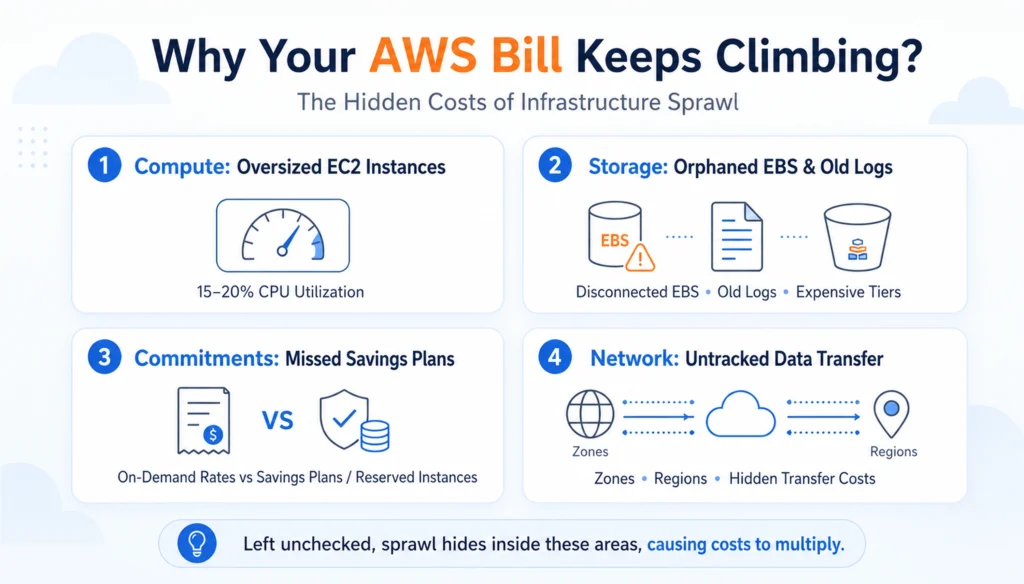
Fast-moving engineering teams spin up infrastructure quickly and rarely spin it down. Left unchecked, this sprawl hides inside four places:
- Compute: Oversized EC2 instances running at 15-20% CPU utilization
- Storage: Orphaned EBS volumes, old snapshots, and logs stuck in expensive S3 tiers
- Commitments: Workloads billed at full On-Demand rates instead of discounted Savings Plans
- Network: Cross-AZ and cross-region data transfer nobody is tracking
One real-world B2B SaaS FinOps playbook on a $50K/month AWS bill found that rightsizing, commitment plans, and storage lifecycle rules alone cut the bill to $30K a month, a $240,000 annual saving achieved through rightsizing and Spot usage, Savings Plans and Reserved Instances, S3 lifecycle rules, and CDN tuning.
| Category | Before Optimization | After Optimization | Monthly Savings |
|---|---|---|---|
| EC2 / Auto Scaling | $25,000 | $15,000 | $10,000 |
| RDS Databases | $7,000 | $5,000 | $2,000 |
| S3 Storage | $5,000 | $3,000 | $2,000 |
| CloudFront + Transfer | $4,000 | $3,000 | $1,000 |
| Misc (Snapshots, Marketplace) | $5,000 | $3,000 | $2,000 |
| Total | $50,000 | $30,000 | $20,000/mo |
That’s the 40% benchmark this blog title promises, and it’s achievable with a structured plan, not guesswork.
How to Reduce Your AWS Bill by 40%?
Step 1: Right-Size With AWS Compute Optimizer
Over-provisioning is the single biggest source of AWS waste. Teams pick a “safe” instance size at launch and never revisit it.
AWS Compute Optimizer right-sizing solves this automatically. Opt in through the AWS Compute Optimizer console (opens in a new tab), and within 24 hours it scans your EC2 instances, Auto Scaling groups, EBS volumes, Lambda functions, and RDS databases to flag idle or oversized resources by generating recommendations after you opt in and enable the service.
Quick decision matrix:
| Avg CPU | Max CPU | Recommendation |
|---|---|---|
| Under 10% | Under 30% | Downsize by 2 sizes, or go serverless |
| 10-30% | Under 50% | Downsize by 1 size |
| 30-60% | Under 80% | Current size is fine |
| Over 60% | Over 80% | Consider upsizing |
Don’t stop at resizing, pick the right family. A CPU-bound workload on m5.xlarge often runs better and cheaper on c5.large. A memory-heavy cache belongs on an r-series instance, not general purpose. Test in staging first, since some legacy software licenses are per CPU core.
Step 2: Stop Paying 100% On-Demand
If a workload runs 24/7, On-Demand pricing is the most expensive way to pay for it. This single fix typically delivers the largest chunk of savings.
- Compute Savings Plans: commit to a baseline spend level for up to 66% off, flexible across instance families and regions
- Reserved Instances (RIs): best for steady, predictable workloads like production RDS databases
- Spot Instances: up to 70% cheaper for bursty, fault-tolerant batch jobs
Analyze your baseline usage with CloudWatch and Cost Explorer first, then commit only what you consistently use, usually 60-70% of your total footprint. A backend service running 24/7 at 8 vCPUs can drop from $500/month On-Demand to roughly $300/month on a Savings Plan.
Step 3: Automate Off-Hours With AWS Instance Scheduler and Terraform
Dev and staging environments rarely need to run overnight or on weekends. Automating shutdowns is one of the fastest wins available, often 5-20% savings with almost zero engineering effort.
AWS Instance Scheduler Terraform deployments let you codify this once and forget it. A simple Lambda plus EventBridge pattern, or the managed Instance Scheduler solution, can stop non-prod instances at 7 PM and restart them at 8 AM, roughly 13 off-hours per weekday plus full weekends, cutting dev instance costs by around 60%.
resource “aws_instance” “dev_server” {
instance_type = “t3.medium”
tags = {
Environment = “dev”
AutoShutdown = “true”
}
}
Tag every resource with Environment and Owner so scheduling rules and cost reports can target them automatically. Untagged resources are the #1 reason cleanup projects stall.
Step 4: Switch to Graviton for Instant Price-Performance Gains
AWS Graviton price-performance savings are one of the easiest optimizations engineering teams overlook. Graviton (ARM-based) instances typically cost about 20% less than equivalent x86 instances, often with better performance for web servers, containerized apps, and databases.
Migration is usually a drop-in change:
- t3 to t4g
- m5 to m7g
- c5 to c7g
Test compatibility for compiled dependencies and container base images first, but for most modern stacks (Node.js, Java, Go, Python), the switch is straightforward, and the savings show up on the very next invoice.
Step 5: Fix EBS and S3 Storage Sprawl
Storage costs creep up quietly until someone finally opens the bill.
EBS gp2 to gp3 migration savings are an easy first move. gp3 volumes cost about 20% less per GB than gp2 while offering better baseline IOPS, and migration takes minutes per volume with zero downtime through the AWS console or CLI.
Next, hunt for orphaned resources:
- Unattached EBS volumes sitting in “available” status
- Snapshots older than 90 days with no active AMI reference
- Unassociated Elastic IPs, billed even when unused
For S3, apply lifecycle rules so data ages out of expensive tiers automatically:
| Storage Class | Cost per GB/Month | Best For |
|---|---|---|
| S3 Standard | ~$0.023 | Actively accessed data |
| S3 Standard-IA | ~$0.0125 | Monthly access |
| S3 Glacier Instant | ~$0.004 | Quarterly access |
| S3 Glacier Deep Archive | ~$0.001 | Compliance archives |
A team with 5TB of product logs sitting in S3 Standard can move that data to Deep Archive and cut a $115/month line item down to roughly $5, as long as legal and compliance sign off on the retention window.
{
“Rules”: [{
“ID”: “MoveToGlacier”,
“Status”: “Enabled”,
“Transitions”: [{ “Days”: 30, “StorageClass”: “GLACIER” }]
}]
}
Step 6: Tame Network and CDN Costs
Cross-region and cross-AZ data transfer is the hidden tax nobody budgets for.
- Use VPC Gateway Endpoints for S3 and DynamoDB traffic. This is free and bypasses NAT Gateway charges entirely
- Raise CloudFront TTLs for static assets. Moving from a 5-minute to a 2-hour cache can cut origin fetches by roughly 75%
- Consolidate multiple small Application Load Balancers into one with path-based routing
These fixes require minimal engineering time but compound month over month.
The 90-Day AWS Cost Optimization Checklist
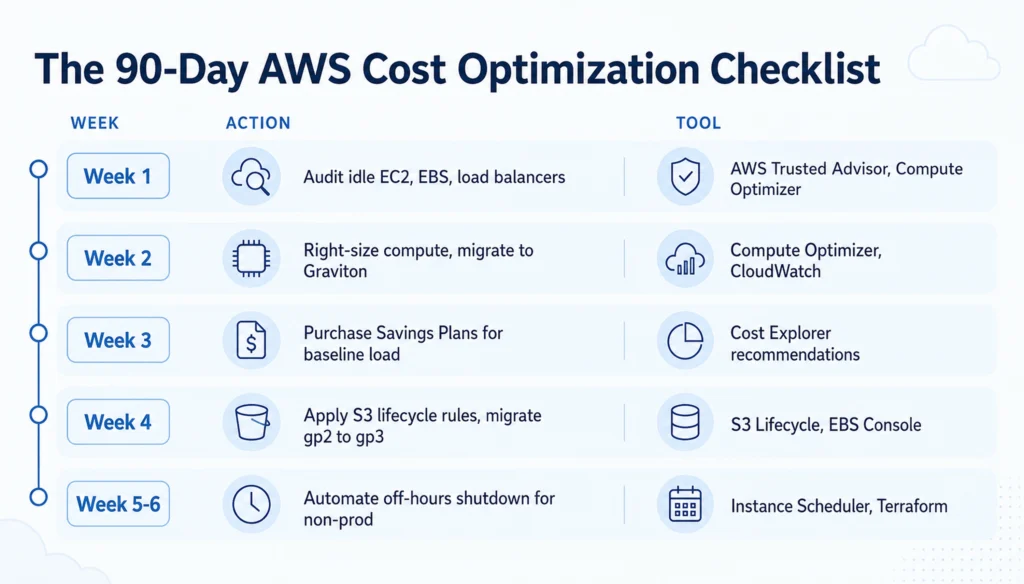
| Week | Action | Tools |
|---|---|---|
| Week 1 | Audit idle EC2, EBS, load balancers | AWS Trusted Advisor, Compute Optimizer |
| Week 2 | Right-size compute, migrate to Graviton | Compute Optimizer, CloudWatch |
| Week 3 | Purchase Savings Plans for baseline load | Cost Explorer recommendations |
| Week 4 | Apply S3 lifecycle rules, migrate gp2 to gp3 | S3 Lifecycle, EBS Console |
| Week 5-6 | Automate off-hours shutdown for non-prod | Instance Scheduler, Terraform |
| Week 7-8 | Enforce tagging via Service Control Policies | AWS Organizations |
| Week 9-12 | Run a Well-Architected cost review, set anomaly alerts | AWS Well-Architected Tool, Cost Anomaly Detection |
The AWS Well-Architected Framework’s Cost Optimization Pillar (opens in a new tab) exists specifically to formalize this. It centers on practicing cloud financial management, staying aware of expenditure and usage, choosing cost-effective resources, matching supply to demand, and optimizing continuously.
Final Words:
Cutting an AWS bill by 40% isn’t about one heroic weekend of cleanup. It’s about building rightsizing, tagging, and commitment reviews into your team’s regular sprint cycle. If you’d rather have a specialized DevOps team run this audit for you, one that pairs automation with human-in-the-loop review before anything gets deleted or resized, that’s exactly the kind of engineering discipline our CodesClue‘s Ahmedabad-based team builds into every cloud engagement.
Frequently Asked Questions
Is switching to Graviton risky for production workloads?
Not if you test first. Most modern runtimes (Node.js, Python, Java, Go) run natively on ARM. Run your CI/CD pipeline against a Graviton build in staging for a week before shifting production traffic. This catches any binary dependency issues early.
Should we buy Reserved Instances or Savings Plans first?
Start with Compute Savings Plans for flexibility across instance families and regions. Reserve RIs specifically for steady-state workloads, such as production databases, where the workload type never changes
Will migrating EBS from gp2 to gp3 cause any downtime?
No. AWS lets you modify an existing gp2 volume to gp3 in place through the console, CLI, or Terraform. The volume stays attached and online throughout the change, and performance typically improves alongside the cost drop.
How do we know if our team actually needs a third-party FinOps tool?
If your monthly AWS spend is under $20K, AWS-native tools like Cost Explorer, Budgets, and Trusted Advisor plus disciplined tagging are usually enough. Past $50K/month, a paid FinOps platform often pays for itself by catching 10-20% in savings that manual reviews miss.
What's the biggest mistake teams make when trying to cut their AWS bill?
Treating it as a one-time project instead of an ongoing practice. Idle resources creep back, tagging discipline slips, and old habits return within a quarter unless rightsizing and commitment reviews are built into the regular sprint cycle.