7 Must-Have Employee Portal Features to Boost Workspace Productivity
7 must-have employee portal features to boost workspace productivity. discover the tools that streamline communication & daily workflows.
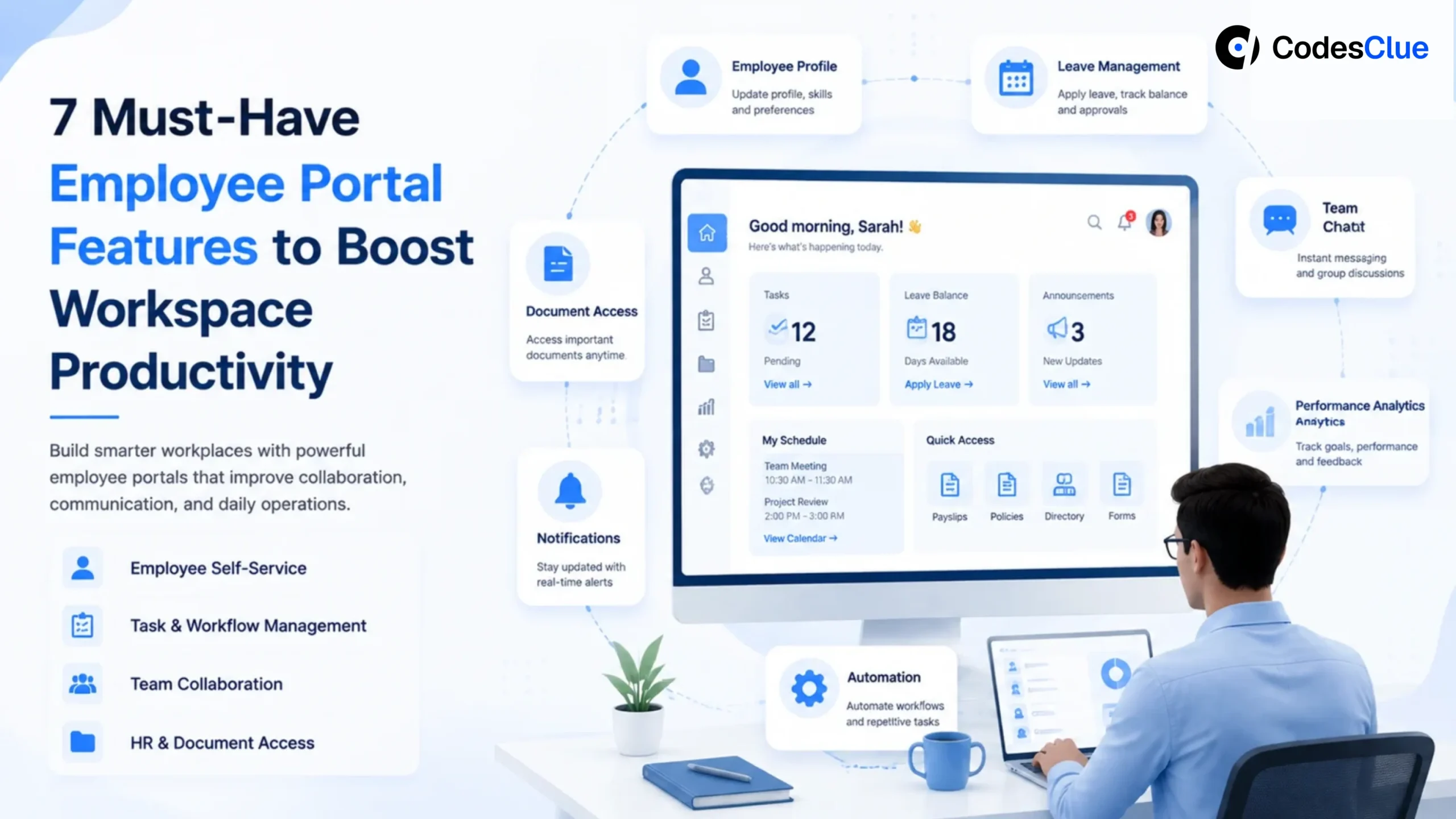
Checking a leave balance should take seconds, not an email to HR, a wait for a reply, and a broken workflow that a proper HR employee portal could have handled instantly. Multiply that friction across hundreds of employees and thousands of requests a month, and it adds up to a real productivity drain.
Yet many organizations still run on disconnected systems and manual processes. Gallup (opens in a new tab)‘s State of the Global Workplace 2025 finds only 21% of employees worldwide feel engaged at work, even though engaged teams are 18% more productive and 23% more profitable than their peers. Microsoft’s Work Trend Inde (opens in a new tab)x adds another data point: meetings, emails, and messages interrupt employees every two minutes on average.
A modern employee portal fixes this by centralizing HR services, company resources, communication, and business applications on one secure platform, boosting productivity, employee experience, and operational efficiency in the process. It’s quickly becoming one of the smartest investments an employee portal for businesses of any size can make.
Here are the seven employee portal features every modern workplace should prioritize.
Why Modern Businesses Need Workplace Platforms?
Today’s workforce expects the same convenience at work that they get in their personal lives: instant access to information, seamless communication, and digital self-service without waiting on emails or approvals. As organizations adopt hybrid and remote work models, employees increasingly struggle to find company documents, request leave, or contact IT across multiple disconnected systems.
A modern workplace platform solves this by combining HR services, collaboration, knowledge management, and business applications into a single digital workspace. Employees access everything through one secure interface instead of switching between apps, while HR teams spend less time on repetitive questions and IT simplifies user access and security management.
Beyond HR processes, these portals also double as an internal communication platform, helping organizations share announcements, policies, and updates more effectively across distributed teams.
Following a few core employee portal best practices centralizing services, securing access, and personalizing content helps organizations capture the full range of employee portal benefits without adding unnecessary complexity.
What Makes a Great Digital Workspace Platform?
Modern workplace platforms do much more than digitize forms or store company documents. The best digital workspace platform combines employee self-service, collaboration, communication, and business applications into one intuitive experience.
The right employee portal software features should:
- Offer an easy, intuitive interface
- Work across any device, including smartphones and tablets
- Secure access with role-based permissions and Single Sign-On (SSO)
- Integrate with HR, payroll, CRM, and business applications
- Personalize content based on employee roles
- Scale as your organization grows
Get these right, and an employee portal becomes more than an internal website; it becomes the digital workplace employees rely on every day.
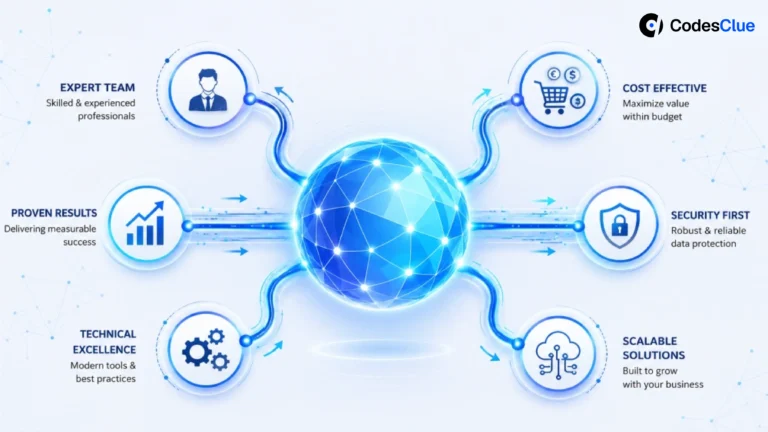
How Workplace Platforms Connect Your Organization
Think of it as your employee intranet portal the single hub that ties HR, knowledge, and communication together:
HR, leadership, and department managers can use the same portal to share updates while giving every team secure, centralized access to the resources they need. A well-connected internal employee portal makes this possible, doubling as both an HR hub and an internal communication platform.
Traditional Workplace vs. Modern Digital Workplace Solutions
| Traditional Workplace | Employee Portal |
|---|---|
| Email HR for leave requests | Apply for leave online |
| Multiple usernames and passwords | Single Sign-On (SSO) |
| Paper forms and manual approvals | Digital workflows |
| Documents stored in multiple folders | Centralized document management |
| Employees search across systems | Unified AI-powered search |
| Limited mobile access | Access from any device |
Organizations that replace fragmented processes with a centralized portal reduce administrative work while making everyday tasks faster for employees.
1. Centralized HR Self-Service
One of the most valuable employee portal features is HR self-service.
Employees shouldn’t have to contact HR every time they need a payslip, tax document, leave balance, or benefits information. These routine requests consume valuable HR time while delaying employees from getting the information they need.
An employee self-service portal lets employees independently:
- Apply for leave
- View leave balances
- Download payslips
- Access tax documents
- Update personal information
- Review benefits
- Track attendance
Why it matters: HR teams can redirect their time from repetitive administrative requests toward strategic initiatives like employee development and engagement.
Business benefit:
- Reduced HR workload
- Faster employee support
- Improved employee satisfaction
- Better operational efficiency
2. Single Sign-On (SSO) and Secure Access
Employees often use multiple business applications throughout the day, including HR systems, payroll software, collaboration tools, CRM platforms, and internal knowledge bases. Managing separate usernames and passwords for every application creates unnecessary friction.
Single Sign-On (SSO) lets employees access multiple systems using one secure login. Instead of remembering numerous passwords, employees authenticate once and move seamlessly between authorized applications.
Why it matters: A simplified login experience increases adoption and strengthens security. When an employee leaves the organization, IT can revoke access from one central location instead of updating permissions across multiple systems.
Business benefit:
- Better cybersecurity
- Reduced password reset requests
- Faster access to business applications
- Simplified identity management
3. AI-Powered Search and Knowledge Base
Many organizations store valuable information across shared drives, folders, emails, and internal websites. The challenge isn’t creating documentation; it’s finding it.
Modern employee portal software uses AI-powered search to help employees locate policies, procedures, FAQs, training materials, and company documents using natural language instead of exact keywords.
For example, an employee can search: “How many maternity leave days do I get?” Instead of manually browsing folders, the portal instantly displays the relevant policy.
Why it matters: Employees spend less time searching and more time completing work. It also reduces repetitive HR and IT questions by directing employees to accurate, up-to-date information.
Business benefit:
- Faster knowledge sharing
- Reduced support tickets
- Better employee experience
- Increased productivity
Many organizations also integrate AI-powered search with Google Workspace productivity tools, so employees can quickly locate documents in Google Drive, shared folders, and collaborative workspaces without leaving the portal.
4. Mobile-First Employee Experience
Today’s workforce isn’t limited to office desks. Field staff, healthcare professionals, retail employees, warehouse workers, and remote teams all need secure access to workplace information from their smartphones, and a modern digital workspace platform keeps them connected to critical business information from any device.
A mobile-friendly employee portal lets employees:
- Request leave
- Check work schedules
- View announcements
- Submit expenses
- Access company documents
- Contact HR or IT
- Complete approvals
from anywhere, at any time.
Why it matters: A responsive website alone isn’t enough. Employees need to complete important tasks quickly without zooming, scrolling excessively, or navigating complicated menus.
Business benefit:
- Higher employee adoption
- Better engagement across hybrid and remote teams
- Faster response times
- Improved accessibility
5. Personalized Dashboards and Smart Notifications
Not every employee needs to see the same information. A sales executive, HR manager, and field technician all have different priorities, responsibilities, and daily tasks.
A personalized employee portal displays relevant information based on an employee’s role, department, location, or permissions, instead of overwhelming everyone with company-wide updates. For example, an HR manager might see pending leave approvals and recruitment updates, while a sales representative sees sales targets, CRM notifications, and customer meetings. For a custom employee portal, organizations can design this personalization around their own workflows and business requirements.
Smart notifications also ensure employees never miss important updates, such as:
- Company announcements
- Policy changes
- Leave approvals
- Training reminders
- Payroll updates
- IT maintenance alerts
Why it matters: Personalization reduces information overload and helps employees focus on tasks that directly impact their work.
Business benefit:
- Better employee engagement
- Higher portal adoption
- Faster decision-making
- Improved internal communication
6. Document and Policy Management
Company documents quickly become difficult to manage when employees scatter them across emails, shared drives, and multiple folders.
An effective employee portal acts as a centralized document repository where employees can easily access the latest versions of policies, forms, training materials, and company guidelines.
Key capabilities include:
- Version control
- Role-based document access
- Searchable document library
- Read-and-acknowledge tracking
- Automated document updates
For example, when the HR team updates the leave policy, employees automatically see the latest version instead of relying on an outdated PDF from an old email.
Why it matters: Maintaining one source of truth reduces confusion, improves compliance, and ensures employees always work with accurate information.
Business benefit:
- Better compliance
- Reduced policy-related confusion
- Faster document retrieval
- Improved governance
7. Analytics and Employee Engagement Tracking
Launching an employee portal is only the beginning; understanding how employees use it is what drives long-term success.
Built-in analytics help organizations answer questions such as:
- Which features do employees use most frequently?
- Which pages receive the highest traffic?
- What information do employees search for?
- Which workflows have the highest completion rates?
- Where do employees abandon processes?
These insights let organizations continuously improve the portal based on real user behavior rather than assumptions, turning it into a genuine employee engagement platform. Since Gallup finds that highly engaged employees consistently outperform others in productivity and profitability, monitoring portal adoption is a direct line to a better employee experience.
Why it matters: Data-driven improvements ensure the portal continues delivering value as business needs evolve.
Business benefit:
- Better decision-making
- Higher employee engagement
- Improved user experience
- Increased return on investment
How to Prioritize Employee Portal Features
Employee portal development doesn’t have to mean launching everything on day one. Trying to launch every feature at once often delays implementation and reduces user adoption. A phased rollout lets organizations deliver value quickly while continuously improving the platform.
Organizations building enterprise digital workplace solutions should prioritize high-impact features first, then expand into collaboration, analytics, and AI capabilities.
| Phase | Features | Business Goal |
|---|---|---|
| Phase 1 | HR Self-Service, Single Sign-On | Eliminate everyday employee friction |
| Phase 2 | Mobile Access, Personalized Dashboards | Increase employee adoption |
| Phase 3 | AI Search, Document Management | Improve knowledge sharing and collaboration |
| Phase 4 | Analytics & Engagement Tracking | Optimize the portal using employee insights |
This phased approach minimizes implementation risk and lets employees adapt gradually.
Common Mistakes to Avoid When Building an Employee Portal
Even the best technology can fail if it isn’t designed around employee needs. Here are some common mistakes organizations should avoid:
| Mistake | Impact |
|---|---|
| Launching too many features at once | Delays implementation and overwhelms users |
| Poor mobile experience | Reduces adoption among remote and frontline employees |
| Weak search functionality | Employees struggle to find important information |
| Lack of system integrations | Creates disconnected workflows and duplicate work |
| Complicated user interface | Lowers employee engagement and usability |
| Ignoring employee feedback | Limits continuous improvement |
| Inadequate security controls | Increases compliance and data protection risks |
The most successful employee portals stay simple and intuitive, and organizations continuously refine them based on employee feedback. When connected with collaboration, HR, communication, and business systems, they become practical digital workplace solutions rather than standalone HR tools.
Conclusion
Modern workplace platforms no longer limit themselves to HR self-service. They have evolved into comprehensive digital workplace solutions that connect employees with business applications, collaboration tools, company knowledge, and workplace communication through a single secure interface.
Whether you’re building an internal communication platform, implementing a digital workspace platform, or integrating Google Workspace productivity tools with your employee portal, the right solution helps improve productivity, collaboration, and employee engagement across the organization.
At CodesClue, we develop secure, scalable employee portals and digital workplace solutions tailored to your workflows. From HR self-service and AI-powered search to third-party integrations and enterprise collaboration tools, we help organizations build connected workplaces that support long-term growth and operational efficiency.
FAQs
What is an employee portal?
An employee portal is a secure digital platform that gives employees access to HR services, company documents, payroll information, communication tools, and business applications from a single location. It simplifies everyday tasks while improving collaboration and productivity.
What are the most valuable employee portal features?
HR self-service, Single Sign-On, AI-powered search, mobile access, personalized dashboards, document management, and analytics together, they cut administrative workload and help employees complete tasks faster.
Can an employee portal function as an internal communication platform?
Yes. Organizations can use their employee portal to publish announcements, company news, policy updates, and event notifications, while ensuring employees receive relevant information based on their roles and permissions.
Can employee portals integrate with Google Workspace productivity tools?
Yes. Employee portals can integrate with tools like Google Drive, Docs, Sheets, Calendar, and Gmail, letting employees access files and collaborate on documents without leaving the portal.
What is the difference between an employee portal and a digital workspace platform?
An employee portal focuses on HR self-service, employee information, and company resources. A digital workspace platform extends this by adding collaboration tools, communication systems, business applications, and workflow automation into one unified digital workplace.
How do employee communication platforms support hybrid work?
They keep remote and hybrid teams connected by centralizing announcements, messaging, document sharing, and notifications, ensuring employees get timely information regardless of location, which improves engagement and teamwork.