Flutter State Management: Scaling Apps with Riverpod
How to scale Flutter apps efficiently with Riverpod state management. Explore best practices, performance tips, and real-world examples.
As mobile applications grow from simple prototypes to enterprise-grade platforms, the foundational architecture of your codebase faces its ultimate test. In Flutter, scale changes everything.
A framework that makes UI building incredibly intuitive also leaves the door wide open for spaghetti code, tightly coupled business logic, and severe performance bottlenecks if state is managed poorly.
Choosing the right state management in Flutter Development isn’t just about incrementing your counter. It’s about long-term maintainability, compile-time safety, seamless testability, and team velocity.
While the Flutter community has historically cycled through numerous state management options, Riverpod (specifically Riverpod 2.0+) has emerged as the definitive production-grade standard for a robust Flutter app architecture.
In this comprehensive guide, we will break down why Riverpod is the preferred choice for a scalable architecture in Flutter and how to implement it using modern, production-ready standards.
What is State Management in Flutter?
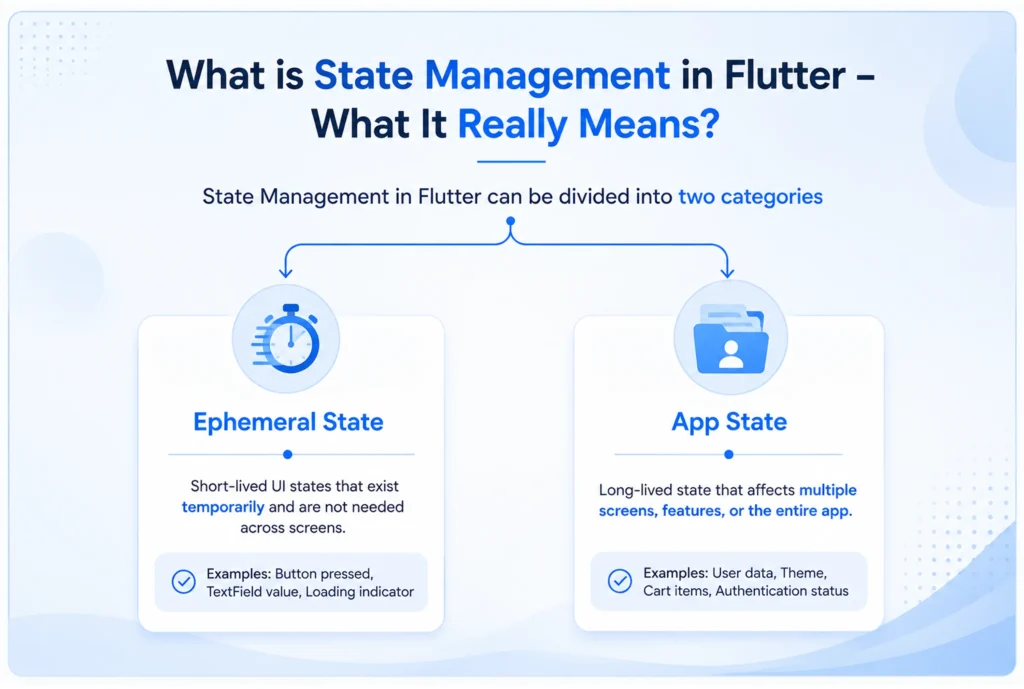
At its core, a state is any data that exists in memory and determines what the UI renders at any given moment. State management in Flutter is the architectural practice of controlling how that data flows through your app, how it updates, and how widgets react to those changes.
Flutter state can be fundamentally split into two types:
- Ephemeral State: Localized state that lives inside a single widget (e.g., current page index in a bottom navigation bar, form validation state). This can easily be handled using standard setState().
- App State: Shared state that needs to span across multiple screens, modules, or services (e.g., user authentication tokens, shopping cart contents, cached API data).
Why do Primitive Solutions Fail at Scale?
For small hobby apps, setState() is perfectly fine. However, relying on it for enterprise apps quickly breaks down due to three major architectural anti-patterns:
- Prop Drilling: Passing state and update callbacks down through dozens of widget constructors just so a deeply nested child can access data.
- Tightly Coupled Logic: Mixing network calls, business logic, and UI rendering inside the same stateful widget, violating the Single Responsibility Principle.
- Unmaintainable Widget Trees: Rebuilding massive sub trees unnecessarily, leading to UI frame drops, unpredictable UI-out-of-sync bugs, and untestable code.
To solve this, Flutter introduced InheritedWidget. While powerful and built into the core framework, its boilerplate is notoriously verbose, heavily reliant on BuildContext, and prone to silent runtime bugs if accessed incorrectly within lifecycle methods.
Flutter State Management Options: A Quick Comparison
Before deep-diving into Riverpod, let’s objectively look at how it stacks up against its predecessors, Provider and BLoC.
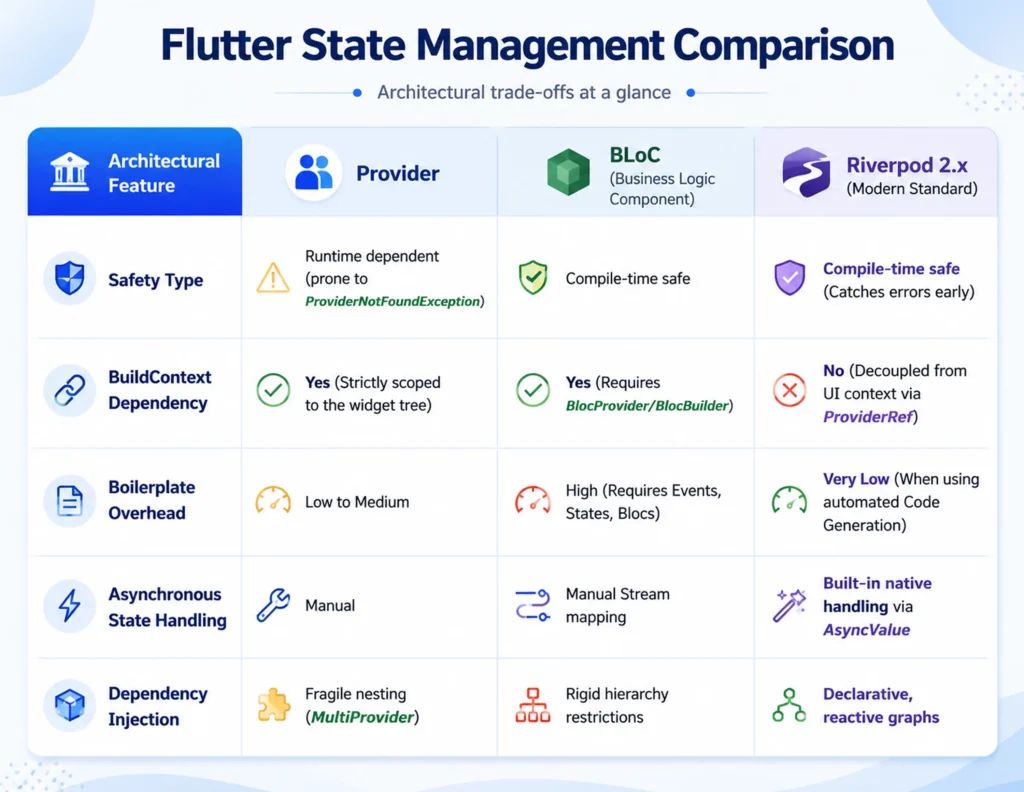
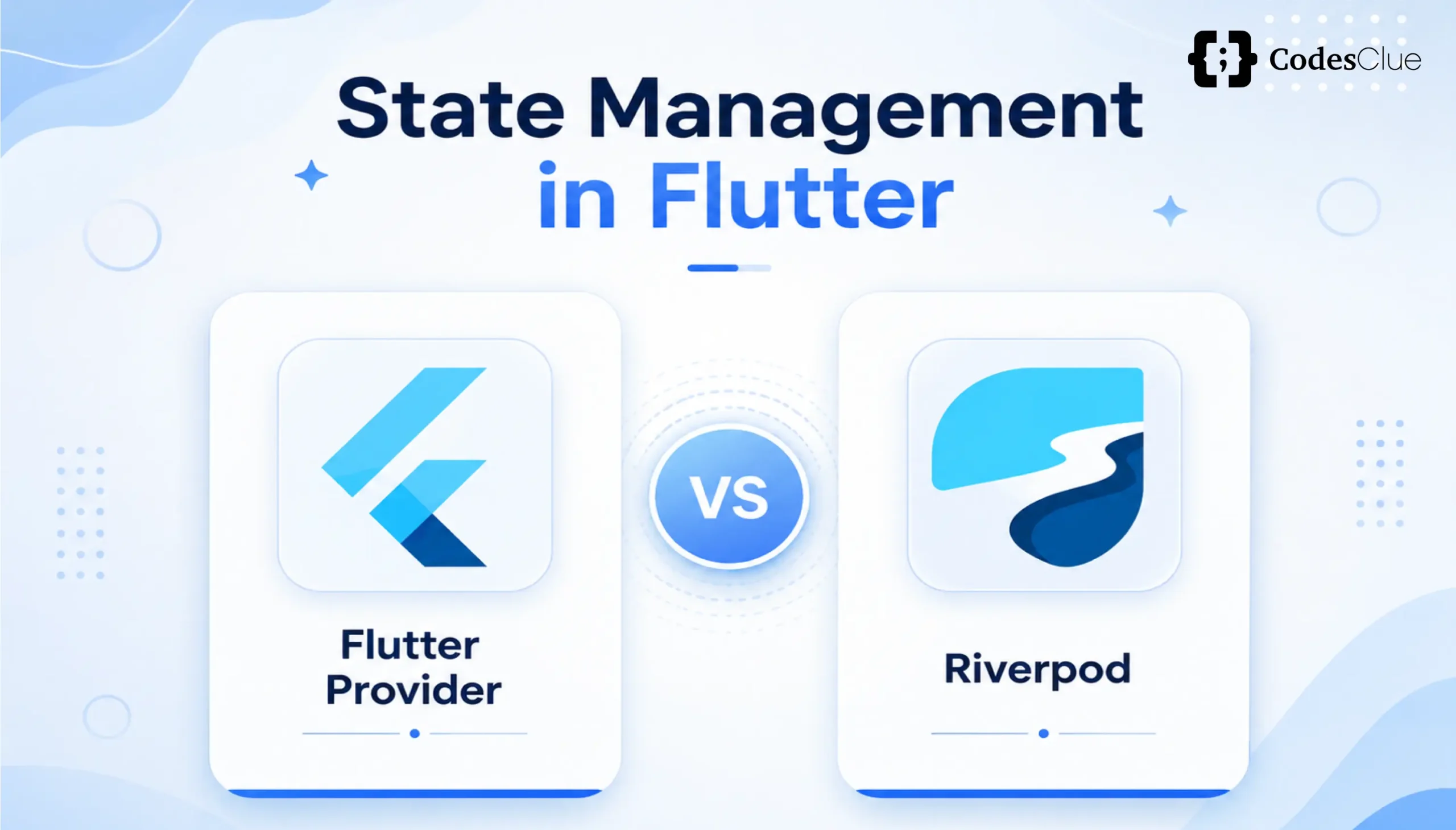
Flutter Provider vs Riverpod
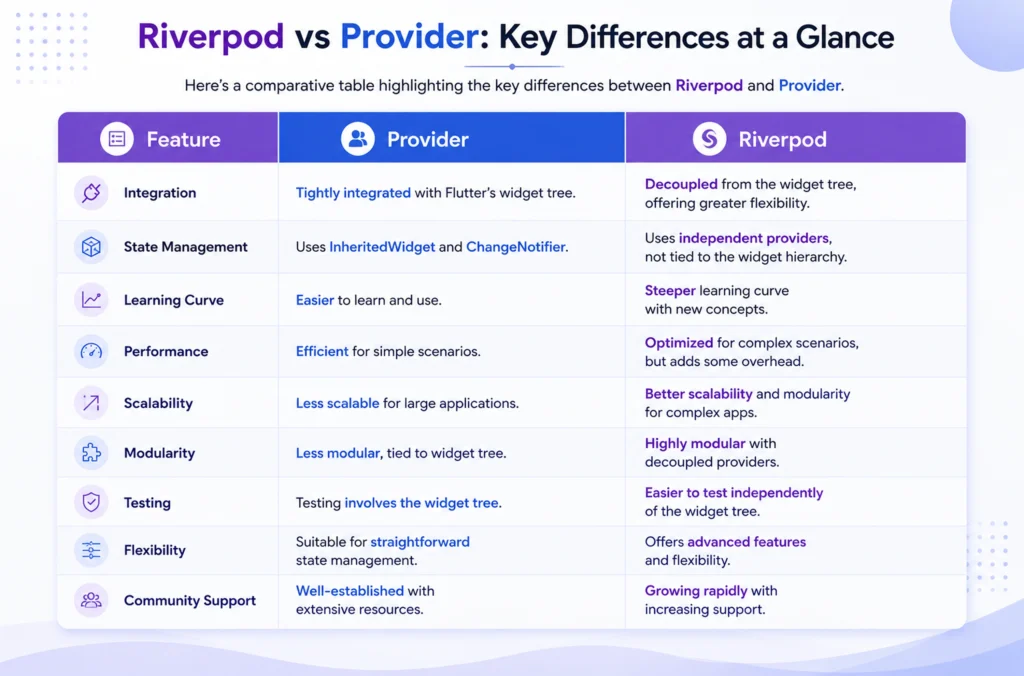
Created by the same author (Remi Rousselet), Riverpod is literally an anagram of “Provider“. It was written from scratch to fix every inherent design flaw of Provider, chiefly removing the constraint of wrapping providers inside the widget tree and eliminating runtime lookup crashes.
Riverpod vs BLoC Flutter
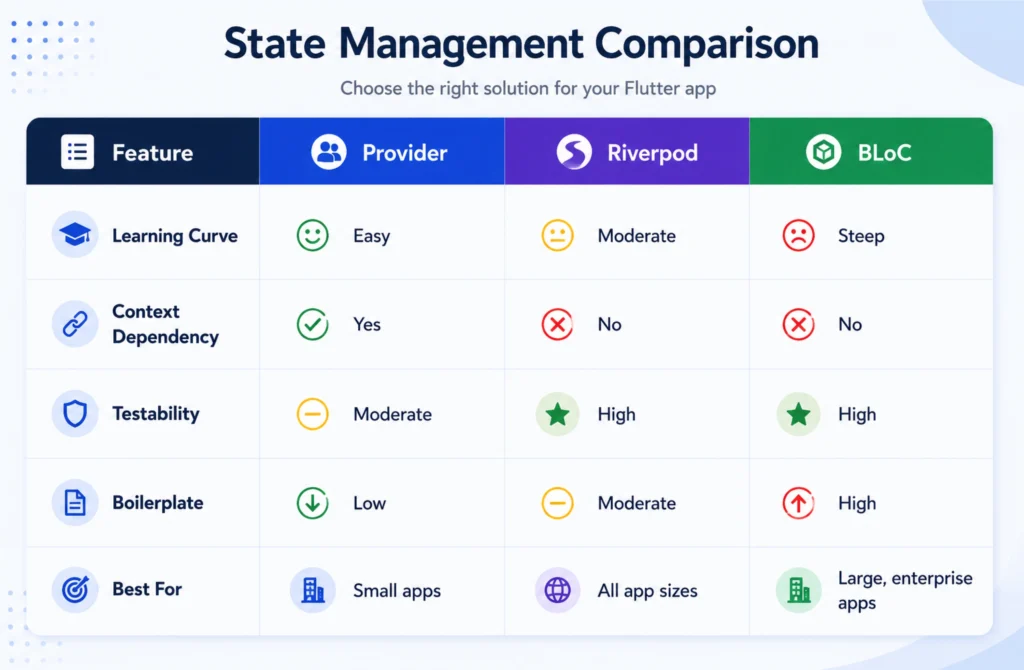
While BLoC provides a rock-solid, strict event-driven architecture perfect for teams coming from a heavy CQRS background, its verbose boilerplate often slows down feature delivery.
Riverpod provides the same unidirectional data flow and architectural safety but with a fraction of the boilerplate code.
Why Riverpod for Scalable Flutter Apps?
When evaluating a tech stack for a startup or an enterprise upgrade, Tech Leads and CTOs look for predictable scaling.
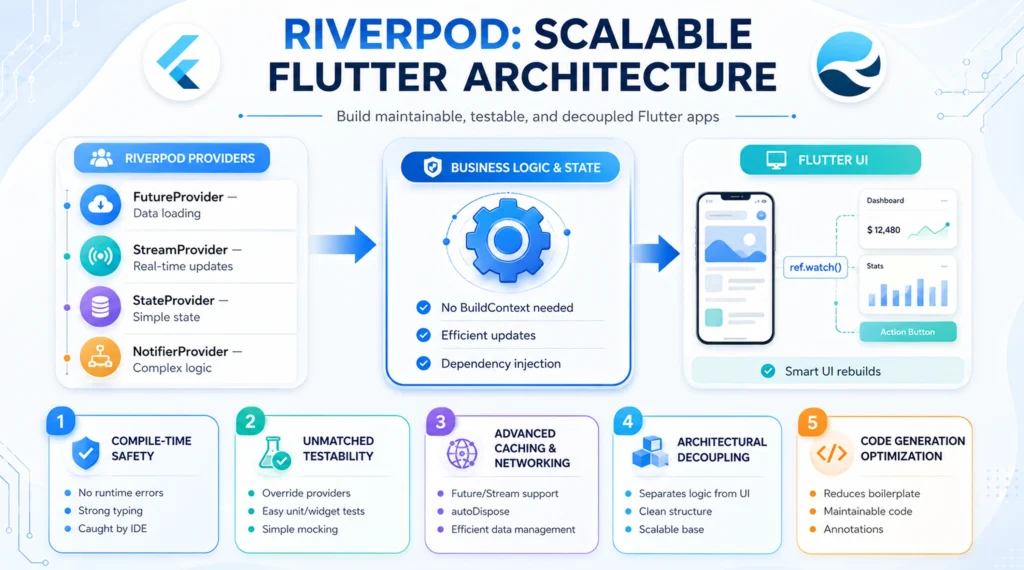
Here is why Riverpod fits the bill for Flutter scalable apps:
1. Compile-Time Safety
Say goodbye to runtime crashes caused by trying to look up a provider that doesn’t exist in the current layout context. With Riverpod, if your code compiles, your dependency graph is valid.
2. Zero BuildContext Dependency
Because Riverpod stores its state globally inside a container independent of the widget tree, you can access your business logic absolutely anywhere, even inside background tasks, isolates, or pure Dart services where BuildContext simply doesn’t exist.
3. Reactive Dependency Graphs
If a UserNotifier relies on an AuthTokenProvider that relies on a SecureStorageProvider, Riverpod automatically tracks the entire execution tree. If the authentication token changes, all downstream objects instantly and safely recalculate.
4. Enterprise-Grade Async State Processing
Asynchronous operations are native first-class citizens in Riverpod. AsyncValue automatically maps data fetching states into explicit pattern-matching branches:
// Native pattern matching ensures you never forget to handle error or loading states
asyncData.when(
data: (items) => ListView.builder(…),
error: (err, stack) => ErrorWidget(err),
loading: () => const CircularProgressIndicator(),
);
5. Automated Code Generation Support
Modern Riverpod leverages riverpod_generator via the @riverpod annotation. This entirely removes the cognitive load of deciding which type of provider class to declare manually, optimizes memory auto-disposal, and streamlines developer onboarding.
Core Riverpod Concepts & Modern Syntax
To implement modern Riverpod successfully, you must embrace code generation. Let’s look at the essential building blocks.
The Entry Point: ProviderScope
Before reading any provider, your entire application root must be wrapped in a ProviderScope. This component houses the underlying ProviderContainer that holds all provider states.
void main() {
runApp(
const ProviderScope(
child: MyApp(),
),
);
}
Traditional Providers vs. Modern Code-Generated Notifiers
In older tutorials, you will see explicit creations of StateNotifierProvider or FutureProvider. In the modern Riverpod tutorial, Flutter material, we use simplified annotations.
Here is a side-by-side comparison of how we track a basic asynchronous user profile query.
The Old, Verbose Way (StateNotifierProvider)
// Deprecated / Discouraged approach in modern enterprise codebases
final userProfileProvider = StateNotifierProvider<UserProfileNotifier, AsyncValue<User>>((ref) {
return UserProfileNotifier(ref.watch(apiClientProvider));
});
The Modern Code-Gen Way (The 10/10 Standard)
import ‘package:riverpod_annotation/riverpod_annotation.dart’;
part ‘user_notifier.g.dart’; // Automatically generated file
@riverpod
class UserNotifier extends _$UserNotifier {
@override
FutureOr<User> build(int userId) async {
// Dependency injection happens cleanly via ref.watch
final api = ref.watch(apiClientProvider);
return api.fetchUserData(userId);
}
// Your business logic sits explicitly here
Future<void> updateName(String newName) async {
state = const AsyncLoading();
state = await AsyncValue.guard(() => ref.read(apiClientProvider).updateName(newName));
}
}
UI Integration: ConsumerWidget & Consumer
To consume state, replace standard StatelessWidget with ConsumerWidget. This gives your layout layer a WidgetRef, allowing it to communicate directly with your data graph.
class ProfileScreen extends ConsumerWidget {
const ProfileScreen({super.key});
@override
Widget build(BuildContext context, WidgetRef ref) {
// Correct usage of ref.watch for continuous state tracking
final userAsync = ref.watch(userNotifierProvider(42));
return Scaffold(
body: userAsync.when(
data: (user) => Text(‘Welcome back, ${user.name}’),
error: (e, __) => Text(‘Something went wrong’),
loading: () => const Center(child: CircularProgressIndicator()),
),
);
}
}
The Golden Rule: ref.watch vs ref.read vs ref.listen
Understanding the difference between these three execution primitives is the boundary line between junior and senior Flutter engineers:
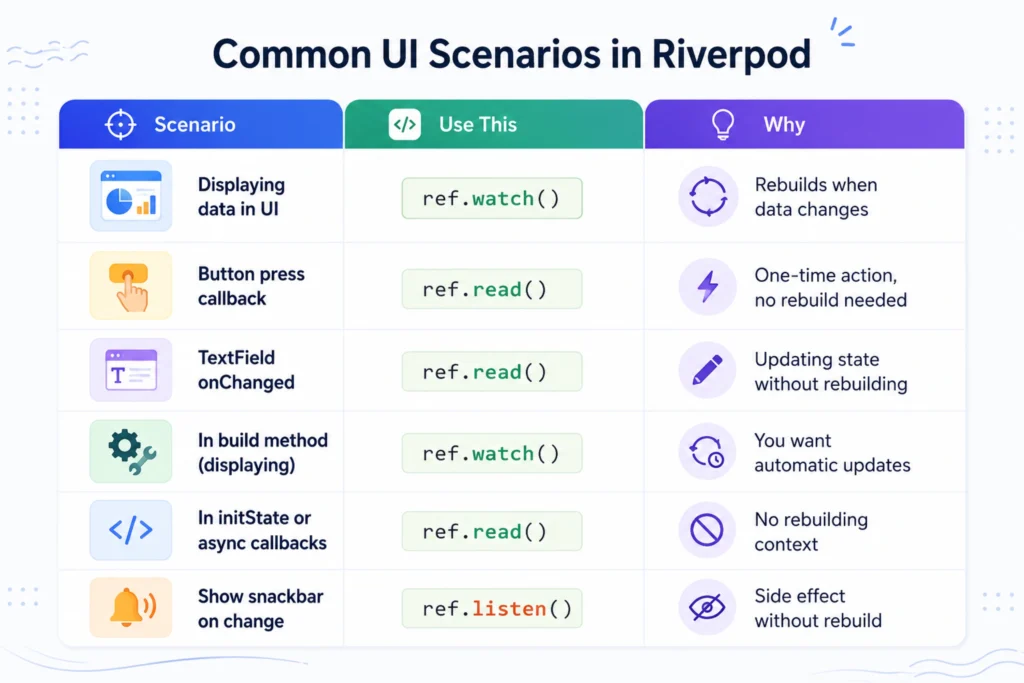
- ref.watch(provider): Use exclusively in the widget build method. It registers the widget to listen for changes. When the data changes, the UI safely schedules a re-render.
- ref.read(provider): Use exclusively inside execution callbacks (e.g., onPressed: () => ref.read(…).submitData()). It reads the value a single time without maintaining a live listener. Never use inside a build method.
- ref.listen(provider, (prev, next) {}): Use for UI side effects. It triggers an action when state shifts without re-rendering the layout (e.g., pushing a route via Navigator, showing a SnackBar, displaying an alert dialog).
Real-World Architecture: How We Structure Riverpod in Scalable Apps?
To ensure an app can scale with large engineering teams without code collisions, we implement a Feature-First Folder Structure aligned directly with Clean Architecture paradigms.
Feature-First Directory Layout
Instead of grouping files by type (putting all models in one directory, all screens in another), encapsulate everything belonging to a domain boundary inside a dedicated feature slice:
lib/
├── core/ # Global shared configurations, routing, themes
│ ├── network/
│ └── theme/
├── features/ # Encapsulated product modules
│ ├── authentication/
│ └── dashboard/
│ ├── data/ # Data Layer: Low-level implementation
│ │ ├── datasources/ # Remote APIs, local database caches
│ │ └── repositories/ # Direct concrete domain contract executions
│ ├── domain/ # Domain Layer: Pure structural objects (Entities)
│ │ └── entities/
│ └── presentation/ # Presentation Layer: Pure layout and state controllers
│ ├── controllers/ # Riverpod Notifiers / AsyncNotifiers (ViewModels)
│ ├── screens/ # Flutter ConsumerWidgets
│ └── widgets/ # Atomic sub-layouts
The Clean Architecture Unidirectional Data Flow
Riverpod handles dependencies across layers cleanly:
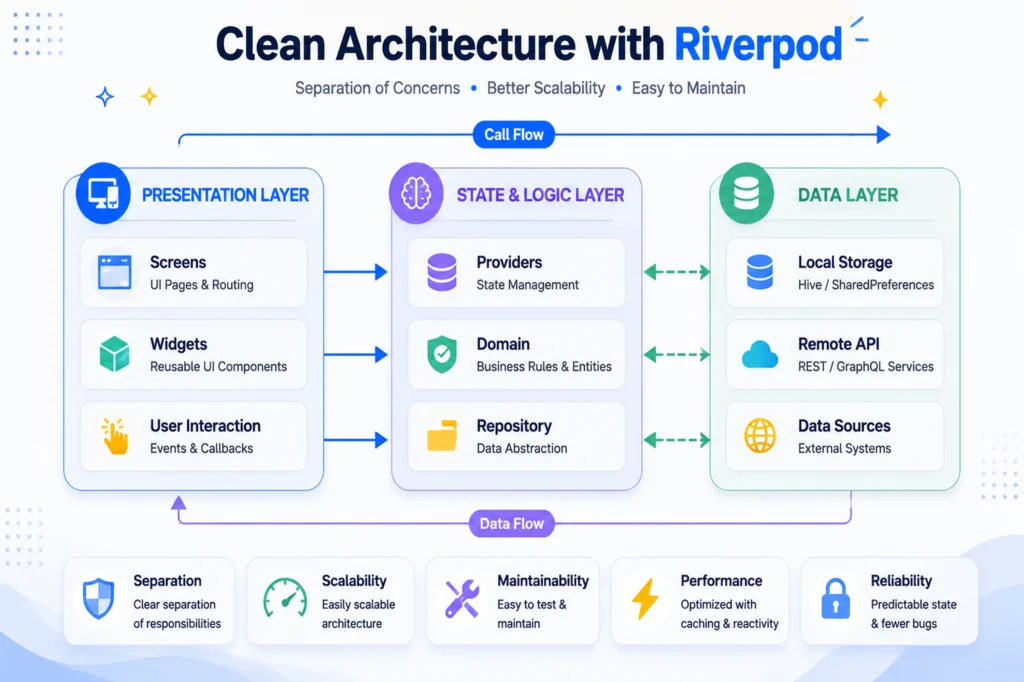
Data Source -> Repository -> Riverpod Notifier (ViewModel) -> Consumer Widget (UI)
Data Source: Fetches raw JSON payload from an HTTP request or a local SQLite database instance.
Repository Provider: Abstract layer converting raw JSON strings into type-safe concrete Domain Entities.
Riverpod Notifier: Subscribes to the repository layer, converts domains into UI State blocks, and tracks changes cleanly.
UI Component: Blindly tracks the Notifier state via ref.watch and translates raw data into visually rich user interfaces.
Performance Considerations
Riverpod is fundamentally engineered to run significantly faster and cleaner than standard setState or traditional Provider implementations. However, a high-scale app requires deliberate engineering choices.
Maximize Efficiency with select()
When a domain model contains complex properties, a widget shouldn’t rebuild if a property it doesn’t care about updates.
Use select() to isolate targeted object properties:
// The UI component will only trigger a repaint if the specific user profile image URL alters
final userProfileImage = ref.watch(
userNotifierProvider(42).select((state) => state.value?.profilePictureUrl),
);
Automatic Memory Disposal via keepAlive
When using modern code generation, providers default to an auto-disposal state, meaning they instantly purge their heap memory consumption the moment they are no longer viewed by any active screen on your navigation stack.
If you want an operation to persist permanently across app life-cycles (such as global user configurations or session caches), explicitly declare .keepAlive():
@Riverpod(keepAlive: true) // Prevents the provider from freeing up its state when screens change
class CacheController extends _$CacheController {
@override
Map<String, dynamic> build() => {};
}
Critical Performance Rules to Avoid Pitfalls
Never use ref.watch inside standard loops, list initializations, or conditionally rendered statements.
Never invoke ref.watch inside callback handlers like onTap or onPressed.
Always split massive monolithic complex UI modules into modular sub-atomic ConsumerWidget elements. This restricts localized structural paint flashes exclusively to the exact sub-node of the application tree affected by updates.
Migration Guide: Moving from Provider to Riverpod
Migrating an enterprise architecture code-base from Provider to Riverpod doesn’t require shutting down feature development for a complete rewrite. Riverpod is deliberately built to run entirely in parallel with traditional frameworks.
Step-by-Step Migration Strategy
- Add flutter_riverpod along with code-generation dev dependencies (riverpod_generator, build_runner) to your pubspec.yaml.
- Wrap the global parent layout tree inside ProviderScope. Traditional legacy MultiProviders can safely live inside this scope without context collision.
- Migrate dependency components one module at a time. Start with leaf nodes (e.g., third-party API clients or local key-value persistence abstractions) before tackling presentation logic.
- Refactor UI segments by switching target layout parents to ConsumerWidget and explicitly updating call structures from Provider.of<T>(context) over to reactive ref.watch(tProvider).
Riverpod 1.x vs 2.x Architecture Breaking Changes
If you are modifying systems configured on Riverpod 1.0 architecture, the paradigm shift boils down to modern object initialization.
Legacy structures relied heavily on StateNotifier and StateNotifierProvider. These models are completely superseded in Riverpod 2.x by unified Notifier and AsyncNotifier structures.
The transition completely removes manual binding boilerplate, offloading the generation steps to the automation compiling engine build_runner.
Conclusion
Building a production-grade application that maintains performance at scale requires an architecture that prevents bugs by design. Riverpod delivers precisely that. It replaces risky runtime framework dependencies with robust compile-time security, native async state management, and streamlined boilerplate via code generation.
If you are currently managing a growing Flutter application or planning a migration path away from fragile legacy state systems, adopting modern Riverpod 2.x standards is one of the smartest architectural investments you can make for your development velocity. Try configuring your next feature slice using @riverpod annotations and experience the massive leap in developer experience yourself.
Frequently Asked Questions
Is Riverpod better than BLoC for Flutter?
For the vast majority of scale-ready applications, yes. Riverpod delivers identical reactive state tracking guarantees, compile-time validation, and strict clean separation of layers, but requires less than half the code generation footprint and architecture boilerplate files that BLoC demands
Can I use Riverpod in a large team project?
Absolutely. By strict adherence to feature-first architecture, clean isolation boundaries, and automated code generation layouts, enterprise development teams can build features in parallel without worrying about global merge conflicts.
What is the difference between Provider and Riverpod?
Riverpod completely abstracts state away from the framework BuildContext layer. This design choice prevents runtime missing dependency lookup crashes, enables state tracking inside plain Dart classes, and completely automates cross-dependency setups.
Does Riverpod work with Flutter Web and Desktop?
Yes. Riverpod contains zero platform-native dependencies. It runs seamlessly with uniform performance on iOS, Android, Web, macOS, Linux, Windows, and Embedded platforms.
How do I test providers in Riverpod?
Testing is remarkably simple. Because providers live inside a container, you don’t need heavy mock injections. You can quickly initialize unit tests by configuring overrides directly on your testing scope container:
final container = ProviderContainer(
overrides: [
// Effortlessly inject your mocked repository dependency layer without boilerplate setup
userRepositoryProvider.overrideWithValue(MockUserRepository()),
],
);
What is the fundamental difference between ref.watch() and ref.read()?
ref.watch() establishes a continuous binding that the reactive-triggers widget builds when updates occur. ref.read() executes a synchronous, one-time retrieval of the state snapshot and should only be triggered inside behavioral functions or button click actions.