

Every slow page increases bounce rates, weakens SEO performance, and reduces conversions. Customers don’t wait for stores to load. They simply move to the next option.
eCommerce site speed optimization is now a business strategy rather than a development task.
Today’s fastest eCommerce stores combine Core Web Vitals optimization, efficient frontend architecture, optimized media delivery, and modern hosting infrastructure to create frictionless shopping experiences.
Whether your store runs on Shopify, WooCommerce, Magento, or a custom platform, eCommerce website performance tuning creates measurable gains across the entire customer journey.
Key Takeaways
- Google reports that improving page speed by just 0.1 seconds can increase retail conversions by more than 8%.
- Bounce probability increases by 32% when page load time grows from one to three seconds.
- Core Web Vitals for eCommerce now directly influence search visibility and user experience.
- Faster websites help reduce cart abandonment through page speed improvements while improving customer satisfaction.
- Website performance delivers the highest ROI when technical optimization supports business goals rather than chasing benchmark scores.
Why Website Speed Has Become an eCommerce Growth Factor
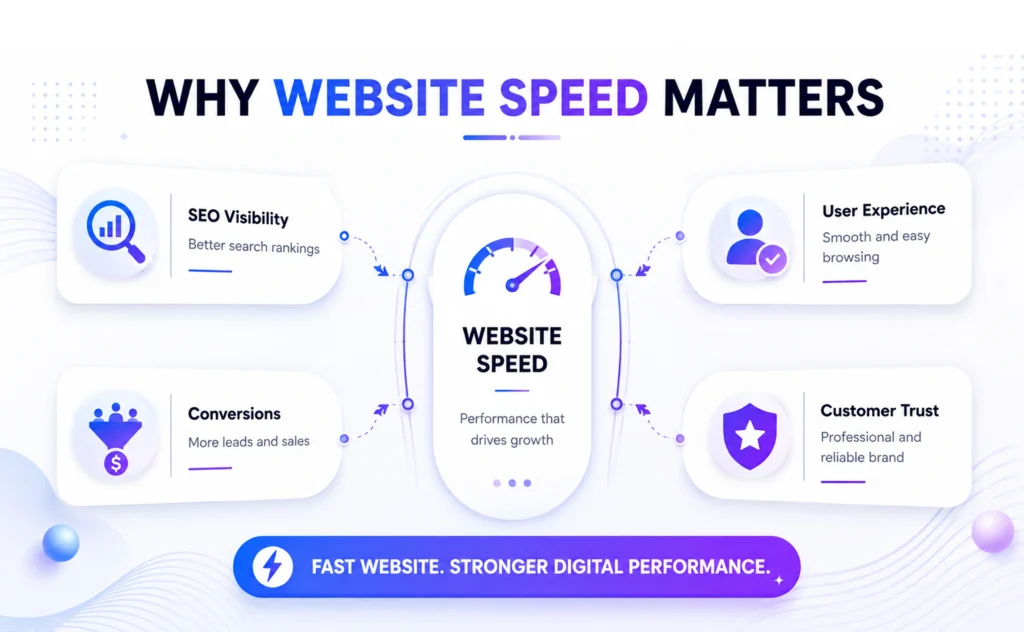
Online shopping has become instant.
Now, customers expect product pages to load immediately, filters to respond without delay, and checkout to complete without interruption.
Most online stores still struggle to deliver that experience. Large product images, excessive JavaScript, third-party apps, poor hosting, and unoptimized themes create unnecessary friction throughout the buying journey.
The result affects far more than page loading.
- Visitors abandon products before browsing.
- Search rankings decline.
- Advertising costs increase because fewer visitors convert.
- Every delay compounds across the entire sales funnel.
A study by Deloitte titled “Milliseconds Make Millions” revealed that a mere 0.1-second improvement in mobile site speed increased retail conversion rates by 8.4% and boosted average order value by 9.2%
Businesses looking at how to speed up an eCommerce website should focus on eliminating performance bottlenecks that directly affect customer experience rather than relying on cosmetic fixes.
It directly affects marketing performance, customer experience, and long-term revenue growth.
At CodesClue, we’ve found that the biggest performance gains rarely come from a single optimization. They come from identifying the right bottlenecks, improving Core Web Vitals, optimizing frontend performance, and continuously monitoring the shopping experience as the store evolves.
Common Causes of Slow eCommerce Websites
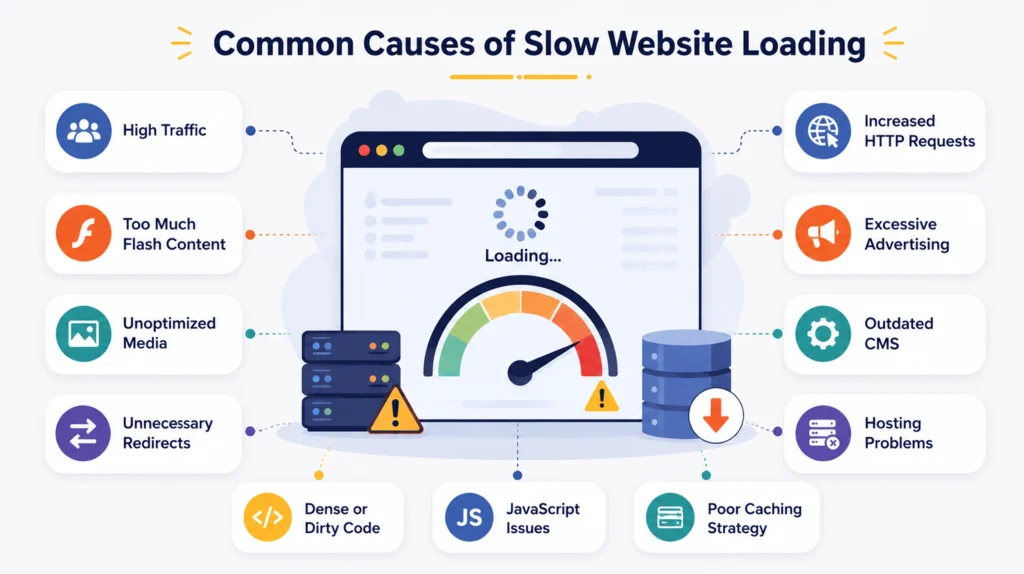
Most eCommerce websites do not become slow because of one problem.
Multiple small performance issues accumulate over time.
Large product images, excessive JavaScript, third-party apps, tracking scripts, heavy themes, and slow hosting all increase loading time and reduce responsiveness.
As more features are added, every page requires additional browser resources before customers can start shopping.
Identifying these bottlenecks early makes eCommerce website performance tuning more effective than applying random speed fixes.
Core Web Vitals for eCommerce: Measuring Experience Instead of Loading Time
Website speed used to be measured by total loading time alone.
Modern performance focuses on user experience instead.
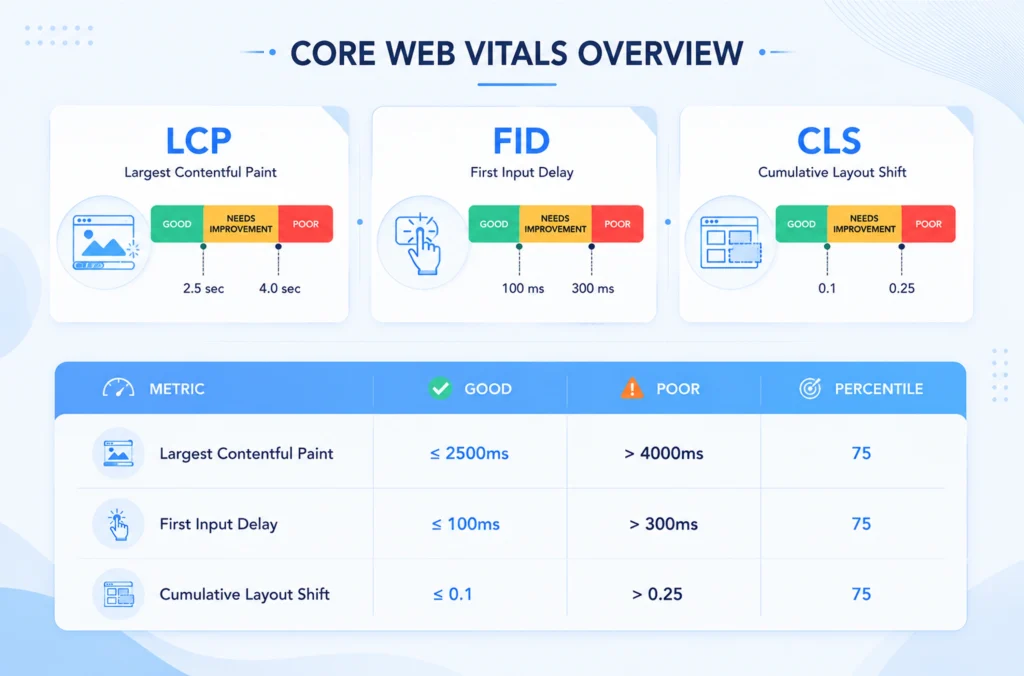
Google evaluates websites using three Core Web Vitals that represent how customers actually interact with a page.
These three metrics tell Google whether your store delivers a smooth shopping experience.
|
Metric |
Good Score |
What It Measures |
| Largest Contentful Paint (LCP) | Under 2.5 seconds | Faster page loading |
| Interaction to Next Paint (INP) | Under 200 ms | Faster user interactions |
| Cumulative Layout Shift (CLS) | Below 0.1 | Stable shopping experience |
Mobile Performance Matters More Than Desktop
Most online purchases now happen on mobile, so every second matters. A slow, unresponsive experience can drive shoppers away before they even reach checkout.
Test your store on real devices instead of relying only on desktop browsers, and optimize touch interactions, images, and network requests to deliver a fast, friction-free shopping experience.
This also naturally introduces:
- Responsive images
- Adaptive loading
- Mobile-first optimization
BrowserStack emphasizes testing on real devices, not just simulators.
Test websites under real mobile conditions instead of relying only on desktop browsers or simulators.
Network speed, device performance, and touch responsiveness all influence how customers experience your store.
Optimizing images, reducing network requests, and minimizing CPU-intensive scripts helps create a faster shopping experience across mobile devices.
Largest Contentful Paint: Make the First Impression Fast
Customers decide whether a website feels fast within the first few seconds.
Largest Contentful Paint measures how quickly the most important visual element appears.
That element is usually the hero banner, featured product image, promotional section, or category heading.
When these assets load slowly, the entire website appears sluggish regardless of actual performance.
Several technical issues commonly increase LCP.
|
Common Cause |
Performance Impact |
| Oversized product images | Delays visual loading |
| Slow server response | Increases initial rendering time |
| Render-blocking CSS | Prevents content display |
| Heavy JavaScript bundles | Delays browser rendering |
| Poor CDN configuration | Slows global delivery |
Optimizing above-the-fold content is one of the most effective eCommerce website performance tuning strategies.
Modern formats like WebP and AVIF reduce image size significantly.
Preloading hero assets helps browsers prioritize visible content.
Avoid lazy-loading the primary page image because it often delays the exact content Google measures for LCP.
Small frontend decisions frequently determine whether a website feels responsive or frustrating.
Improving server response time also helps pages load faster.
Enable browser caching, reduce Time to First Byte (TTFB), and use modern protocols like HTTP/2 or HTTP/3 to deliver content more efficiently.
Small infrastructure improvements often create noticeable gains across the entire website.
Optimize Product Images Without Reducing Quality
Product images usually account for the largest portion of an eCommerce page.
Optimizing them delivers some of the fastest performance improvements.
Compress product images before uploading. Serve them in modern formats like WebP or AVIF. Use responsive images so browsers download only the size each device requires.
Lazy-load images below the fold while allowing hero banners and primary product images to load immediately.
Many Shopify speed optimization tips begin with image optimization because it improves loading speed without affecting visual quality.
Interaction to Next Paint: Every Click Should Feel Instant
Loading pages quickly is only part of the shopping experience. Customers continue interacting with the website after the page appears.
They filter products. Open menus. Add items to the cart. Apply coupons.
Interaction to Next Paint measures how quickly the browser responds to these actions.
Large JavaScript files remain the biggest obstacle. Every unnecessary script competes for browser resources before customer interactions receive attention.
Improving responsiveness usually requires reducing JavaScript rather than adding more optimization plugins.
Effective improvements include:
- Removing unused JavaScript libraries.
- Delaying third-party marketing scripts.
- Splitting large JavaScript bundles.
- Prioritizing customer-facing functionality first.
Modern development practices like code splitting, tree shaking, and JavaScript minification further reduce browser workload and improve interaction speed.
Fast interactions build confidence throughout the buying journey.
Every delay creates hesitation.
Audit Third-Party Apps and Tracking Scripts
Every third-party app adds additional work for the browser.
Live chat, analytics, review widgets, marketing pixels, heatmaps, and social media integrations all consume valuable browser resources.
Review installed apps regularly.
Remove tools that no longer provide business value.
Delay non-essential scripts until after the page becomes interactive.
Loading fewer external resources helps customers browse products, filter categories, and complete checkout more smoothly.
Cumulative Layout Shift: Build Trust Through Stability
Nothing damages customer confidence faster than a moving webpage.
A customer attempts to click Add to Cart. The page shifts. The wrong button receives the click. Thus, that single interaction creates frustration.
Cumulative Layout Shift measures unexpected visual movement while the page loads.
Several common development practices create poor CLS scores.
|
Layout Issue |
Customer Experience |
| Images without dimensions | Content jumps while loading |
| Promotional banners | Push page content downward |
| Web font swapping | Causes text movement |
| Dynamic advertisements | Rearrange page layout |
| Late-loading widgets | Interrupt browsing flow |
Stable layouts improve both usability and trust. Hence, reserve image dimensions before loading. Preload important fonts and avoid inserting promotional elements after the page becomes interactive.
A visually stable website always feels faster, even when loading times remain similar.
Platform-Specific Speed Optimization Tips
Every eCommerce platform has its own performance challenges.
Small platform-specific improvements often deliver faster results than generic optimizations.
Shopify
Remove unused apps, choose lightweight themes, and compress product images before uploading.
WooCommerce
Limit unnecessary plugins, optimize the database regularly, and enable caching wherever possible.
Magento
Use Full Page Cache, optimize indexing, and configure Varnish to improve server performance.
Custom eCommerce Platforms
Implement code splitting, server-side rendering, efficient API calls, and CDN delivery to maximize website performance.
Measure Performance Before You Optimize
Many businesses begin optimizing without understanding where performance problems actually exist.
That usually wastes development time. Performance tools identify bottlenecks far more accurately than assumptions and provide a practical starting point for eCommerce site speed optimization.
The most widely used solutions include:
|
Tool |
Primary Purpose |
| Google PageSpeed Insights | Core Web Vitals and real-user performance |
| Lighthouse | Technical audits and optimization opportunities |
| GTmetrix | Request analysis and loading waterfalls |
| WebPageTest | Global testing across locations and network conditions |
Lab tests identify technical opportunities.
Real-user monitoring shows how customers actually experience your website across different devices, browsers, and network conditions.
Using both provides a more complete picture of website performance.
Each tool highlights different performance issues.
Together, they provide a complete picture of website health.
Optimization becomes significantly easier once the actual bottlenecks are visible.
Monitor Performance Continuously
Website performance changes over time.
New themes, apps, product catalogs, and marketing campaigns can gradually reduce loading speed.
Monitor Core Web Vitals for eCommerce regularly.
Test performance after every major update and compare mobile and desktop results.
Continuous monitoring helps identify new bottlenecks before they affect customer experience or search rankings.
Speed Optimization Is About Customer Experience, Not Perfect Scores
Many businesses become obsessed with achieving a perfect PageSpeed score. That should never be the primary objective.
Customers never see benchmark numbers. They experience loading speed.
Successful eCommerce site speed optimization focuses on outcomes rather than reports. It covers fast product pages, responsive filters, stable layouts, smooth checkout, and reliable mobile performance.
They also help reduce cart abandonment through page speed improvements, especially on mobile devices. Benchmark scores simply reflect the quality of that experience.
The highest-performing eCommerce websites optimize for shoppers first and search engines second.
Ironically, that strategy usually improves both.
Quick eCommerce Speed Optimization Checklist
|
Priority |
Optimization |
| High | Compress product images and use WebP or AVIF |
| High | Improve Core Web Vitals (LCP, INP, CLS) |
| High | Reduce unnecessary JavaScript |
| High | Deliver assets through a CDN |
| Medium | Remove unused third-party apps |
| Medium | Enable browser caching |
| Medium | Optimize CSS and fonts |
| Medium | Test performance on real mobile devices |
Businesses that invest in continuous eCommerce website performance tuning instead of treating optimization as a one-time project will consistently outperform slower competitors in both search visibility and revenue.
Speed Optimization Is an Ongoing Process
Website performance is never finished.
Every new feature, plugin, product update, or marketing campaign can introduce new performance bottlenecks.
Continuous monitoring and optimization keep your store fast as your business grows.
At CodesClue, we help businesses improve website speed through ongoing performance audits, Core Web Vitals optimization, frontend performance improvements, image optimization, and infrastructure tuning.
The goal isn’t just a faster website. It’s a smoother shopping experience that drives higher conversions and long-term growth.