GitHub Copilot vs Claude Code vs Cursor: Which AI Coding Tool Wins
Which AI coding assistant is best? We compare GitHub Copilot, Claude Code, and Cursor on features, pricing, and real-world coding performance.
AI coding tools have grown up fast. Two years ago, developers judged them on how well they finished a line of code.
Today, they ask something bigger: can this tool understand my entire codebase, run my workflows, write production-ready code, review pull requests, and even execute terminal commands on its own?
That shift has produced a new breed of AI coding assistant one that acts less like autocomplete and more like a genuine engineering partner.
Three platforms lead this new era: GitHub Copilot, Claude Code, and Cursor. Each one takes a different path:
- GitHub Copilot slots seamlessly into the workflows developers already use.
- Cursor rebuilds the IDE itself around AI.
- Claude Code takes an agentic approach: it plans, implements, tests, and refines software tasks independently.
So if you’re weighing GitHub Copilot against Claude Code and Cursor, don’t just ask which one writes better code. Ask which one fits your development style, project complexity, and team needs.
This guide breaks down their architecture, features, pricing, and enterprise fit so you can decide with confidence.
Why AI Coding Assistants Matter More Than Ever
AI-assisted development isn’t a niche experiment anymore. It’s the mainstream.
The 2025 Stack Overflow Developer Survey found that 84% of developers now use or plan to use AI tools in their workflow, up from 76% in 2024. Even more strikingly, 51% of professional developers now use AI tools every single day.
The survey also points to a bigger shift: developers are embracing AI agents, not just assistants.
- 69% of developers using AI agents report a productivity boost.
- Roughly 70% say agents cut the time they spend on development tasks.
- Cursor has already reached 18% adoption among surveyed developers, while Claude Code, despite being much newer, has hit 10%.
The takeaway? Developers are moving past simple code generators and reaching for autonomous systems that understand project context and can execute complex engineering work on their own.
From Code Completion to AI Software Engineering
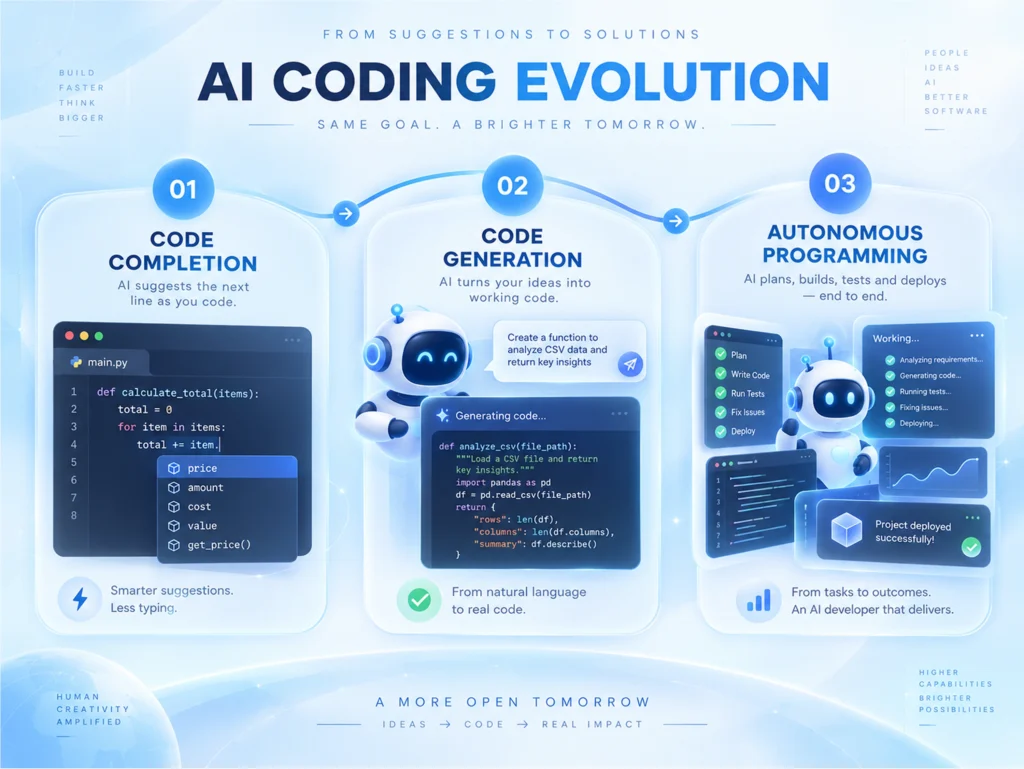
Early coding assistants did one thing: they completed your next line. Today’s tools do far more.
They can:
- Understand a repository end to end
- Edit multiple files at once
- Generate documentation
- Explain unfamiliar code
- Write tests
- Execute terminal commands
- Debug failed builds
- Review pull requests
- Suggest architectural improvements
The real difference between these tools today isn’t code quality. It’s how much of the software development lifecycle each one can take off your plate.
The Quick Verdict
| If you want | Choose |
|---|---|
| Maximum autonomous coding | Claude Code |
| The best AI code editor | Cursor |
| Deep GitHub ecosystem integration | GitHub Copilot |
| Enterprise collaboration | GitHub Copilot for Business |
| AI-assisted daily coding | Cursor |
| Large-scale refactoring | Claude Code |
| Budget-friendly productivity | GitHub Copilot |
Feature Comparison
| Feature | Claude Code | Cursor | GitHub Copilot |
|---|---|---|---|
| Primary Interface | CLI | VS Code-based IDE | IDE Extension |
| Repository Understanding | Excellent | Excellent | Good |
| Autonomous Coding | Excellent | Very Good | Good |
| Multi-file Editing | Yes | Yes | Limited |
| Terminal Execution | Yes | Limited | Limited |
| AI Models | Claude | Multiple Models | Multiple Models |
| Visual Editing | No | Yes | Yes |
| Best For | Enterprise automation | Daily development | GitHub workflows |
GitHub Copilot: The Enterprise Standard
GitHub Copilot earns its wide adoption by fitting naturally into environments developers already use: Visual Studio Code, Visual Studio, JetBrains IDEs, and Neovim. It doesn’t ask you to change how you work; it enhances what’s already there.
That’s its biggest strength: ecosystem integration. If your team already relies on GitHub, GitHub Actions, GitHub Enterprise, and GitHub Advanced Security, you can bring Copilot on board with almost zero friction. Recent updates have pushed Copilot well beyond autocomplete. It now handles AI chat, agent mode, code reviews, multi-model support, and pull request assistance. GitHub has also rolled out AI credit–based usage for its more advanced models while keeping standard code completions in its base plans.
Strengths
- A mature, well-established enterprise ecosystem
- Excellent GitHub integration
- Strong security and governance controls
- Affordable entry-level plans
- Excellent AI extensions for VS Code
Limitations
Copilot has come a long way, but it still leans more on developer guidance than on true autonomy. It won’t plan and execute a multi-step task the way an agent like Claude Code will.
Cursor: The Best AI Code Editor for Everyday Development
Cursor treats AI as a native part of the editor, not a bolt-on extra. Built on Visual Studio Code, it keeps the interface familiar while layering in serious AI power: repository-wide understanding, multi-file editing, intelligent code search, inline diffs, AI-powered debugging, and natural-language editing.
When developers compare Copilot to Cursor, the real difference comes down to philosophy. Copilot augments your existing IDE. Cursor rebuilds the IDE around AI itself. That makes Cursor especially appealing if you want strong automation but still want to see and approve every change visually.
Strengths
- An excellent overall user experience
- A standout editing workflow
- Support for multiple frontier models
- One of the best AI-native code editors available today
Limitations
If your organization has invested heavily in GitHub Enterprise, Copilot will likely integrate more smoothly into your existing setup.
Claude Code: The Autonomous AI Coding Tool
Claude Code takes a different starting point altogether. It runs primarily from the command line, and it aims to do more than generate code.
It behaves like an autonomous software engineer: it understands large repositories, plans an implementation, edits multiple files, executes commands, runs tests, fixes failures, and keeps iterating until the task is done.
That agentic loop is what sets Claude Code apart from a typical code generator.
One of its standout features is CLAUDE.md, a file that lets the assistant retain project conventions, coding standards, and architectural context across sessions. Teams working on enterprise applications, platform engineering, backend services, and large-scale refactoring often find this cuts way down on repetitive prompting. Claude Code simply remembers how your project works.
Strengths
- Deep repository reasoning
- Strong long-context understanding
- High degree of automation
- Excellent for legacy modernization
- A powerful choice for large, complex projects
Limitations
Its command-line-first workflow can feel less familiar to developers who prefer working visually inside an IDE.
GitHub Copilot vs Cursor: Which Should You Pick?
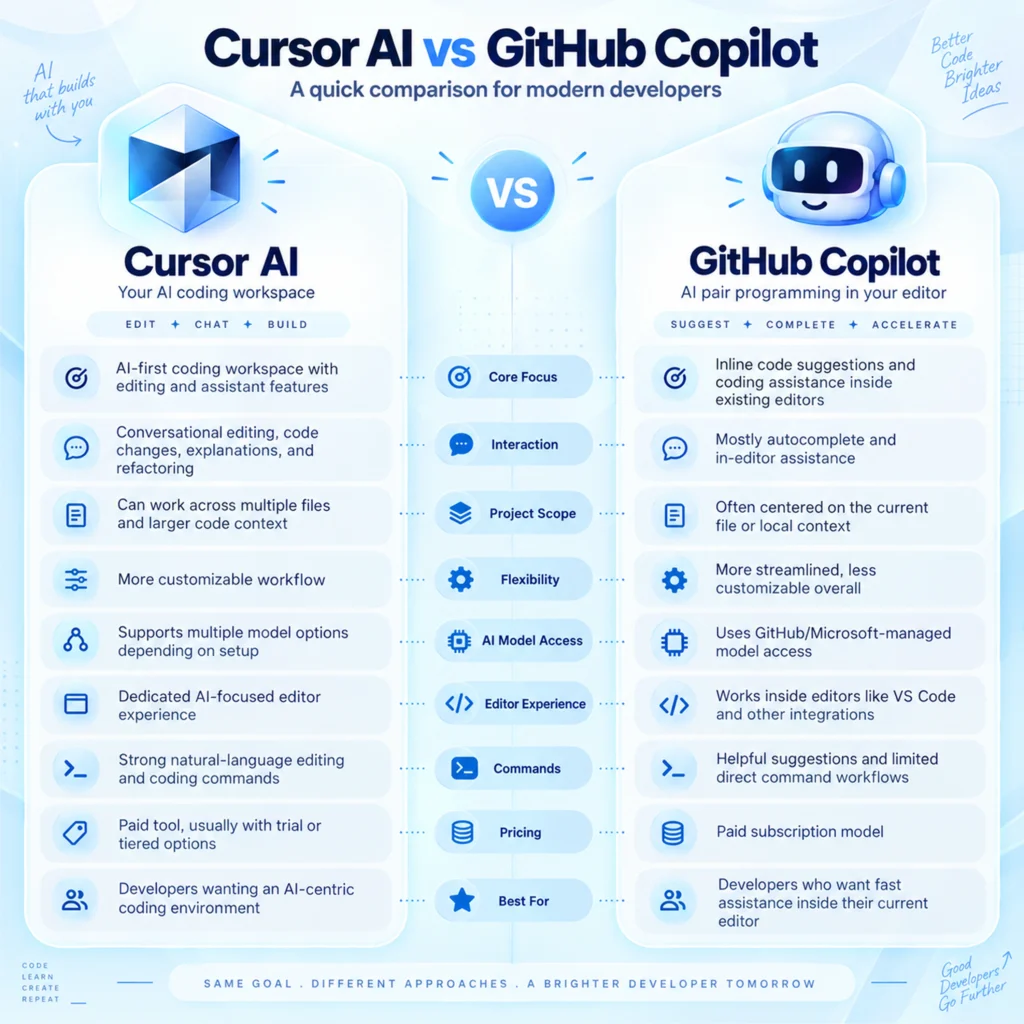
This is one of the most common face-offs developers ask about.
Pick GitHub Copilot if you:
- Already live inside GitHub every day
- Work at an organization built around GitHub Enterprise
- Need affordable AI assistance
- Want minimal disruption to your current workflow
Pick Cursor if you:
- Spend most of your time in VS Code
- Want stronger repository awareness
- Prefer reviewing every AI-generated change visually
- Want an AI-first editing experience from the ground up
Both tools are strong performers. The right pick comes down to whether you value ecosystem integration or AI-native editing more.
Which AI Coding Assistant Fits Enterprises Best?
Enterprises weigh more than code quality when choosing a tool. They look at security, compliance, governance, identity management, auditability, scalability, and cost control.
For many large organizations, GitHub Copilot for Business remains the safest bet, since it plugs directly into existing GitHub Enterprise environments and administrative controls. At the same time, engineering teams focused on squeezing out maximum productivity increasingly bring in Cursor or Claude Code alongside Copilot for specialized workflows.
In practice, these tools don’t compete so much as complement one another.
Pricing Comparison
| Tool | Free Plan | Paid Plan |
|---|---|---|
| GitHub Copilot | Yes | From $10/month |
| Cursor | Yes | Pro from $20/month |
| Claude Code | Usage-based | Premium usage plans available |
Pricing models keep shifting as vendors roll out token-based billing and new AI capabilities, so it’s worth evaluating your expected usage rather than just comparing sticker prices.
The Bottom Line
Choosing between GitHub Copilot, Claude Code, and Cursor comes down to your workflow, your project’s complexity, and your team’s needs. GitHub Copilot shines in GitHub-centric environments. Cursor delivers one of the best AI-native editing experiences for everyday development. And Claude Code leads the pack when it comes to autonomous coding and large-scale engineering work.
Whichever tool you choose, pairing it with experienced engineers and a clear development strategy will get you the most value.
At CodesClue, we help businesses build scalable, AI-powered software by combining these cutting-edge tools with expert engineering practices. Whether you’re launching a new product, modernizing legacy systems, or weaving AI into your development workflow, our team can help you move faster without sacrificing quality, security, or performance.
FAQs
Which is better: GitHub Copilot, Claude Code, or Cursor?
It depends on your workflow. GitHub Copilot suits developers and teams already living in GitHub. Cursor stands out as one of the best AI-first code editors for daily work. Claude Code excels at autonomous coding, large-scale refactoring, and complex engineering tasks.
What actually separates GitHub Copilot, Claude Code, and Cursor?
Their approach to assistance differs most. Copilot enhances your existing IDE with AI-powered suggestions. Cursor delivers a fully AI-first coding experience built on VS Code. Claude Code acts as an autonomous coding assistant that plans tasks, edits multiple files, runs terminal commands, and executes tests on its own.
Which tool works best for enterprise development?
It hinges on your existing stack. GitHub Copilot for Business suits organizations already running GitHub Enterprise, thanks to its governance and security features. Cursor fits teams wanting an AI-powered development environment. Claude Code suits organizations tackling large codebases and complex engineering workflows.
Is Cursor better than GitHub Copilot?
Neither wins outright. Copilot offers deeper GitHub integration and lower pricing; Cursor offers stronger repository awareness, multi-file editing, and a more advanced AI-first experience. Your workflow and collaboration needs should drive the decision.
Can AI coding assistants replace developers?
No. Even the most advanced tools can’t replace experienced developers. They automate repetitive work, generate code, and boost productivity, but human judgment still drives architecture, business logic, security, testing, and code review.
Which languages do these tools support?
All three support a broad range of languages, including Python, JavaScript, TypeScript, Java, C#, Go, Rust, PHP, Ruby, Kotlin, Swift, and C++. Rather than chasing the “best” AI language, pick the language that fits your project’s needs.
How can CodesClue help businesses adopt these tools?
We help businesses weave modern AI coding assistants into their development lifecycle. Whether you’re adopting GitHub Copilot, Cursor, or Claude Code, our team can help you build AI-powered applications, modernize legacy systems, streamline workflows, and accelerate delivery, all while protecting quality, security, and scalability.