

AI Agents in 2026: The Future of Enterprise Automation
AI agents in 2026 for enterprise teams: agentic AI vs generative AI, autonomy levels, guardrails, real costs and a 90-day plan to launch your first agent.
Most teams already have a chatbot. Few have software that finishes a task on its own and stays safe while doing it. That gap is the real story of AI agents in 2026. It decides who gets value from enterprise AI automation and who gets a canceled pilot.
This guide shows where agents earn their keep, where they fail, and how to launch one that survives the budget review.
Key Takeaways
- Agents now ship inside the tools you already pay for. Build custom only where your process is your edge.
- Gartner expects companies to cancel over 40% of agentic AI projects by the end of 2027. Cost, unclear value and weak risk controls drive most of it.
- Pick the autonomy level per task. Most good agents draft, and a person approves.
- Narrow tools, scoped permissions and logs matter more than the model you pick.
- Start with one workflow, one owner and one number to move. Scale only after 30 days of clean results.
What changed for AI agents in 2026
AI agents are software that reads a goal, plans steps, calls business tools and checks its own result. A chatbot answers a question. An agent finishes the job, such as matching an invoice or routing a ticket, and asks a person only when its rules say so. Three shifts made that practical this year.
First, agents moved into the apps. Gartner made a clear call in August 2025. It expects 40% of enterprise apps to feature task-specific AI agents by 2026 (opens in a new tab). The figure for 2025 was less than 5%. Your CRM, help desk and ERP now ship with agents switched on or one click away.
Second, the plumbing now has shared standards. The Model Context Protocol (MCP) gives agents one way to reach tools and data. In December 2025, MCP moved to the new Agentic AI Foundation (opens in a new tab) under the Linux Foundation, co-founded by Anthropic, Block and OpenAI. Integrations you write once now work across more models.
Third, the hype met the budget review. Gartner also warned of a wave of cancellations. Its June 2025 forecast says companies will cancel over 40% of agentic AI projects by the end of 2027 (opens in a new tab). In 2026, a demo no longer wins funding. A measured result does.
Agentic AI vs generative AI
People mix these up, and the mix-up leads to the wrong budget. Here is the short version of agentic AI vs generative AI.
| Generative AI | Agentic AI | |
|---|---|---|
| Main job | Writes text, code or images from a prompt | Reaches a goal across several steps |
| Touches your systems? | Usually not | Yes, through tools and APIs |
| Who checks the result? | The person reading it | Rules in code, then a person for risky steps |
| Main risk | Wrong text | A harmful action |
Every agent uses a generative model inside it. The difference is the tools, the permissions and the loop around the model.
How an AI agent works, step by step
Under the hood, most agents run the same loop:
- Plan. The model reads the goal and breaks it into steps, such as “find the order, compare the invoice, flag the gap”.
- Act. It calls one approved tool at a time, for example a read from the ERP or a draft email.
- Check. It compares the result with the goal and with rules written in code, then picks the next step.
- Hand off. When a step is risky or the result is unclear, it stops and passes the case to a person with its notes.
That loop is also why rule-based RPA hits a ceiling. A bot that clicks through fixed screens cannot plan around a missing field or an email in a new format. An agent can, as long as its tools and limits stay tight.
Embedded agents vs custom enterprise AI agents
The first decision is not which framework to use. It is whether you should build at all. Many enterprise AI agents now come at little or no extra cost inside software you already license. Many also include an AI agent builder, so an admin can set one up without code.
| Question | Use the embedded agent | Build a custom agent |
|---|---|---|
| Does the task live inside one app? | Yes, such as ticket triage inside your help desk | No, it crosses CRM, ERP, email and files |
| Is the process standard? | Yes, most firms do it the same way | No, your process is how you beat rivals |
| Who owns the data rules? | The vendor’s defaults are fine | You need your own access rules and audit trail |
| How fast do you need it? | This month | You can give a pilot a few months |
| What happens if the vendor changes it? | You can live with it | You need control of prompts, tools and logs |
Pro tip: Switch on the embedded agent first, even if you plan to build. Two weeks of its logs show you which steps people trust and which they redo.
Types of AI agents by autonomy level
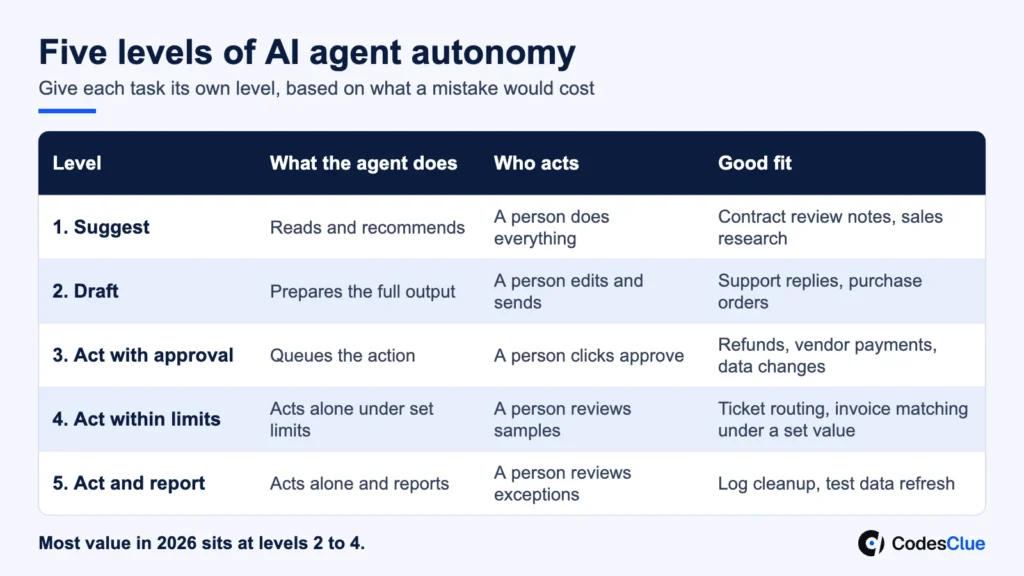
The most useful way to sort the types of AI agents is by how much freedom they get. Agentic AI is not one switch. Give each task its own level, based on what a mistake would cost.
| Level | What the agent does | Who acts | Good fit |
|---|---|---|---|
| 1. Suggest | Reads and recommends | A person does everything | Contract review notes, sales research |
| 2. Draft | Prepares the full output | A person edits and sends | Support replies, purchase orders |
| 3. Act with approval | Queues the action | A person clicks approve | Refunds, vendor payments, data changes |
| 4. Act within limits | Acts alone under set limits | A person reviews samples | Ticket routing, invoice matching under a set value |
| 5. Act and report | Acts alone and reports | A person reviews exceptions | Log cleanup, test data refresh |
Most value in 2026 sits at levels 2 to 4. Fully autonomous AI agents at level 5 suit low-risk internal work. Promote a task one level at a time, and only after its error rate stays low for a full month.
How autonomous AI agents are automating enterprise workflows
Good targets share a pattern. The task repeats often, follows written rules, pulls from several systems and has a clear right answer. AI business process automation works when all four hold. These agentic AI use cases are where we see teams start.
| Team | Agent task | Starting level | Number to track |
|---|---|---|---|
| Finance | Match invoices to orders and flag gaps | 3 | Exceptions caught before payment |
| Support | Read the ticket, check the account, draft the reply | 2 | First reply time, reopen rate |
| Sales ops | Research a lead and fill CRM fields | 2 | Hours saved per rep each week |
| IT | Reset access, route incidents, collect logs | 4 | Tickets closed without a hand-off |
| Engineering | Write tests, update docs, open small fixes | 2 | Review time per pull request |
| Operations | Chase late suppliers and update ETAs | 3 | Orders with a current ETA |
Plain AI automation with fixed rules still wins for the stable steps. Agents earn their place on the messy steps, such as emails and PDFs that never look the same. For a full build walkthrough with retrieval and tool setup, read our guide on how to build custom AI agents for enterprise workflows.
Have a workflow in mind? Tell us which process eats your team’s week. An engineer replies within one business day with the autonomy level we would start at.
Single agents vs multi-agent systems
Vendors love multi-agent systems: a planner agent, a research agent, a checker agent and so on. Sometimes that design helps. Often it adds cost and new ways to fail.
- Use one agent when the task fits in one context and needs fewer than ten tool calls.
- Split into several agents when steps need different permissions, such as one that reads payroll and one that only writes reports.
- Add a checker agent when a second pass catches real errors in your tests, not because it looks thorough.
Each extra agent adds model calls, delay and one more log to read. Prove the single agent first. Then split only where the logs show a clear need.
Why agentic AI projects get canceled
Gartner points to rising costs, unclear business value and weak risk controls. In practice, those three show up in five common forms.
| Cause | What it looks like | The fix |
|---|---|---|
| No owner | IT builds it, nobody in the business uses it | Name one business owner before any code |
| No baseline | Nobody knows the old cost or error rate | Measure the manual process for two weeks first |
| Too much freedom | The agent gets broad tools and one bad step costs money | Narrow tools, low autonomy, human approval |
| Messy data | The agent reads stale or conflicting records | Fix the source fields the task depends on |
| Token bills | Long loops and repeated context push costs up | Cap steps per run, cache context, track cost per task |
Data quality deserves its own warning. When we built InvoiceMinds, a billing platform, the core work was clear invoice states: paid, pending and overdue. An agent that chases overdue invoices can only be as reliable as those states.
AI agent governance that holds up in production
In practice, AI agent governance is mostly plain engineering. The OWASP GenAI project lists prompt injection (opens in a new tab) as the top risk for LLM apps. Hidden text in an email, web page or file can steer an agent. OWASP also names excessive agency (opens in a new tab), with three roots: too much functionality, too many permissions and too much autonomy.
Build these controls in from day one:
- Narrow tools. Give the agent “create draft refund”, not “run any database query”.
- Scoped credentials. Run each action under the requesting user’s own rights. Read-only wherever possible.
- Checks outside the model. Enforce limits in code and in the target system. Never trust the model to police itself.
- Untrusted input stays untrusted. Mark outside content clearly and keep it apart from your instructions.
- A human in the loop for high-impact steps. Payments, deletions and customer messages wait for a click.
- Logs for every step. Store the goal, each tool call, inputs, outputs and cost. You will need them for audits and fixes.
- A kill switch. One setting stops the agent and routes work back to people.
Pro tip: Match the control to the risk. A docs agent and a payments agent should not share one approval policy.
A typical first agent: supplier ETA updates
Here is a pattern we see often. It is an example, not a client result. An operations team spends hours each week emailing late suppliers and copying new dates into the ERP.
- Week 1: The agent reads open orders past their due date and drafts one email per supplier. A planner reviews and sends them. Level 2.
- Week 3: The agent reads supplier replies and proposes the new ETA. The planner approves each change. Level 3.
- Week 8: Small changes of a few days go straight in. Anything larger, or any reply the agent cannot read, goes to the planner. Level 4.
The agent never gets rights to cancel an order or change a price. Those tools simply do not exist for it. That one design choice removes the worst failure before it can happen.
Pro tip: Write the stop rules in plain words next to each tool. “Never change a date by more than 7 days without approval” is easy to test and easy to audit.
How to measure an agent before you scale
Build a test set before launch: 50 to 100 real past cases with the right answer written down. Run the agent against it after every prompt, model or tool change. Then track five numbers in production:
- Task success rate on the test set and on live samples
- Share of runs that needed a person to step in
- Cost per finished task, including model calls
- Time from request to finished task
- Serious errors, counted one by one with a cause
If cost per task beats the manual baseline and serious errors stay at zero for 30 days, you have a case to scale.
Where the return shows up
Business owners fund outcomes, not accuracy scores. Turn the agent’s numbers into four plain measures:
- Throughput: cases closed per person per week, before and after.
- Cycle time: hours from request to done, for example from invoice received to invoice matched.
- Cost per case: model calls and review time against the manual cost you measured in the first two weeks.
- Error rate: serious mistakes per 100 cases, compared with the team’s own baseline.
Pick one as the headline number for the business owner. Track the other three so a gain in one does not hide a loss in another.
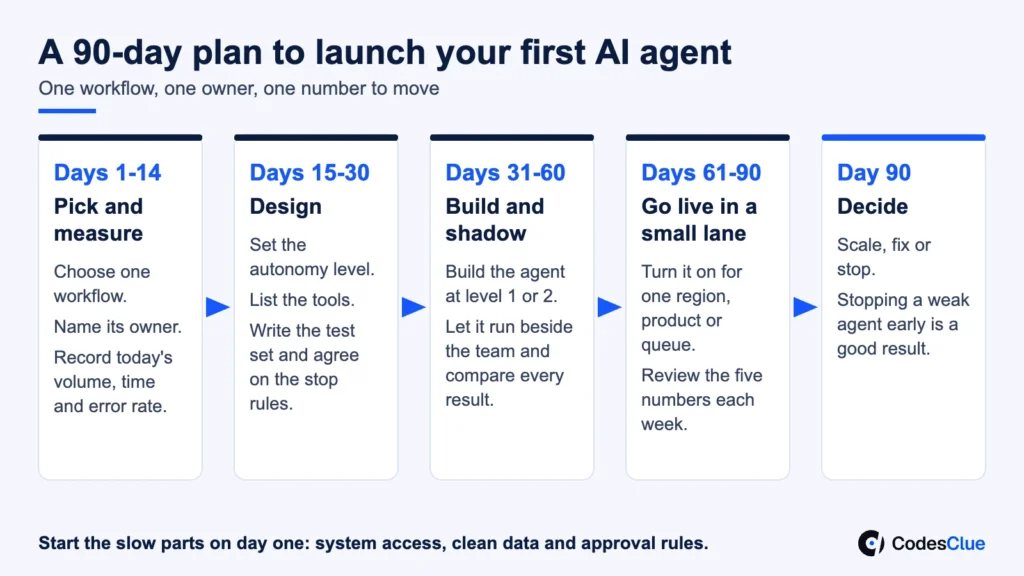
A 90-day plan to launch AI agents in your company
- Days 1 to 14: pick and measure. Choose one workflow. Name its owner. Record today’s volume, time and error rate.
- Days 15 to 30: design. Set the autonomy level, list the tools, write the test set and agree on the stop rules.
- Days 31 to 60: build and shadow. Build the agent at level 1 or 2. Let it run beside the team and compare every result.
- Days 61 to 90: go live in a small lane. Turn it on for one region, product or queue. Review the five numbers each week.
- Day 90: decide. Scale, fix or stop. Stopping a weak agent early is a good result, not a failure.
Readiness checklist
- One named business owner who wants this
- A written process with clear rules and exceptions
- API access to every system the task touches
- Two weeks of baseline numbers
- 50 or more past cases with known answers
- Agreed autonomy level and approval steps
- A budget for model calls and for ongoing tuning
Missing three or more? Fix those first. The agent will not fix them for you.
Common mistakes to avoid
- Starting with the hardest, most visible process to impress leadership
- Giving one agent access to everything “to keep it simple”
- Judging success from a demo instead of a test set
- Skipping the cost per task until the first invoice arrives
- Letting the agent message customers before staff trust its drafts
When an AI agent is the wrong call
Skip the agent when a fixed rule or a simple script does the job. The same goes for a task that happens a few times a month. Avoid it, too, when one wrong action could cause legal or safety harm and no person can check it first.
In those cases, a form, a workflow tool or a plain report often wins.
What AI agent development costs
AI agent development cost depends on how many systems the agent touches and how much autonomy it gets. These are our project ranges:
| Scope | What you get | Typical range |
|---|---|---|
| Pilot | One workflow, levels 1 to 2, two or three integrations, test set and logs | $8K to $25K |
| Production agent | Approvals, scoped access, monitoring, cost tracking and more integrations | $25K to $70K |
| Agent platform | Several agents, shared tools, governance and audit across teams | From $70K |
The model provider bills usage on top of these ranges. For a line-by-line breakdown, see our AI agent development cost guide.
When you compare agentic AI companies, ask each one three questions. Which autonomy level would they start at? How will they test the agent before it touches live data? Who owns the prompts, tools and logs after launch? Vague answers to any of the three are a warning sign.
The bottom line on AI agents
AI agents reward focus. Pick one workflow, give the agent narrow tools and the lowest level that still saves time, and measure it honestly. Our engineers in Ahmedabad, with offices in India, the USA and Germany, take agents from proof of concept to MVP to production. We work AI-first, in short sprints.
Send us three things: the workflow you want to automate, the systems it touches and how many times it runs each week. We reply within one business day with a suggested autonomy level and a first estimate.
Explore our AI agent development services and AI automation services, or contact us to start. Need hands on your own team? Hire AI agent developers to work inside your own sprints. Development starts within 48 hours.
FAQs
What is AI automation?
AI automation means software that handles work which used to need human judgment, such as reading an email, sorting a document or drafting a reply. Rule-based automation follows fixed steps. AI automation reads messy input and decides the next step, usually with limits and a person checking the risky ones.
What is the difference between an AI agent and RPA?
RPA follows fixed clicks and rules, so it breaks when a screen or format changes. An AI agent reads the goal and the content, then picks its next step. Many teams keep RPA for stable, high-volume steps and add an agent for the messy parts, such as emails or PDFs that never look the same.
Can AI agents work with our on-premise or legacy systems?
Yes, if the system has an API, a database you can read safely or a stable export. Where none exists, we add a thin service layer that exposes only the actions the agent needs. Screen scraping an old desktop app is a last resort, because small interface changes break it.
How do we keep customer data private when an agent uses an LLM?
Send the model only the fields a task needs and mask the rest. Use provider plans that do not train on your data, and check where they process it. Keep logs inside your own cloud, set retention limits, and give the agent read-only access unless a step truly needs to write.
How long does it take to build a first AI agent?
Plan in weeks, not days, for a focused pilot on one workflow, including the test set and a shadow run beside your team. The build itself is often the shortest part. Access to systems, clean data and agreement on approval rules take most of the calendar, so start those on day one.