

PWA vs Native App: Which Should You Build in 2026?
PWA vs native app in 2026: what a PWA can do on iPhone and Android, when native is worth it, app store rules, cost ranges and a 5-step way to choose.
Your team has a product idea, a budget and a deadline. Someone asks the question that stalls every kickoff: app store or browser? Picking the wrong side of the PWA vs native app choice can cost you months and a second build. This guide shows what each option can do on an iPhone and an Android phone in 2026. It also covers cost and a way to choose in one meeting.
Key Takeaways
- A PWA is one web codebase that installs from the browser. A native app targets each platform and ships through the app stores.
- iPhones now support web push for PWAs, but only after the user adds the app to the Home Screen.
- Pick native when the product lives on hardware: Bluetooth, background location, heavy camera work or smooth 3D.
- Pick a PWA when people find you through search, links or email and use you a few times a month.
- Many teams ship a PWA first, learn from real users, then build native only for the screens that need it.
PWA vs native app: the short answer
Choose a PWA when reach, search traffic and one codebase matter most, and your features run inside a browser. Choose a native app when the product depends on deep device access, all-day background work or top performance. If you need both store presence and one codebase, a cross-platform app built with Flutter or React Native sits in the middle.
A PWA (progressive web app) is a website with three extras. A web manifest lets people install it to the home screen. A service worker caches files so screens load fast and some work offline. Push messages bring users back. Teams write a native app in Swift for iOS and Kotlin for Android, or with a cross-platform toolkit. Users download it from the App Store or Google Play.
Side-by-side comparison
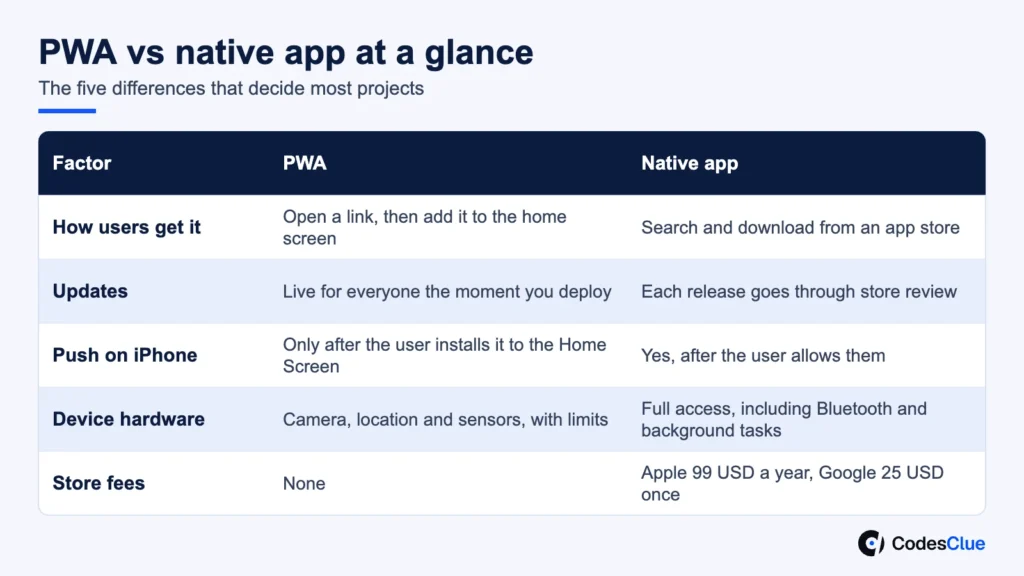
| Factor | PWA | Native app |
|---|---|---|
| Codebase | One, for every device with a modern browser | One per platform, or one with a cross-platform toolkit |
| How users get it | Open a link, then add it to the home screen | Search and download from an app store |
| Found through Google | Yes, every screen can rank like a web page | The store listing ranks, but screens inside the app rarely show in Google |
| Updates | Live for everyone the moment you deploy | Each release goes through store review |
| Offline use | Cached screens and queued actions | Full offline data and sync |
| Push messages on iPhone | Only after the user installs it to the Home Screen | Yes, after the user allows them |
| Device hardware | Camera, location and sensors in the browser, with limits | Full access, including Bluetooth and background tasks |
| Performance | Good for forms, lists, dashboards and stores | Best for animation, 3D, audio and heavy data |
| Store fees | None | Apple 99 USD a year, Google 25 USD once, plus commission on digital sales |
| Best fit | Commerce, booking, portals, field forms, content | Fitness, media, IoT, games, daily-use social apps |
Pro tip: Score each row from 1 to 3 for how much it matters to your product. If the high scores cluster on hardware and performance, you already have your answer.
What a PWA can and cannot do on an iPhone in 2026
Most US buyers ask about iPhones first, because that is where PWAs used to fall short. The gap is smaller now, but it has not closed.
- Push messages: Apple added web push for Home Screen web apps in iOS and iPadOS 16.4. The WebKit team’s announcement (opens in a new tab) says the app must be on the Home Screen. The permission request must also follow a direct tap, such as a subscribe button.
- Badges: The same release lets Home Screen web apps show a count on their icon.
- Installing: Safari has no install banner like Chrome on Android. Users add the app through the Share menu, so your screens must show them how.
- Bluetooth and NFC: MDN still marks Web Bluetooth as experimental (opens in a new tab), and it does not work in several major browsers, Safari among them. If your product talks to a device, plan for native.
- Europe: In early 2024 Apple planned to turn Home Screen web apps into plain bookmarks in the EU. On 1 March 2024 it reversed that plan (opens in a new tab), and they still run on WebKit. Platform rules can change quickly, so keep a fallback.
Pro tip: Test the install flow on a real iPhone with your least technical colleague. If they cannot add the app to the Home Screen in 30 seconds, your push strategy will not work either.
When a PWA is the better choice
PWA development pays off when people arrive from Google, a QR code, an email or a shared link and need to act right away. Nobody wants to download an app to book one appointment or reorder supplies.
- Online stores and ordering, where every extra step loses buyers
- Booking, check-in and appointment flows opened from a link
- Customer, partner and employee portals that also run on desktop
- Field forms and inspections that must save work on a weak signal
- A first version you want in front of users this quarter
Our GreenReleaf project is a good example. The dispensary needed a secure web store and a mobile PWA, with live inventory and prices synced from its Dutchie POS. We built it with Angular, Node.js, MongoDB and AWS. One codebase serves shoppers on any phone, and every update reaches them at once, with no app review to wait for.
When native app development is worth it
Native app development earns its higher cost when people open the app daily or it depends on the phone itself.
- Connected hardware: wearables, medical devices, scanners or smart locks over Bluetooth
- Location that runs in the background, as in delivery, ride and safety apps
- Heavy media: live video, audio, AR, 3D and games
- Large offline data sets with sync, such as maps or full catalogs
- Products where store ranking and ratings drive most installs
Pro tip: If only one or two screens need native power, you may not need a full native build. A cross-platform app gives you one codebase in both stores. Our native vs cross-platform cost comparison walks through that trade-off.
Can a PWA go in the app stores?
On Android, yes. Google supports Trusted Web Activity, which runs your PWA inside a thin Android app. Its Bubblewrap tool (opens in a new tab) packages the app for Google Play, and Digital Asset Links prove you own the site.
On iPhone, it is harder. Apple’s App Review Guidelines (opens in a new tab) say an app should offer features that “elevate it beyond a repackaged website.” A wrapped PWA with nothing extra is a common reason for rejection. If you need the App Store, add native features such as push, widgets or offline sync, or build the iOS app natively.
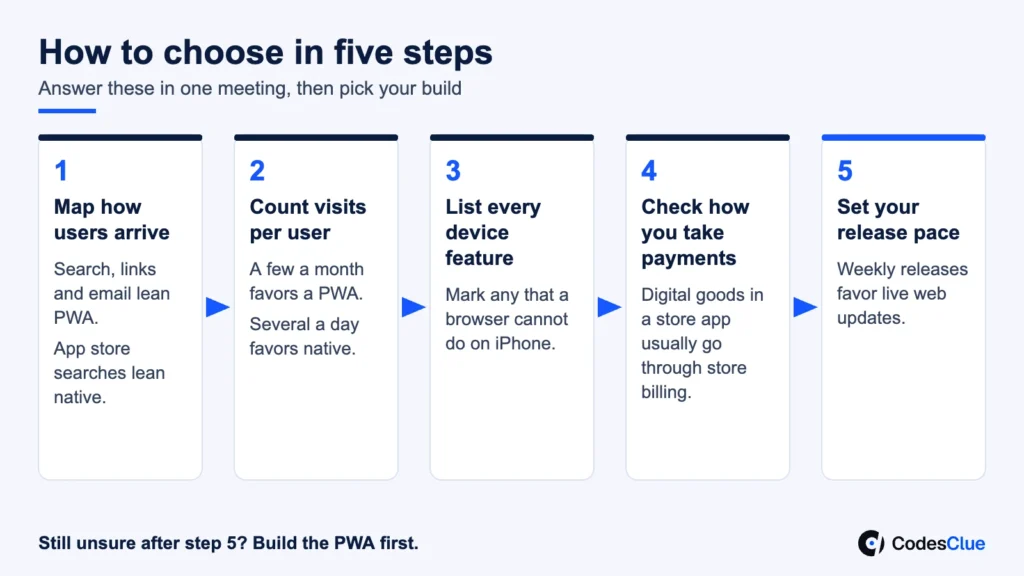
How to decide in five steps
- Map how users arrive. Count how many come from search, links and email versus people who would search an app store.
- Count visits per user. A few visits a month favors a PWA. Several sessions a day favors native.
- List every device feature. Write down camera, location, Bluetooth, background tasks, files and payments. Mark any that a browser cannot do on iPhone.
- Check how you take payments. Physical goods and services can use your own checkout in either option. Digital goods sold inside a store app usually go through store billing and its commission.
- Set your release pace. If you ship changes every week, live web updates save real time.
Still unsure after step 5? Build the PWA first. It becomes your web app, your search entry point and your test bed for the native version later. If your own team is short on web skills, you can hire PWA developers for that first version.
PWA vs native app cost
Cost depends on screens, integrations and how many platforms you ship. As a rule, one PWA codebase costs less to build and maintain than two native apps with the same features. These are our project ranges:
| Scope | Typical build | Typical range |
|---|---|---|
| MVP | A PWA or one Flutter or React Native codebase with core flows, login, admin and one or two integrations | $8K to $25K |
| Growth product | PWA plus web admin, or native iOS and Android with push, payments and analytics | $25K to $70K |
| Complex platform | Native apps, PWA and web together, offline sync, hardware and compliance | From $70K |
Native apps also carry store costs: Apple charges 99 USD per membership year (opens in a new tab) and Google Play a US$25 one-time fee (opens in a new tab). For a full breakdown, see our mobile app development cost guide.
Want a second opinion on your feature list? Send it to us and our team will mark which items a PWA can handle on iPhone and Android.
Readiness checklist
- You know where most users will first meet the product
- You have listed every device feature and checked it on iPhone and Android
- You have a plan to show iPhone users how to install
- Your payment model fits the store rules, or you skip the stores
- You have chosen how often you will ship updates
- Your web pages and screens are fast on a mid-range phone
Common mistakes to avoid
- Choosing native because “real companies have apps,” with no feature that needs it
- Counting on iPhone push without an install step in the design
- Wrapping a website for the App Store and hoping review lets it through
- Building two native apps before testing the idea with a PWA or a single codebase
- Skipping offline design, then losing form data on a weak signal
When neither option is right yet
Sometimes the best first step is not an app at all. If you are still testing demand, a fast mobile website with a good form may answer the question for far less. Come back to the PWA vs native app choice once you know people will use the product more than once.
Plan your app with CodesClue
The PWA vs native app choice gets easy once you map how users arrive, what the phone must do and how often you ship. Our engineers in Ahmedabad build PWAs, native apps and Flutter or React Native apps. Teams in the USA, Europe and India work with us through our offices in all three regions. We use AI-assisted delivery to take each one from first prototype to MVP to production.
Tell us three things: the one task users must finish in your app, the device features you need and your launch date. We reply within one business day with a recommended approach and a first estimate. See our progressive web app development services, our mobile app development services, or contact us to start.
FAQs
Can we turn our existing website into a PWA?
Often, yes. If the site is already fast and works well on phones, we add a web manifest, a service worker and an offline plan for key screens. Older sites built around heavy page reloads may need their main flows rebuilt first. A short audit of speed, login and checkout tells you which path fits.
Is a PWA secure enough for payments or patient data?
A PWA must run over HTTPS, and its security depends mostly on the server, the login and how you store data. That is the same work a native app needs. For card payments, use a provider’s hosted checkout. For health data, the backend still has to meet HIPAA rules whatever the front end is.
Does a PWA help or hurt our Google rankings?
It can help, because each screen is a normal web page that Google can crawl. The catch is speed and rendering. If content only appears after heavy JavaScript runs, rankings can suffer. Server rendering or pre-rendering for public pages, plus clean URLs for every screen, keeps the SEO benefit.
If we start with a PWA, can we add native apps later without losing users?
Yes. Keep your business logic and data behind an API from day one, so a later native app reuses the same backend. Users keep one account across both. Many teams keep the PWA for first visits and search traffic, then invite frequent users to install the native app for richer features.
Do PWAs work on desktop computers too?
Yes. Chrome and Edge on Windows, macOS and ChromeOS let users install a PWA so it opens in its own window, with an icon in the taskbar or dock. That makes a PWA a good fit for portals and internal tools that staff use on both laptops and phones.