Legacy Software Modernization: 7 Approaches, Risks and Cost
Legacy software modernization explained: rehost, refactor, rebuild, replace or retain. Compare the 7 approaches, a phased plan, risks and real cost ranges.
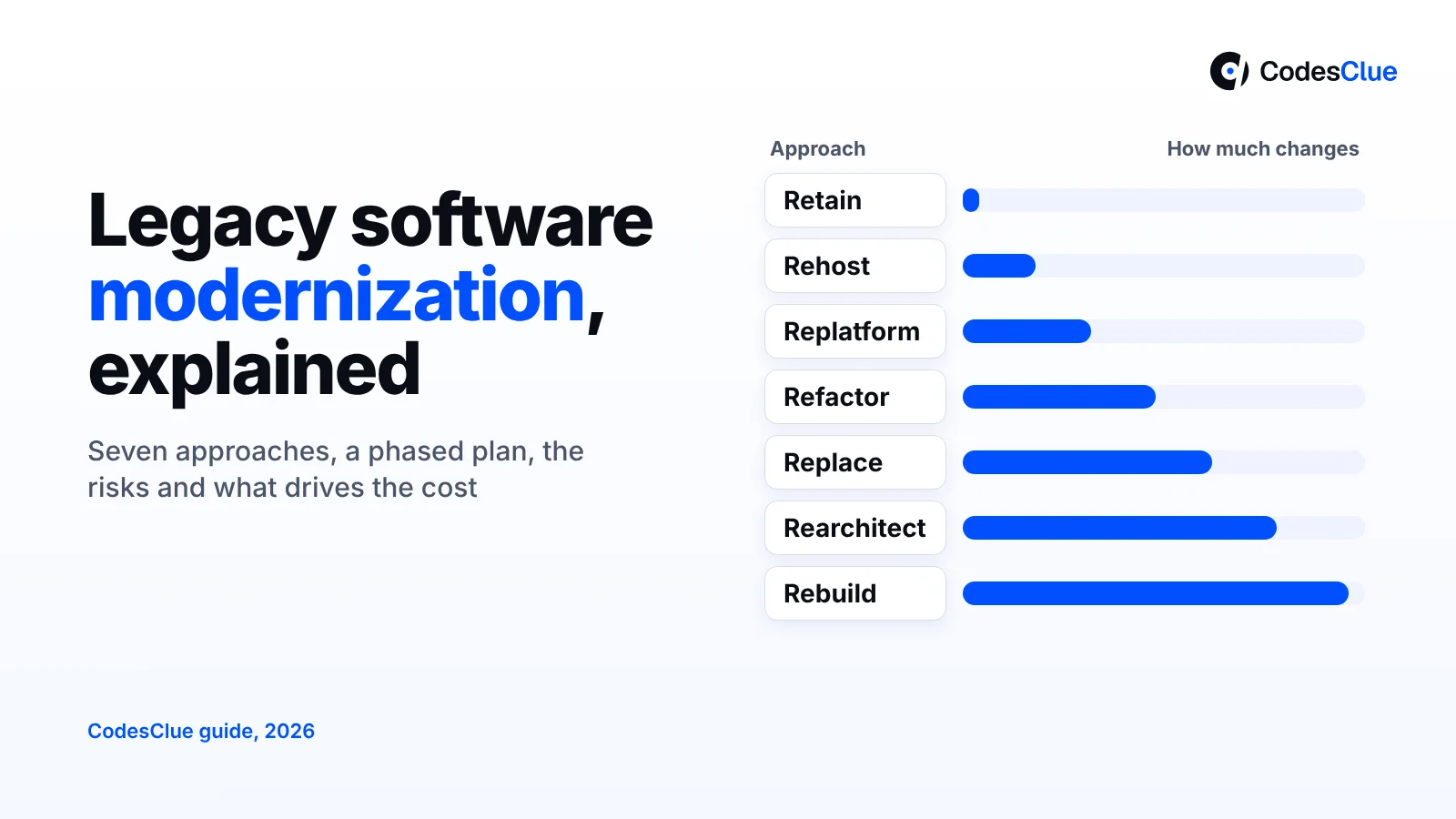
Your core system still runs the business, but every change takes weeks. The one developer who understands it wants to leave. One vendor quotes a full rewrite, another says move it to the cloud. This legacy software modernization guide explains the seven approaches, how to choose, a phased plan, the risks and the cost.
Key takeaways
- You have seven options, from leaving the system alone (retain) to buying a product that replaces it (replace). A full rebuild is only one of them.
- Pick the approach per part of the system, not for the whole thing. Most projects mix two or three.
- Start with a short assessment. It costs little and stops you from paying for the wrong approach.
- Move in small phases, keep the old system running and switch users over piece by piece.
- Cost depends on code size, data, integrations and how much nobody knows about the system. A scoped phase often costs $8K to $25K.
What is legacy software modernization?
Legacy software modernization means updating an old system the business still depends on, so it is safer, easier to change and less costly to run. It can mean moving it to new servers, cleaning up the code, splitting it up, rebuilding it or swapping it for a product.
“Legacy” is about importance, not age. A five-year-old app can count if nobody dares to touch it. A twenty-year-old system can be fine if it is stable, secure and rarely needs new features.
The problem is common. The US Government Accountability Office says federal agencies spend about 80 percent of IT budgets on running existing systems. Its July 2025 report on critical legacy systems (opens in a new tab) found 11 key systems aged 23 to 60 years. Only 3 had a complete plan.
Signs it is time to modernize legacy software
You rarely need a big study to know. Tick the lines that sound like your system:
- A small change takes weeks because nobody can predict what it will break.
- One or two people hold all the knowledge, and there is little written down.
- The language, framework or database is out of vendor support, so no more security patches.
- Hosting or licence fees keep rising while usage stays flat.
- New tools, such as a CRM, payment provider or AI feature, cannot connect without manual exports.
- Outages or slow pages show up every month at busy times.
- Hiring for the old stack is slow, and candidates turn the job down.
Three or more ticks is a good reason to run an assessment. One tick may only need a fix.
The 7 approaches to legacy system modernization
Most guides use a list of “Rs”. The cloud providers keep similar lists: AWS names seven migration strategies (opens in a new tab), including retire and relocate. Here is the version most useful for an old business system.
Rehost
You move the system to new servers or the cloud as it is. It is fast and lowers hardware risk, but fixes none of the code problems.
Replatform
You move the system and change a few parts on the way. A common case: you swap a self-run database for a managed one, or put the app in containers.
Refactor
You clean up the code without changing what it does for users. Think smaller modules, tests and updated libraries. It suits systems that work but feel fragile.
Rearchitect
You change how the system fits together. For example, you split one large app into separate services, or add an API layer so other tools can connect. AWS calls this the most complex and costly of its migration strategies.
Rebuild
You write the system again on a modern stack and keep the business rules. It gives the cleanest result. It also carries the most risk, because hidden rules in the old code are easy to miss.
Replace
You retire the custom system and move to a product, often a SaaS tool. This works when your process is standard, such as billing, HR or ticketing. You trade control for less upkeep.
Retain
You keep the system as it is, on purpose, and review it later. It is a fair choice for a stable tool with few users, or when other systems must move first.
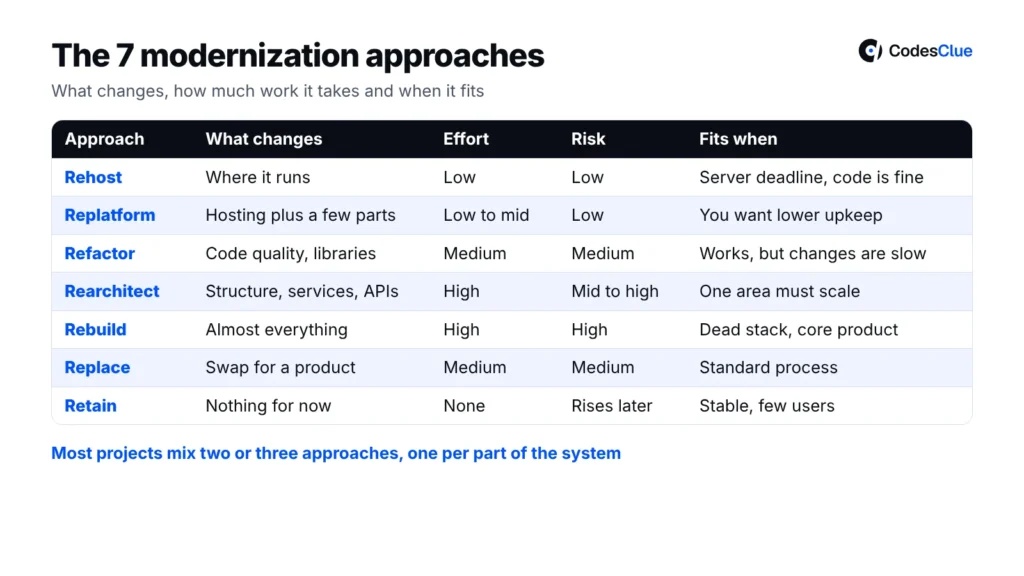
Comparison table: which approach changes what
| Approach | What changes | Effort | Risk | When it fits |
|---|---|---|---|---|
| Rehost | Where it runs | Low | Low | Hardware or data centre deadline, code is fine |
| Replatform | Where it runs plus a few parts (database, containers) | Low to medium | Low, some testing | You want lower upkeep without touching business logic |
| Refactor | Code quality, libraries, framework version | Medium | Medium | Works well, but every change is slow and scary |
| Rearchitect | Structure: services, APIs, data flow | High | Medium to high | One part needs to scale or change much faster than the rest |
| Rebuild | Almost everything except the business rules | High | High | Stack is dead and the system is core to what you sell |
| Replace | The whole tool, swapped for a product | Medium | Medium | Standard process that a good product already covers |
| Retain | Nothing for now | None | Low today, rising later | Stable, low use, or waiting on other moves |
Pro tip: Score each part of the system on two things: how much the business values it and how bad the code is. High value with bad code is where you refactor or rebuild. Low value is where you retain or replace.
Which legacy modernization strategy fits you?
Find the situation that sounds like yours. Treat the answer as a starting point, not a verdict.
- Your server contract ends in six months and the app works fine: rehost now, then refactor later.
- Hosting and licence bills hurt, but the code is stable: replatform to managed services.
- The app works, but each release breaks something: refactor in small steps behind tests.
- One area, such as orders or search, cannot keep up: rearchitect that area only and leave the rest.
- The framework has no support and the product is your main revenue: rebuild in phases, module by module.
- The system does what any good billing or HR tool does: replace it with a product.
- Few users, no security gaps and no new features planned: retain it and review in a year.
Most real projects mix these. For a worked example of one framework moving step by step, see our AngularJS to Angular migration guide. If the real issue is growth, our post on how to scale your existing product may fit better.
A phased modernization plan, step by step
Big-bang switches fail because everything changes on one day. A phased plan lets you test each piece while the old system keeps working.
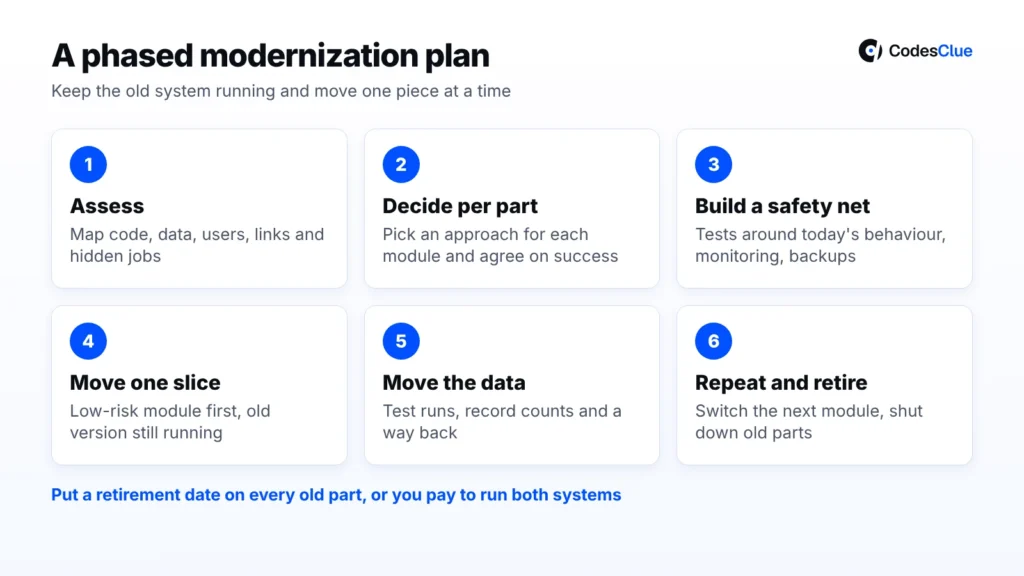
- Assess (2 to 4 weeks). Map the code, data, users, integrations and hidden jobs, such as nightly scripts. Write down rules people only know by heart.
- Decide per part. Pick an approach for each module using the table above. Agree what success means: faster releases, lower bills or fewer incidents.
- Build a safety net. Add automated tests around today’s behaviour, plus monitoring and backups. You now know if a change breaks something.
- Move one slice first. Choose a module with real users but low risk. Route its traffic to the new version while the old one still runs. Teams often call this the strangler pattern.
- Move the data with care. Run test migrations, compare record counts and keep a way back. Our data migration team treats this as its own step, not an afterthought.
- Repeat, then retire the old parts. Switch the next module when the last one is stable. Shut down each old piece once nothing calls it.
Pro tip: Put a date on retiring each old part. Without one, teams end up paying to run both systems for years.
Not sure which approach fits your system? Tell us what you run today, and we will suggest a first phase and a rough range.
What drives the cost
How much is unknown matters more than code size. These drivers move the price most:
- Missing knowledge. No docs, no tests and no original developers mean more time spent reading code.
- Data. Large, messy or duplicated data needs cleaning, mapping and several test runs.
- Integrations. Every link to an ERP, payment provider or partner API needs testing on both sides.
- Approach. Rehost and replatform cost far less than rearchitect or rebuild.
- Compliance. HIPAA, GDPR or SOC 2 adds security reviews and audit logs.
- Running both systems. You pay for old and new side by side until you finish the switch.
At CodesClue we price modernization by scoped phase, not as one large number. As a rough guide, an assessment plus one module often lands at $8K to $25K. A mid-size phase, such as rearchitecting a core area with its data, sits around $25K to $70K. Large rebuilds of a core platform start from $70K.
Your quote depends on the drivers above. Our legacy modernization services page shows how we run these phases.
Risks and how to keep them small
Every approach carries risk, but most of it is predictable.
- Lost business rules. Old code often holds rules nobody wrote down. Control: interview users and compare old and new outputs on real data.
- Data loss or mismatch. Control: test migrations, record counts and a rollback plan for every move.
- Scope creep. “While we are at it” requests double the timeline. Control: modernize first, add features after.
- Downtime. Control: switch users in stages and plan cutovers for quiet hours.
- Two systems for too long. Control: a retirement date for each old part.
Moving to the cloud adds its own choices on regions, costs and security. Our cloud consulting and migration work starts there, and application migration covers the move itself.
What we see in real projects
Many “legacy systems” are not old code at all. They are spreadsheets, paper and copy-paste between tools. Two of our projects show this kind of replace.
For Invoice Minds, we built a web platform to replace manual, fragmented billing with one automated system. Invoices, customers and payments sit in one dashboard.
For ArcelorMittal’s UAE site, gate staff used a paper register or spreadsheet to log vendors and visitors. We built a Flutter app with a Node.js API that scans an Emirates ID and records each check-in and check-out.
Now a clearly labelled hypothetical. A logistics firm runs a 12-year-old PHP order system. A full rewrite would freeze new features for a year. A better path: replatform, add tests, then rebuild only the pricing module, which changes monthly. The rest stays put.
Pro tip: Ask your team which screen they avoid changing. That module is usually where the first phase pays back fastest.
When not to rebuild: honest limits
A rebuild sounds clean, but it is often the wrong call. We would retain or replace instead when:
- The system is stable, secure and needs few changes.
- A mature product already does 90 percent of the job. Our post on custom software vs off-the-shelf helps with that call.
- Nobody can explain what the old system does. Assess and document first, or the rebuild will copy the gaps.
Modernization will not fix a broken process either. If people work around the system today, fix the process first.
Common mistakes to avoid
- Choosing one approach for everything. Different parts need different answers.
- Skipping the assessment. A few weeks of mapping saves months of surprises.
- Treating data as a weekend task. Data issues cause more delays than code.
- No tests before changes. Without them, you cannot prove the new system behaves the same.
Need extra hands for an old .NET stack? You can hire .NET Core developers from us, and development starts within 48 hours. For a full program, see our application modernization services.
FAQs
How long does legacy software modernization take?
It depends on the approach and size. Smaller modernization projects, such as a rehost or one module, typically take 3 to 10 weeks. A full platform rebuild runs for several months, delivered in phases. The assessment, usually 2 to 4 weeks, gives you a real timeline for your own system instead of a guess.
What is the difference between rehosting and replatforming?
Rehosting moves the system to new servers or the cloud with no code changes. Replatforming moves it and changes a few parts on the way, such as a managed database or containers. Rehost is faster and needs less testing. Replatform takes longer but lowers running effort, since the provider handles more upkeep.
Is it better to refactor or rebuild a legacy application?
Refactor when the system mostly works and the business rules are sound, but the code is hard to change. Rebuild when the stack has lost vendor support and the system is core to your revenue. Even then, rebuild one module at a time. A full rewrite in one go carries the highest risk of missed rules.
Can we modernize without stopping the business?
Yes, in most cases. Keep the old system running and move one module at a time. Route users to the new part once it passes tests. Plan cutovers for quiet hours and keep a rollback plan for each step. You may still need a short planned window for the final data switch.
Should every legacy system move to the cloud?
No. Some systems run better on premises or in a hybrid setup. Data may have to stay in one country, or the system may depend on special hardware. AWS lists retain as a valid strategy for such cases. Decide on cost, security and how often the system changes, not on a general push.
What does a modernization assessment include?
A good assessment maps the code, data, integrations, users and hidden jobs such as scheduled scripts. It rates the risk and value of each part and suggests an approach per module. You get a phased plan with rough costs and timelines, plus a list of unknowns, such as missing source code.
Plan your legacy software modernization
Good legacy software modernization starts small: an assessment, one module and a date to retire the old part. Want a second opinion on your system? Book a free call with our team, and we will suggest a first phase with a rough range.